We research products independently from specs, manufacturer documentation, warranty terms and owner feedback. When you buy through links on this page, we may earn a commission at no extra cost to you. As an Amazon Associate we earn from qualifying purchases.
Quick answer
Most US homes are best served by a robot vacuum with LiDAR mapping and a self-emptying dock, which today costs about $300–$800. Spend more only for specific problems: mopping lots of hard floor, pets that leave messes, cords on the floor, or thresholds a normal robot cannot climb. Skip basic random-bump robots unless your budget is under $200 and your floor plan is a single open room. Our top value pick is the Roborock Qrevo S.
This robot vacuum buying guide is the full decision framework: what each feature actually does, which ones are worth paying for in your home, and which ones are marketing. The best robot vacuum buying guide starts with your home rather than the spec sheet, so that is how this one is organized. Our verdicts come from specs, manufacturer documentation, warranty terms, independent review consensus and owner-feedback patterns. If you only want the quick version, read the decision rules in the next section and jump to the picks. If you are spending real money, read it all, because the expensive mistakes in this category come from buying features you do not need and missing the one you do.
Start here: six decision rules
Answer these questions about your home before comparing models.
- Mostly carpet, no mopping needed? Buy a vacuum-only robot or a combo with a cheap dock. A mop-washing dock adds hundreds of dollars you will not use.
- Mostly hard floors? A mopping robot with a dock that washes and dries the pads is the single biggest upgrade, because dirty mop pads are the chore people hate most.
- Pets, especially a puppy or a sick older dog? Prioritize front-facing obstacle avoidance that recognizes pet waste. This is the feature that prevents the one disaster everyone has heard about.
- Cords, socks and kids’ toys on the floor? Same answer: better obstacle avoidance, or plan to tidy before every run.
- Thick door saddles, sunken rooms or tall rug edges? Look at premium models that can lift themselves over higher thresholds.
- Small apartment? Dock size and noise matter more than raw power. Our small apartment robot vacuum guide covers that case in detail.
If none of these apply and this is your first robot, our beginner's guide to choosing a first robot vacuum keeps things simpler than this page.
The robot vacuum buying guide to features that matter
This is the core of how to choose the best robot vacuum: six features decide almost everything about daily experience. Here is what each one does and when it earns its price.
1. Navigation: LiDAR, camera or random
LiDAR robots have a small spinning laser turret on top. They build an accurate floor map on the first run, clean in neat rows, work in the dark and let you set no-go zones and room-by-room schedules in the app. This is the default choice for most homes.
Camera (vSLAM) robots navigate using a camera and visual landmarks. They work well, but can struggle in very dark rooms.
Random or gyro navigation robots bump around until the battery runs low. They have no real map, no room selection and no no-go zones beyond physical barrier strips. They are cheap and simple, but in a multi-room home they miss spots and waste battery.
Decision rule: if your home has more than two rooms, buy mapped navigation.
2. Docks: none, self-empty, or all-in-one
A basic charging dock just recharges the robot. You empty a small bin after most runs.
A self-empty dock sucks debris out of the robot into a bag or bin in the base. That base typically holds weeks of debris, so you stop thinking about the bin. For pet owners this is the feature that makes a robot feel automatic. Bagless bases save on bags; bagged bases are cleaner to empty.
An all-in-one dock (also called an omni or ultra station) adds clean and dirty water tanks, washes the mop pads, often dries them with warm air, and in some cases refills detergent. Some can be plumbed into a water line, which is useful but not essential.
Shop robot vacuums with a self-empty base if you want the biggest jump in convenience per dollar.
3. Mopping: what actually works
Robot mopping ranges from a damp cloth dragged behind the robot to spinning pads and roller mops that press down and rinse as they go. For daily maintenance of sealed hard floors, spinning pads and rollers are both good. None of them replace a deep scrub of sticky spills or grout.
The make-or-break detail is carpet handling. Look for a robot that lifts its mop when it detects carpet, or one that can leave the pads at the dock while vacuuming rugs. Without that, you have to set no-mop zones around every rug or risk damp carpet.
If your home is mostly tile, vinyl or sealed wood, consider shopping robot vacuum and mop combos with a mop-washing dock as your starting category rather than vacuum-only models.
4. Obstacle avoidance
Every mapped robot avoids walls and furniture. The difference is in small objects: charging cables, shoelaces, socks, pet toys and pet waste. Better systems use a front camera or structured light plus on-device object recognition to steer around these items.
This is not perfect on any model. Review consensus is that premium systems avoid most common clutter most of the time, while budget robots will eat cables and drag socks into their brushes. If you have a pet that has accidents, this is the one feature worth paying for even if you skip everything else.
5. Suction numbers (and why Pa misleads)
Manufacturers advertise suction in pascals (Pa), and the numbers keep climbing. Those figures are measured differently by each brand and are not comparable across brands. Brush design, airflow path, how well the robot seals against the floor, and whether it boosts power on carpet matter more than the headline number.
Decision rule: ignore Pa when comparing brands. If you have thick carpet, look for automatic carpet boost and a rubber or tangle-resistant main brush, and check what owners with similar floors say.
6. Thresholds, rugs and multiple floors
Most robots climb thresholds of about 2 cm (roughly three-quarters of an inch). Taller door saddles, transition strips in older homes and thick rug edges can stop them. Some premium models can lift themselves or “step” over higher obstacles.
For multi-level homes, look for multi-floor map saving so you can carry the robot upstairs and it recognizes where it is. You will still need a dock on the main floor, and the robot cannot climb stairs, so plan to carry it or buy a second unit.
How much to spend in 2026
This chart shows the typical starting price of a representative model in each tier. Always check the current price.
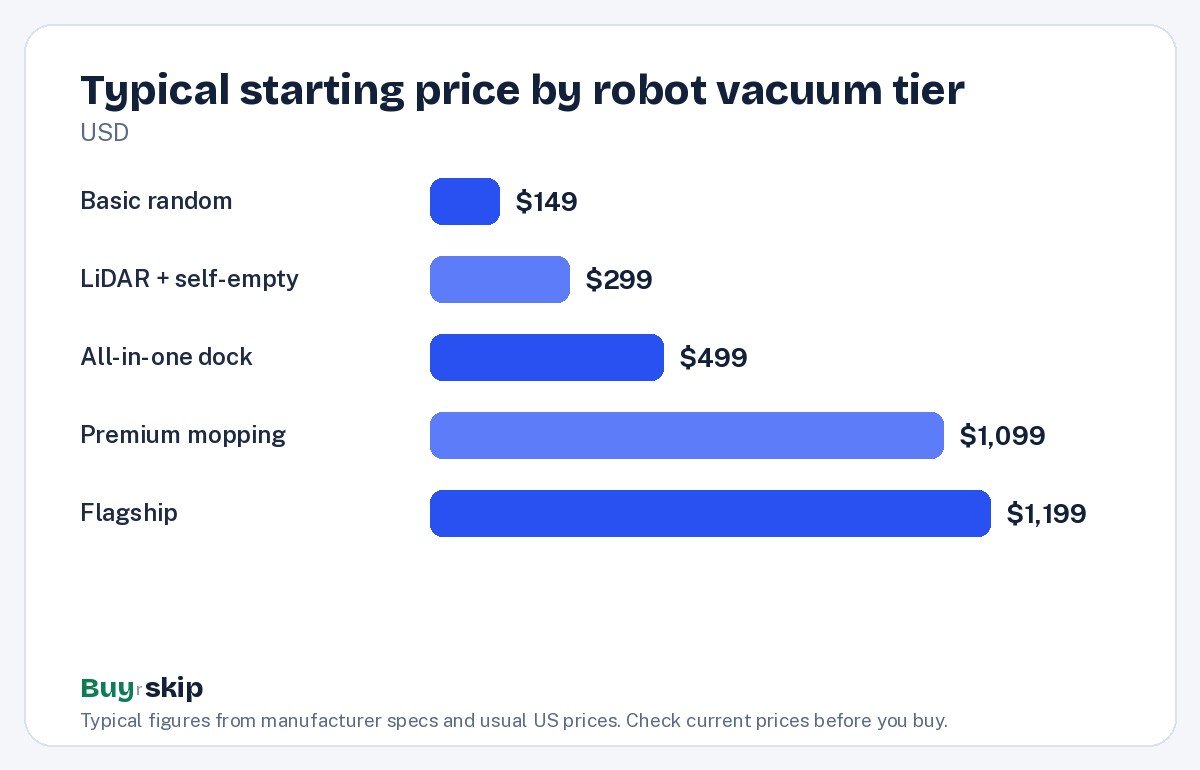
In short: about $300–$450 buys mapping and auto-empty, about $400–$800 adds a mop-washing dock, and about $1,100 and up buys better obstacle avoidance, threshold climbing and slimmer bodies. Above about $2,000 you are paying for novelties like robotic arms.
Robot vacuum comparison table
Use this comparison to choose a robot vacuum based on what you actually need. Prices are typical ranges; check the current price before buying.
| Model | Typical price | Best for | Dock | Key strength | Our verdict |
|---|---|---|---|---|---|
| Roborock Qrevo S Robot Vacuum and Mop | about $499–$799 | Most homes | Self-empty, washes and dries pads | Value all-in-one with LiDAR | Buy |
| Shark AV2501S AI Ultra Robot Vacuum | about $299–$449 | Pet hair on a budget | Bagless self-empty | LiDAR at a low price | Buy |
| eufy Robot Vacuum Omni C20 | about $399–$599 | Small homes | Compact all-in-one | Slim body, small station | Buy |
| Ecovacs Deebot X8 Pro Omni | about $1,099–$1,499 | Mostly hard floors | All-in-one | Self-rinsing roller mop, edges | Buy |
| iRobot Roomba Combo j9+ | about $899–$1,399 | Pets and clutter | Auto-empty | Avoids cords and pet waste | Consider |
| Dreame X50 Ultra Complete | about $1,299–$1,799 | Thresholds and multi-level | All-in-one | Steps over small thresholds | Buy |
| Roborock S8 MaxV Ultra | about $1,199–$1,799 | Hands-off premium | All-in-one | Strong obstacle avoidance | Buy |
| eufy RoboVac 11S | about $149–$249 | Tight budgets, one room | Charging only | Slim and quiet | Consider |
| iRobot Roomba 694 | about $199–$274 | Nobody in 2026 | Charging only | Simple | Skip |
Our picks by home type
Each pick is matched to a kind of home rather than ranked by price.
Best overall value Our verdict: Buy
Roborock Qrevo S Robot Vacuum and Mop
Typical price: $499–$799
Most homes with a mix of carpet and hard floors that want a hands-off dock without flagship pricing.
- Pros
- ✓ LiDAR mapping with room-by-room control
- ✓ dock self-empties and washes and dries the mop pads
- ✓ strong value for an all-in-one
- Cons
- ✕ obstacle avoidance is basic compared with premium models
- ✕ dock takes real floor space
Check price on Amazon Paid link
The Roborock Qrevo S is the robot we would point most households toward. It covers the two chores people most want automated, emptying the bin and cleaning the mop, at a price that used to buy a vacuum-only robot. Its main limitation is small-object avoidance, so pick up cords before runs.
Best budget Our verdict: Buy
Shark AV2501S AI Ultra Robot Vacuum
Typical price: $299–$449
Vacuum-first homes, especially with shedding pets, that want mapping and a self-empty base for the least money.
- Pros
- ✓ LiDAR mapping at a budget price
- ✓ bagless self-empty base
- ✓ good on pet hair
- Cons
- ✕ no mop-washing
- ✕ bagless base can be dusty to empty
Check price on Amazon Paid link
If you do not need mopping, the Shark AV2501S AI Ultra Robot Vacuum gets you the two features that matter most, mapping and auto-empty, for about $299–$449.
Best for hard floors Our verdict: Buy
Ecovacs Deebot X8 Pro Omni
Typical price: $1,099–$1,499
Homes that are mostly tile, vinyl or sealed wood and want mopping that keeps up with daily dirt.
- Pros
- ✓ roller mop rinses itself while cleaning
- ✓ strong edge cleaning
- ✓ full all-in-one dock
- Cons
- ✕ priced well above mid-range all-in-ones
- ✕ overkill for carpet-heavy homes
Check price on Amazon Paid link
Best for pets Our verdict: Consider
iRobot Roomba Combo j9+
Typical price: $899–$1,399
Pet owners worried about cords and accidents who value avoidance over mopping performance.
- Pros
- ✓ designed to avoid cords and pet waste
- ✓ auto-empty base
- ✓ mop lifts onto the top of the robot on carpet
- Cons
- ✕ expensive for what it includes
- ✕ mopping is lighter duty than roller or spinning-pad rivals
Check price on Amazon Paid link
Best for thresholds Our verdict: Buy
Dreame X50 Ultra Complete
Typical price: $1,299–$1,799
Older homes with tall door saddles, sunken rooms or several floors where ordinary robots get stuck.
- Pros
- ✓ can step over small thresholds
- ✓ full self-cleaning dock
- ✓ premium mopping
- Cons
- ✕ high price
- ✕ large dock
Check price on Amazon Paid link
Best slim premium Our verdict: Consider
Roborock Saros 10R
Typical price: $1,199–$1,599
People who want top-tier obstacle avoidance and a body that fits under low furniture.
- Pros
- ✓ ultra-slim body
- ✓ top-tier obstacle avoidance
- ✓ full self-cleaning dock
- Cons
- ✕ premium price
- ✕ most homes do not need its extras
Check price on Amazon Paid link
A note on the previous flagship: the Roborock S8 MaxV Ultra is often discounted and still offers a hands-off dock and strong obstacle avoidance. If you find it near the price of a newer mid-range model, it is a smart buy. The Roborock Saros Z70, with its robotic arm that picks up small items like socks, is a fun novelty at about $1,999–$2,599, but it is not worth buying for most people over a flagship without the arm.
What pros and reviewers look for
People who clean homes for a living and experienced reviewers tend to judge robot vacuums on reliability first and peak performance second. When you think about how to choose among top rated robot vacuums, it helps to borrow their priorities:
- Consistent coverage: does the robot finish the whole floor plan without getting stuck or needing rescue? Owner reviews mentioning “stuck” are a stronger signal than any spec.
- Edges and corners: round robots miss corners. Extending side brushes or mops help, and review consensus consistently credits models that reach edges well.
- Hair tangles: rubber or anti-tangle brushes save you from cutting hair off a bristle roll every week.
- Maintenance burden: how often you touch the robot, the dock and the mop. The best robots are the ones you forget about.
- Parts and support: whether filters, brushes, batteries and bags are easy to buy for years.
Review consensus agrees that LiDAR is reliable across major brands and that obstacle avoidance still separates premium from mid-range. If you want a recommended-by-pros approach to how to choose a robot vacuum, it is this: buy reliable navigation and a good dock before you buy extra suction.
Hidden costs and practical details
The sticker price is not the full cost. Budget for these before you decide which robot vacuum is worth buying.
Consumables
Side brushes and filters are consumables, typically replaced every few months. Bags and mop pads wear out too. If you want to stock up, shop replacement brushes and filters for your exact model.
Battery life over time
Robot batteries degrade over years like any lithium battery. A robot that comfortably finishes your home today may need to recharge and resume in a few years. Check whether the manufacturer sells replacement batteries and how hard the swap is. Durability and repairability get their own deep dive in our guide to the most durable robot vacuums.
Apps, cameras and privacy
Nearly every mapped robot uses an app and your Wi-Fi. Robots with front cameras for obstacle recognition raise a fair question: do images ever leave the device? Look in the privacy documentation for whether image processing is local or cloud-based, whether you can disable photo features, and whether the app requires an account. Some newer models support Matter, which lets them work with Apple Home, Google Home, Alexa and SmartThings more consistently.
Checklist before you buy
Run through this list in your home before you order. It catches most of the problems owners complain about after delivery.
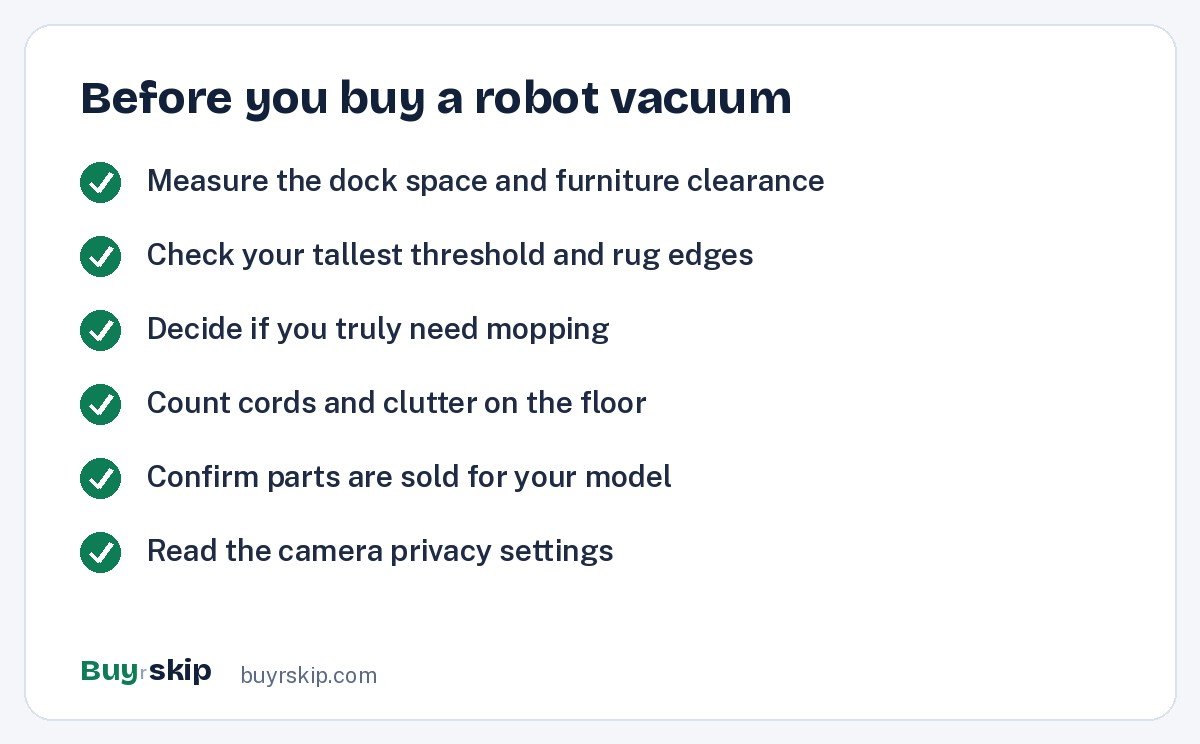
If you are choosing a robot vacuum for home use with stairs, check owner feedback for falls, since very dark carpets can confuse some cliff sensors.
When to skip a robot (or add something else)
A robot vacuum is a maintenance tool. It keeps floors clean between real cleanings. It does not do stairs, cars, upholstery, spills or deep cleaning of thick carpet. Most owners still keep a stick vacuum for those jobs. A good pairing is a mid-range robot plus a cordless stick such as the Shark Stratos Cordless Vacuum or, on a tighter budget, the Levoit LVAC-300 Cordless Vacuum. If you are deciding between the two types rather than buying both, read our robot vacuum vs stick vacuum comparison.
The one model we would actively skip is the iRobot Roomba 694. It has no mapping and no self-empty base, and for similar money the eufy RoboVac 11S is slimmer and quieter, while a little more buys a mapped robot with auto-empty. The broader point of any robot vacuum buying guide applies here: unmapped robots made sense years ago, but better budget buys now exist.
Once you have chosen, follow our robot vacuum setup tips when it arrives.
Frequently asked questions
How do I choose the right robot vacuum for my home?
Start with your floors and your clutter, not the spec sheet. Mostly carpet points to a vacuum-only robot with a self-empty base. Mostly hard floors points to an all-in-one dock that washes mop pads. Pets that have accidents or lots of cords call for strong obstacle avoidance. Tall thresholds call for a premium model that climbs. Then pick the cheapest robot that solves those problems, and check the current price.
Is LiDAR better than a camera for robot vacuums?
For mapping, LiDAR is the more consistent choice. It works in the dark, builds an accurate map quickly and is used by most mid-range and premium robots. Cameras are better at recognizing objects, which is why many premium robots combine LiDAR for navigation with a front camera or structured light for obstacle avoidance. If you only get one, choose LiDAR navigation and keep the floor tidy.
Are self-emptying docks worth it?
For most people, yes. A self-empty base typically holds weeks of debris, so you stop emptying a small bin after almost every run. That is the difference between a robot that cleans daily on its own and one you have to babysit. The exception is a very small home on a tight budget, where a basic robot and a quick bin dump can be fine.
Do suction ratings in Pa matter?
Only loosely. Pa ratings are measured differently by each brand, so they are not comparable across manufacturers. Brush design, airflow and automatic carpet boost often make a bigger difference to real cleaning. Use the number only to compare models within the same brand, and lean on review consensus and owner feedback for how a robot handles carpet and pet hair.
How long do robot vacuums last?
With regular maintenance, a good robot can last several years. Batteries gradually lose capacity, and brushes, filters and mop pads need replacement on a schedule. The models that last longest are from brands that keep selling parts and replacement batteries. Before you buy, check that consumables and a battery are available for your exact model.
The bottom line
For most US homes, the smartest buy is a LiDAR robot with a dock that empties itself and, if you have hard floors, washes the mop. That combination does the boring work without supervision, and it no longer requires flagship money. Spend more only to solve a specific problem: pets, clutter, thresholds or low furniture.
Our pick for most people is the Roborock Qrevo S. Check the current price, measure your dock space, and then let it run.
Check price on Amazon: Roborock Qrevo S Robot Vacuum and Mop
Paid link. Typical price $499–$799; check the current price on Amazon.