We research products independently from specs, manufacturer documentation, warranty terms and owner feedback. When you buy through links on this page, we may earn a commission at no extra cost to you. As an Amazon Associate we earn from qualifying purchases.
Quick answer
For a first robot vacuum, buy one with LiDAR mapping and a self-emptying base, and ignore almost everything else. That combination is the easiest to live with because it cleans in neat rows, knows which room it is in, and empties itself. Expect to spend about $300–$600. The Shark AV2501S AI Ultra is a great low-risk starter for vacuum-only homes, and the eufy Omni C20 adds mopping in a compact package.
Picking a robot vacuum for beginners should not require learning a new vocabulary. Product pages throw around terms like LiDAR, vSLAM, omni stations and 10,000 Pa as if everyone knows what they mean, and that makes a simple purchase feel risky. This guide keeps it simple: what a robot can and cannot do, the three features worth paying for, what you can ignore, and a short list of first robots that are easy to own. Our recommendations are based on specs, manufacturer documentation, warranty terms, independent review consensus and owner-feedback patterns.
First, what a robot vacuum will and will not do
Setting expectations is the best way to love your first robot instead of returning it.
What it does well:
- Picks up everyday dust, crumbs, pet hair and tracked-in dirt on a schedule, usually daily.
- Gets under beds, sofas and cabinets that you rarely reach with a regular vacuum.
- Keeps floors consistently “pretty clean” so big cleaning days become rare.
- If it mops, it keeps sealed hard floors fresh between real mopping.
What it will not do:
- Climb stairs. It cleans one floor at a time.
- Clean furniture, cars, curtains or stair treads.
- Handle wet spills, big messes or sticky stains.
- Deep-clean thick carpet the way a strong upright or stick vacuum can.
So think of a robot as a helper that handles the daily routine, not a replacement for every cleaning tool. Most owners still keep a cordless stick vacuum for the jobs above. If you are still deciding whether a robot is the right type at all, our comparison of robot, stick and upright vacuums walks through that choice.
Robot vacuum for beginners: the only three features you need
If you remember nothing else from this page, remember these three.
1. Mapping (look for “LiDAR”)
A mapping robot learns the layout of your home on its first run and then cleans in tidy, overlapping rows. In the app you see a floor plan, name your rooms, and tell it to clean “kitchen only” or “everywhere except the nursery.” LiDAR is the most common and reliable mapping technology; you can spot it by the small round bump on top of the robot.
Why it matters for a beginner: without mapping, a robot drives around randomly and you never quite know what it missed. Mapping makes the robot predictable, and predictable is what builds trust.
2. A self-emptying base
The robot’s own dust bin is small. Without a self-emptying base, you empty it after most runs. With one, the robot returns to its dock and the dock sucks the dirt into a larger bag or bin that typically holds weeks of debris.
Why it matters for a beginner: the number one reason robots end up in a closet is that they become one more thing to maintain. A self-emptying base removes the most frequent chore.
3. Decent obstacle handling (if your floors are busy)
Every robot avoids walls and furniture. Cheaper ones still bump into small items and will happily swallow a phone charger cable. Better models recognize and steer around cords, socks and pet waste.
Why it matters for a beginner: if you have pets, kids or a lot of cables, this saves you from the classic first-week mishaps. If your floors are already tidy, you can save money here.
Features you can safely ignore on your first robot
Marketing pages make every feature sound essential. For a first robot, these are optional:
- Huge suction numbers. Brands measure suction (in Pa) in different ways, so the numbers are not comparable across brands. A good brush and mapping matter more.
- Robotic arms and novelty extras. Fun to watch, not needed.
- Plumbed water connections. Useful in some homes, but a dock with refillable tanks is fine.
- Voice assistant tricks. Nice, but the app does everything you need.
- Mopping, if you have mostly carpet. A mop you never use just adds cost and maintenance.
The one optional feature that is worth it if you have lots of hard floors: a dock that washes and dries the mop pads. Without it, you will be rinsing smelly pads by hand. If that sounds like your home, browse robot vacuum and mop combos with a self-cleaning dock.
How much should a first robot cost?
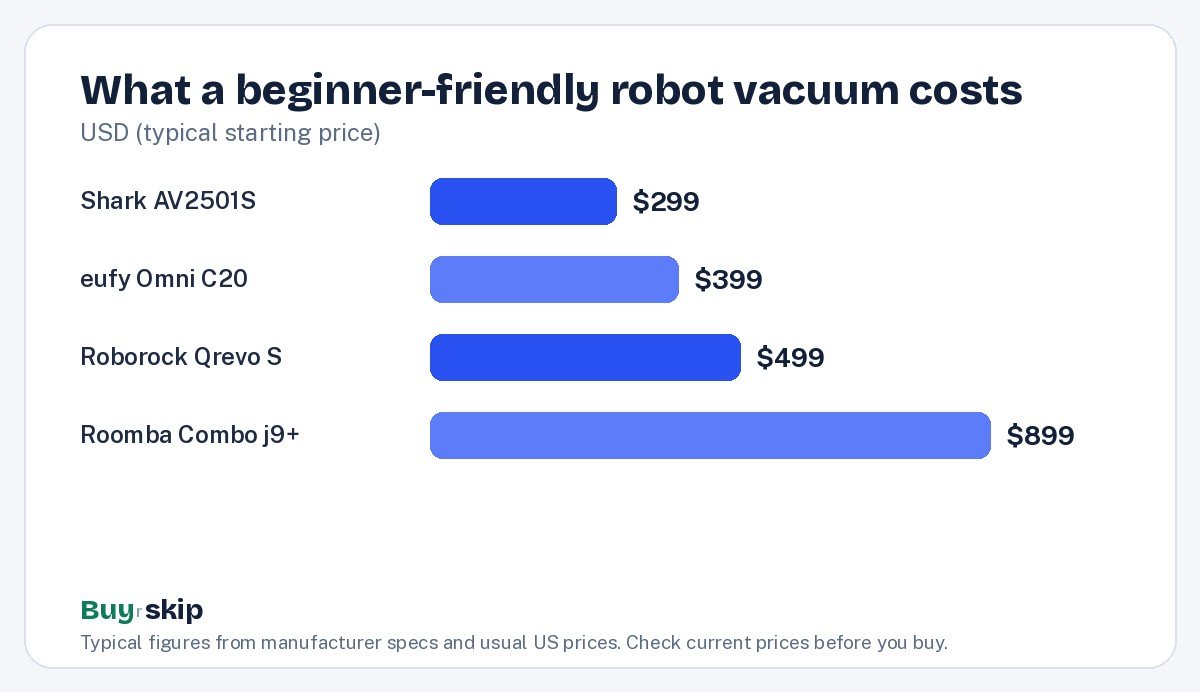
You do not need to spend flagship money on your first robot. The chart below shows the typical starting price of four beginner-friendly picks, from the low end of the ranges we track. Prices move often, so check the current price.
A simple rule for picking a budget:
- About $300–$450: vacuum-only with mapping and a self-empty base. Ideal if you have mostly carpet or rugs.
- About $400–$800: adds a dock that handles the mop. Ideal for mixed floors.
- About $900 and up: stronger obstacle avoidance and premium extras. Worth it mainly for pet owners or very cluttered homes.
Beginner picks at a glance
This table compares the robots we suggest for first-time owners, plus one to skip. All prices are typical ranges; check the current price before you buy.
| Robot | Typical price | Mapping | Empties itself | Mops | Easiest for |
|---|---|---|---|---|---|
| Shark AV2501S AI Ultra Robot Vacuum | about $299–$449 | Yes (LiDAR) | Yes, bagless | No | Carpet, pet hair |
| eufy Robot Vacuum Omni C20 | about $399–$599 | Yes | Yes | Yes | Small homes, mixed floors |
| Roborock Qrevo S Robot Vacuum and Mop | about $499–$799 | Yes (LiDAR) | Yes | Yes, dock washes pads | Most homes |
| iRobot Roomba Combo j9+ | about $899–$1,399 | Yes | Yes | Yes, mop lifts on carpet | Pets, cords on the floor |
| eufy RoboVac 11S | about $149–$249 | No | No | No | One open room, tiny budget |
| iRobot Roomba 694 | about $199–$274 | No | No | No | Skip |
Our first-robot picks
A good robot vacuum for beginners is easy to set up and forgiving of mistakes, and every pick below meets that bar. We have matched each one to a type of home.
Best first robot Our verdict: Buy
Shark AV2501S AI Ultra Robot Vacuum
Typical price: $299–$449
First-time owners with carpet, rugs or shedding pets who want mapping and auto-empty without spending much.
- Pros
- ✓ LiDAR mapping at a budget price
- ✓ bagless self-empty base means rare emptying
- ✓ good on pet hair
- Cons
- ✕ no mopping
- ✕ emptying a bagless base can release some dust
Check price on Amazon Paid link
The Shark AV2501S is the low-risk starting point. It covers the two features that matter most for beginners and leaves out the ones that add maintenance. If you later decide you want mopping, you will know exactly what you are looking for.
Best compact all-in-one Our verdict: Buy
eufy Robot Vacuum Omni C20
Typical price: $399–$599
Beginners in smaller homes or apartments who want vacuuming and mopping without a huge dock.
- Pros
- ✓ slim body fits under low furniture
- ✓ compact all-in-one station
- ✓ handles both vacuuming and mopping
- Cons
- ✕ smaller dock tanks mean more frequent refills
- ✕ less suited to large homes
Check price on Amazon Paid link
Best for mixed floors Our verdict: Buy
Roborock Qrevo S Robot Vacuum and Mop
Typical price: $499–$799
Beginners with a mix of carpet and hard floors who want the most hands-off routine for the money.
- Pros
- ✓ LiDAR mapping with room-by-room control
- ✓ dock self-empties and washes and dries mop pads
- ✓ strong value
- Cons
- ✕ basic small-object avoidance
- ✕ dock needs floor space
Check price on Amazon Paid link
If you have both carpet and hard floors, the Roborock Qrevo S is the robot that most often makes new owners say they wish they had bought one sooner. The dock cleans the mop for you, which is the chore that sours people on cheaper mopping robots.
Best for worried pet owners Our verdict: Consider
iRobot Roomba Combo j9+
Typical price: $899–$1,399
First-time buyers with pets or lots of cords who want the robot to avoid messes on its own.
- Pros
- ✓ built to avoid cords and pet waste
- ✓ auto-empty base
- ✓ mop lifts onto the top on carpet
- Cons
- ✕ high price for a first robot
- ✕ mopping is lighter duty than rivals
Check price on Amazon Paid link
Skip it Our verdict: Skip
iRobot Roomba 694
Typical price: $199–$274
Nobody buying their first robot in 2026; better budget options exist.
- Pros
- ✓ simple to use
- ✓ familiar brand
- Cons
- ✕ no mapping, so cleaning is random
- ✕ no self-empty base
Check price on Amazon Paid link
Why skip the iRobot Roomba 694? Without mapping or auto-empty, it misses the two features that make robots pleasant for beginners. If your budget truly tops out under $250, the eufy RoboVac 11S is slimmer and quieter for similar money, and it works fine in a single open room. Otherwise, stretching to a mapped robot with a self-empty base is the better first purchase.
How to choose a robot vacuum as a beginner: five quick questions
Answer these in order and you will land on the right type of robot.
- Is your home mostly carpet or mostly hard floor? Mostly carpet: skip mopping and look at mapped robot vacuums with a self-empty base. Mostly hard floor: get a dock that washes the mop.
- Do you have pets? Shedding pets: a self-empty base is a must. A pet prone to accidents: pay for better obstacle avoidance.
- How tidy are your floors? Lots of cords, socks or toys: better obstacle avoidance or a pre-run tidy habit.
- How big is your home? A small apartment benefits from a compact dock. Our guide to robot vacuums for small apartments covers space and noise.
- What is your ceiling on price? Pick the cheapest robot that answers the first four questions.
If you want the full detail behind each choice, including navigation types, threshold heights and consumable costs, our complete robot vacuum buying guide goes deeper. Think of this page as the beginner’s buying guide for a robot vacuum and that page as the reference manual.
Your first week with a robot
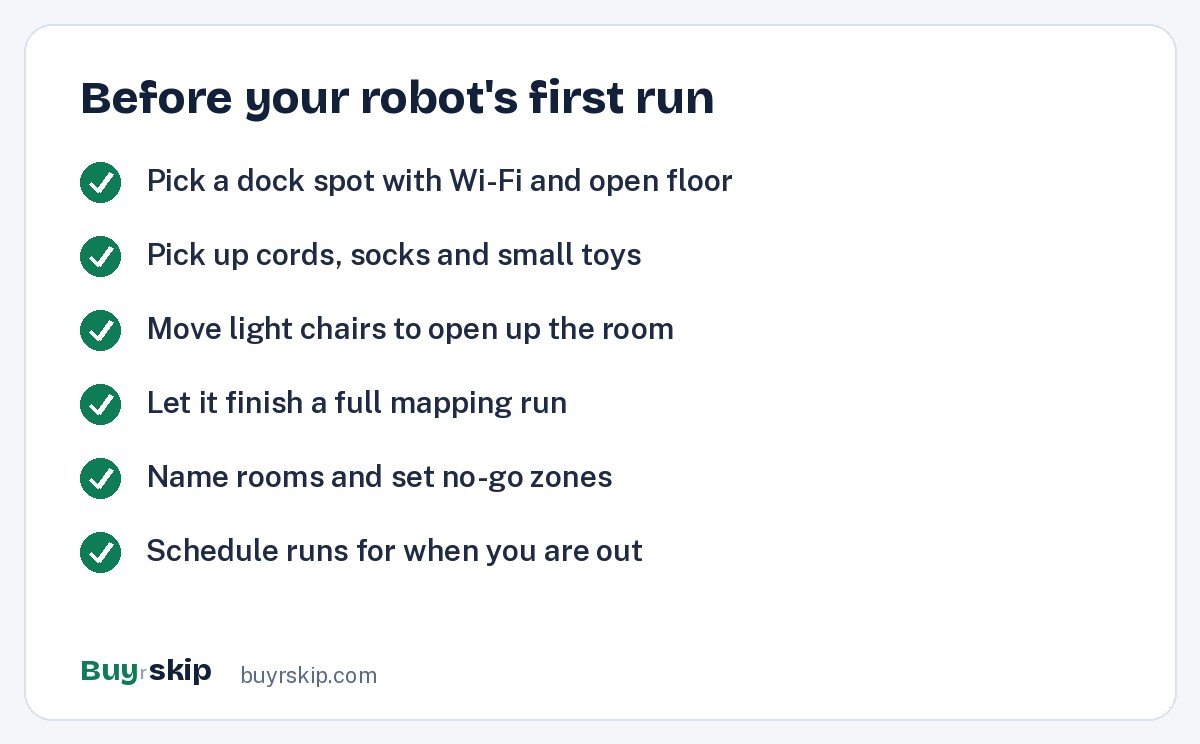
A little preparation in the first week makes a huge difference. Here is a short pre-run routine to follow before the very first cleaning.
A few beginner tips that save frustration:
- Let the first map finish. Do not move the robot or the dock during mapping. A clean first map makes everything easier afterward.
- Use no-go zones generously. Pet bowls, fringed rugs and the area behind the TV are good candidates.
- Start with one daily run. It is better to clean a little every day than a lot once a week.
- Check the brush after week one. Hair wraps around brushes over time. A quick look tells you how often to clean it.
For a step-by-step version of all this, see our robot vacuum setup tips.
Common first-time worries, answered
“Will it fall down the stairs?” Robots have cliff sensors that detect drops. They work well on most floors, but very dark carpet can occasionally confuse them. Owners with dark rugs near stairs often add a no-go line in the app as a backup.
“Is it loud?” Robots are quieter than most uprights, but you will hear them, and the self-empty step is a short, loud whoosh at the dock. Scheduling runs while you are out solves this.
“Will it get stuck?” Sometimes, especially in the first week under low furniture or on tangled cords. After you see where it struggles, a no-go zone or moving a cord usually fixes it permanently.
“Is it safe with kids and pets?” Robots move slowly and stop when they bump into things. Most pets get used to them within days. Small toys are the bigger risk to the robot than the robot is to anyone.
“What about privacy?” Robots with front cameras use them to recognize obstacles. Check the brand’s privacy settings for whether images are processed on the robot or in the cloud, and whether you can turn photo features off.
What owning one actually costs after purchase
Beginners are often surprised that a robot has ongoing costs, though they are modest. Side brushes and filters are replaced every few months, self-empty bags if your dock uses them, and mop pads for mopping robots. Over years, the battery will slowly hold less charge.
The easy way to stay on top of this: when you order the robot, also look at replacement parts kits for that exact model, so you know what they cost and where to find them. Buying a robot from a brand with good parts availability is the simplest way to make sure your first robot lasts.
Frequently asked questions
What is the easiest robot vacuum for a beginner?
The easiest robots have LiDAR mapping and a self-emptying base, because they clean predictably and need very little attention. The Shark AV2501S AI Ultra Robot Vacuum is a simple, affordable choice for carpet-heavy homes, and the Roborock Qrevo S suits homes with hard floors because its dock also cleans the mop. Avoid unmapped robots if you can, as their random cleaning is frustrating for first-time owners.
Do I need Wi-Fi to use a robot vacuum?
Most mapped robots need Wi-Fi and an app for setup, maps, room selection and scheduling. Many can still start a basic clean from a button on the robot without Wi-Fi, but you lose the features that make them convenient. Check that your router reaches the spot where you plan to put the dock, and note that many robots connect only to 2.4 GHz networks.
How often should a beginner run a robot vacuum?
Once a day is a good starting point for most homes, especially with pets. Daily runs keep dirt from building up and are easier on the robot than one long weekly clean. If your home stays clean, drop to every other day. Use room scheduling to run busy areas like the kitchen more often than spare rooms.
Is a robot vacuum worth it for a first-time buyer?
If you dislike vacuuming or have pets, usually yes. A mapped robot with a self-empty base takes care of everyday floor cleaning with little effort. It is less worthwhile if your home has lots of stairs and small rooms on several levels, or if floors are constantly cluttered. In those homes, a cordless stick vacuum may be the better first purchase.
Should my first robot vacuum also mop?
Only if you have a lot of sealed hard flooring. Robot mopping is good for light daily maintenance, and a dock that washes the pads makes it nearly effortless. In carpet-heavy homes, a mop adds cost and maintenance with little benefit. If you do choose a mopping robot, make sure it lifts or removes the mop on carpet.
How long does setup take?
Unboxing and connecting to the app usually takes a short while, and the first mapping run depends on your home’s size. Plan an afternoon for the first map, room names and no-go zones. After that, the robot runs on its schedule and you only step in for occasional maintenance.
The bottom line
The best first robot vacuum is not the most powerful one. It is the one with mapping and a self-emptying base, because those two features make a robot predictable and low-maintenance. Add a mop-washing dock only if you have a lot of hard floors, and pay for obstacle avoidance only if pets or cords demand it.
For most first-time buyers, the Shark AV2501S AI Ultra is the easy, low-risk place to start. Check the current price and set it up on a quiet afternoon.
Check price on Amazon: Shark AV2501S AI Ultra Robot Vacuum
Paid link. Typical price $299–$449; check the current price on Amazon.