We research products independently from specs, manufacturer documentation, warranty terms and owner feedback. When you buy through links on this page, we may earn a commission at no extra cost to you. As an Amazon Associate we earn from qualifying purchases.
Quick answer
The most durable robot vacuum is usually not the one with the most features. It is a model from a brand with easy-to-find spare parts, a replaceable battery, a simple dock with few moving parts, and a decent warranty. For most homes, the Roborock Qrevo S hits the best balance of long-term parts support and price. If you want the fewest things that can break, a bagless self-empty robot like the Shark AV2501S is the low-risk pick. Skip novelty hardware like robotic arms if longevity is your priority.
A robot vacuum runs most days of the week, bumps into furniture hundreds of times and drags its brushes through hair, grit and pet fur. That is a hard life for a small appliance. Choosing the most durable robot vacuum means looking past suction numbers and app features to the boring stuff: what wears out, what it costs to replace, and whether you can actually buy the part in three years. Our verdicts are based on specs, manufacturer documentation, warranty terms, independent review consensus and owner-feedback patterns.
Think of this page as a robot vacuum buying guide for models that last: it is only about longevity. If you are still deciding what features you need in the first place, start with our complete robot vacuum buying guide and come back here to narrow the list.
How to choose the most durable robot vacuum: four questions
When shoppers ask how to choose a robot vacuum that lasts, they usually mean “which one will not die in two years.” In practice a robot rarely fails all at once. It fades. The battery holds less charge, the side brush frays, a wheel module starts to click, a dock pump weakens, or the app stops supporting an older model. Durability is really four separate questions:
- Build: How well do the wheels, bumper, brush roll and sensors hold up to daily use?
- Parts: Can you buy brushes, filters, bags, mop pads, wheels and batteries easily, at a fair price, years after launch?
- Repairability: Can a normal owner swap those parts with a screwdriver, or does every fix mean shipping the robot back?
- Support: Does the warranty cover the parts most likely to fail, and is the company likely to keep the app and firmware alive?
A robot that scores well on all four will outlast a fancier model that scores well on only one. That is the lens we use for every pick below.
The parts that wear out (and what to check before you buy)
Every robot vacuum has consumables. That is normal and not a sign of poor quality. What separates a robot that lasts from one that gets thrown out is how cheap and easy those consumables are to replace.
| Part | How it wears | Typical replacement rhythm | What to check before buying |
|---|---|---|---|
| Side brush | Bristles splay and bend | Every few months | Sold in multi-packs by the brand and third parties |
| Filter | Clogs with fine dust | Every few months | Washable or not; easy to find replacements |
| Main brush | Bearings and bristles wear; hair wraps | Longer than filters, per the manual | Rubber or bristle; tangle-resistant design |
| Dust bags (self-empty docks) | Fill up | When full, often after weeks | Bagged or bagless base; bag price |
| Mop pads or roller | Fray and hold odors | Varies with use | Pad style and replacement cost |
| Wheels | Tread wears; modules can click or slip | Years, if at all | Wheel modules sold separately |
| Battery | Holds less charge over time | Years | Replaceable by the owner, and sold by the brand |
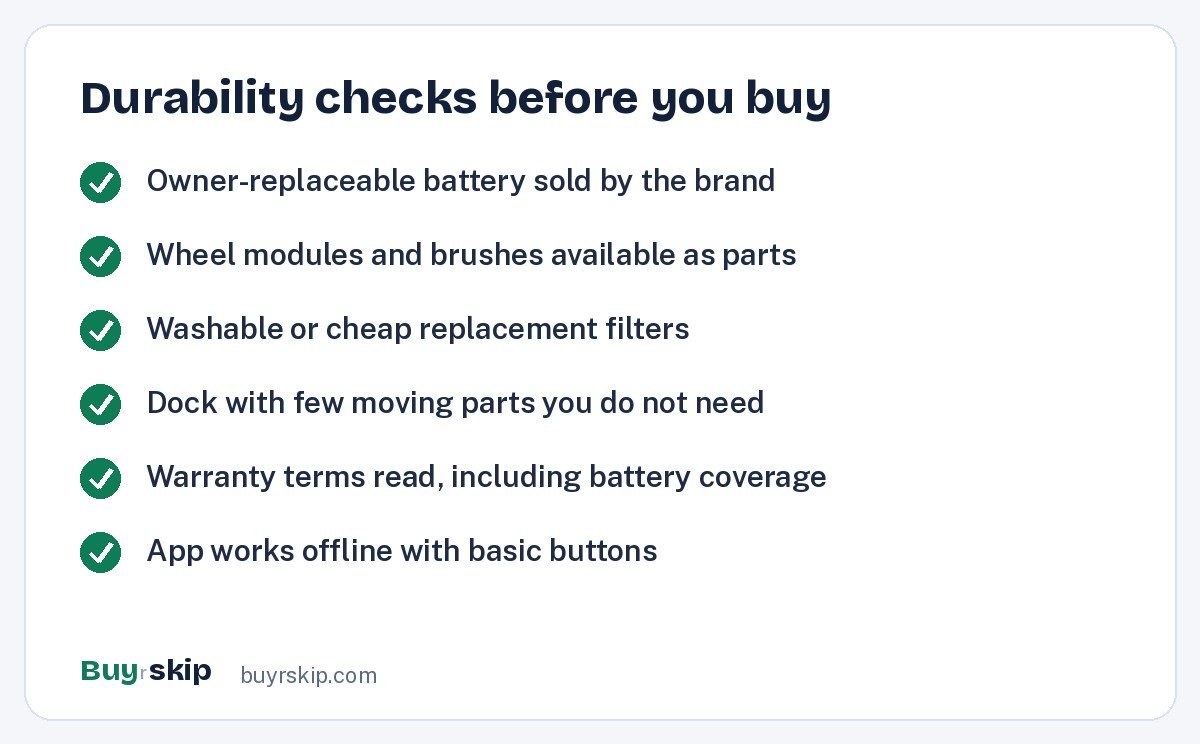
Two rows on that table matter most for long-term ownership: the battery and the wheels. Brushes and filters are cheap and everywhere. Batteries and wheel modules are the parts that decide whether a three-year-old robot gets a $50 refresh or goes in the trash. Before you buy, search the model name plus “battery” and “wheel” on Amazon or the brand’s parts store. If you find official replacements, that is a strong durability signal.
Simple docks vs do-everything docks
The biggest durability trade-off in 2026 is the dock. Docks have grown from a charging pad into small appliances of their own, with pumps, water tanks, heaters, fans and moving trays. Every one of those is something that can fail.
- Charging dock only: The fewest parts. You empty the bin by hand. Very little can go wrong, but you lose convenience.
- Self-empty base: Adds a strong suction motor and an airway. Bagged bases trap dust neatly; bagless bases skip the ongoing bag cost but need occasional cleaning.
- Vacuum and mop dock: Adds clean and dirty water tanks, a pump, a wash tray and usually a pad dryer. More convenience, more maintenance, more parts that can clog or leak.
- Premium all-in-one dock: May add detergent dosing, hot water washing, automatic pad swapping or plumbing hookups. The most hands-off option and the most complex.
Decision rule: only pay for dock features you will use every week. If you have mostly carpet, a mop-washing dock adds failure points with little benefit. If you have large hard floors and hate mopping, a mop-washing dock is worth its complexity because you will actually use it. If you are unsure which kind of floors favor which setup, our robot vacuum vs stick vacuum comparison explains where robots earn their keep and where a cordless stick is the better tool.
The durable picks for 2026
These are the models from our approved list that score best on build, parts availability, repairability and support, along with two honest skips. Prices are typical ranges; always check the current price before you buy.
Best overall for longevity Our verdict: Buy
Roborock Qrevo S Robot Vacuum and Mop
Typical price: $499–$799
Most homes that want a full-featured dock without paying flagship prices for parts and repairs
- Pros
- ✓ Roborock parts and consumables are widely sold
- ✓ LiDAR mapping is a proven, mature navigation type
- ✓ dock washes and dries mop pads to reduce odor and mildew
- Cons
- ✕ Mop-washing dock adds pumps and tanks to maintain
- ✕ bagged dock means an ongoing bag cost
Check price on Amazon Paid link
The Qrevo S is our pick for most people who want a robot that lasts. Roborock has been one of the most popular robot brands in the US for several generations, which means a deep supply of official and third-party brushes, filters, pads and bags. LiDAR navigation, which uses a spinning laser on top of the robot, is a well-understood technology and does not depend on lighting conditions. At about $499–$799, it also leaves money in the budget for a spare set of consumables.
Fewest things to break Our verdict: Buy
Shark AV2501S AI Ultra Robot Vacuum
Typical price: $299–$449
Pet owners and carpet-heavy homes that want self-emptying without a mop dock
- Pros
- ✓ Bagless self-empty base means no bags to buy
- ✓ LiDAR mapping
- ✓ Shark parts and filters are easy to find in US stores
- Cons
- ✕ No mop-washing dock if you want mopping
- ✕ bagless base needs occasional cleaning
Check price on Amazon Paid link
If your priority is a robot that simply keeps vacuuming, the Shark AV2501S AI Ultra Robot Vacuum is the low-risk choice. There is no water system to clog or leak, and the bagless base removes an ongoing purchase. At about $299–$449, a replacement is also less painful if you ever need one. It is the model we would point a pet owner with mostly carpet toward first.
Best premium value for the long haul Our verdict: Buy
Roborock S8 MaxV Ultra
Typical price: $1,199–$1,799
Shoppers who want flagship features but would rather buy a mature model than a brand-new one
- Pros
- ✓ Previous flagship with a long parts track record
- ✓ strong obstacle avoidance
- ✓ hands-off dock
- Cons
- ✕ Complex dock with many parts to maintain
- ✕ price still about $1,199–$1,799
Check price on Amazon Paid link
Buying a previous flagship is one of the smartest durability moves you can make. By the time a model like the Roborock S8 MaxV Ultra has been out for a while, early firmware bugs have been addressed, owner feedback has surfaced any weak points, and the parts market is well stocked. It is often discounted compared with the newest models, so check the current price.
Best for pet messes Our verdict: Consider
iRobot Roomba Combo j9+
Typical price: $899–$1,399
Homes with pets where avoiding cords and pet waste protects the robot itself
- Pros
- ✓ Avoids cords and pet waste, which prevents some of the worst robot accidents
- ✓ mop lifts onto the top so carpets stay dry
- ✓ iRobot parts are widely sold
- Cons
- ✕ Price of about $899–$1,399 is high for what it does
- ✕ self-empty base uses bags
Check price on Amazon Paid link
Obstacle avoidance is a durability feature that rarely gets credit. A robot that drags a phone cable can strip its brush bearings, and one that runs through pet waste can need a deep clean or worse. The iRobot Roomba Combo j9+ is built around avoiding exactly those hazards, which is why it lands here despite a price that is hard to justify on features alone.
Best for threshold-heavy homes Our verdict: Buy
Dreame X50 Ultra Complete
Typical price: $1,299–$1,799
Multi-level homes with door sills and rug edges that strand ordinary robots
- Pros
- ✓ Can step over small thresholds instead of grinding against them
- ✓ full-featured dock
- ✓ premium build
- Cons
- ✕ Newer climbing hardware has less long-term owner history
- ✕ complex dock to maintain
Check price on Amazon Paid link
Repeatedly ramming a threshold is hard on wheels and drive motors. Most robots climb about 2 cm, so if your home has taller sills, a model like the Dreame X50 Ultra Complete that is designed to step over them can save its own wheel modules from constant strain. Be aware that climbing mechanisms are newer, so there is less multi-year owner history than with standard designs.
Skip it for durability Our verdict: Consider
Roborock Saros Z70
Typical price: $1,999–$2,599
Early adopters who want a robotic arm that picks up socks and small items
- Pros
- ✓ Genuinely novel tidying arm
- ✓ premium navigation
- Cons
- ✕ A robotic arm is an extra mechanism with little track record
- ✕ about $1,999–$2,599 is a lot to risk on first-generation hardware
Check price on Amazon Paid link
The Saros Z70 is interesting technology, but first-generation mechanical features are the opposite of what a durability-focused buyer should want. If you love the idea, wait for owner feedback to build up. If you want a premium Roborock today, the S8 MaxV Ultra above has the longer track record.
Also skip: the iRobot Roomba 694. Its simple design has fewer parts to fail, but with no mapping and no self-empty base, it delivers less for the money than the budget picks above. If you need a bare-bones robot, the eufy RoboVac 11S is slim and quiet for about $149–$249, though it also navigates randomly and has no mapping.
How to read a robot vacuum warranty
Warranty terms tell you a lot about how a brand expects its product to hold up. Most robot vacuum warranties are short, so the details matter more than the headline length.
- Check battery coverage separately. Some brands cover the battery for a shorter period than the robot, because batteries degrade with use.
- Check the dock. On all-in-one systems, the dock is often the most complex part. Make sure it is covered on the same terms as the robot.
- Look for consumable exclusions. Brushes, filters, pads and bags are almost always excluded. That is normal.
- Register the product. Some brands require registration or proof of purchase. Keep your Amazon order confirmation.
- Note who handles service. Some brands ship replacement parts for you to fit; others require you to ship the robot. Parts-first service usually means faster fixes.
If two models are close on features and price, pick the one with clearer warranty terms and a parts store you can browse today. Brand warranty pages and manuals are free to read before you buy, and they are the most reliable source on this.
Repairability: the overlooked durability feature
A robot vacuum that is easy to open is a robot vacuum that is easy to keep alive. Owner-feedback patterns are consistent here: the robots people keep for many years are the ones where the battery, wheels, brushes and bumper switches can be swapped at home.
Signs a robot is repair-friendly:
- The battery sits behind a screwed panel rather than being glued or sealed inside.
- The brand sells wheel modules, side brush motors and bumpers as parts, not only brushes and filters.
- There are official or well-documented guides for common fixes.
- A healthy third-party market exists for the model, which you can check with a quick robot vacuum replacement battery search on Amazon.
Popular models from large brands tend to have the best parts ecosystems simply because more of them are in homes. That is one reason we lean toward Roborock, Shark, iRobot and eufy for longevity, and why a niche model, however impressive, carries more long-term risk.
Software and app support
Robots depend on apps for maps and schedules, so a company can change its app or slow updates for older models. Favor robots that can start a clean from a physical button, prefer brands that keep updating older models, and check camera privacy settings, including whether images leave the device. Our robot vacuum setup tips cover those settings. Matter support on some newer models is a bonus, not a guarantee.
What a long-lasting robot costs up front
Durability does not require a flagship price. The chart below shows the typical low end of the price range for each of the main picks, so you can see where the long-term value sits.
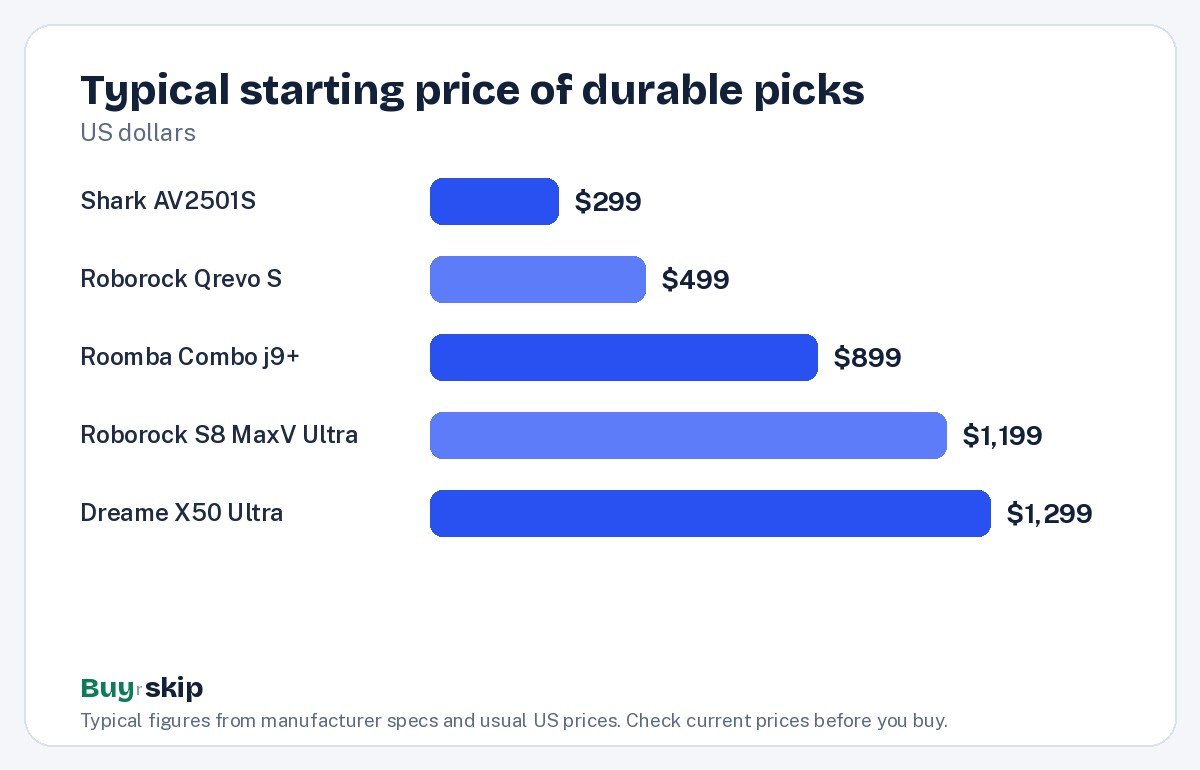
The gap between the Qrevo S and the premium models is large, and much of that money goes into dock features. If those features matter to you, they are worth it. If not, the extra spend buys more parts that can fail, not more years of cleaning. You can compare current options with a search for LiDAR robots with a self-empty base.
Habits that double a robot’s working life
Even the best hardware wears out faster when it is neglected. A few habits make a large difference:
- Cut hair off the main brush weekly if you have pets or long-haired family members. Wrapped hair strains the brush motor and bearings.
- Replace side brushes and filters on schedule. A clogged filter makes the motor work harder for less suction. Stock up with a Qrevo S replacement kit or the matching kit for your model.
- Wipe the sensors and charging contacts monthly. Dirty cliff sensors and contacts cause confused navigation and failed charging.
- Let it live on its dock between runs instead of leaving it dead under a couch.
- Clean the dock’s tanks and tray on mop systems so residue does not build up.
For apartments and small spaces, where robots often work around tight furniture, see our guide to robot vacuums for small apartments for layout and storage tips.
One mistake to avoid: buying on suction numbers. Pa ratings are marketing figures, not comparable across brands, and they tell you nothing about longevity.
Frequently asked questions
How long should a robot vacuum last?
With routine care, a well-supported robot vacuum can keep working for several years. The battery is usually the first major part to fade, followed by wheels and brush motors. Whether the robot keeps going depends mostly on whether you can buy those parts. Models from large brands with official parts stores tend to have the longest useful lives, because a worn part becomes a quick swap instead of a reason to replace the whole robot.
Is a self-emptying robot vacuum less durable?
A self-empty base adds a motor and an airway, so there is a little more that can fail. In exchange, the robot’s own bin and filter get emptied often, which can reduce strain on its motor. For most people the convenience is worth it. If you want the simplest self-empty setup, choose a bagless base like the Shark AV2501S, which avoids bag costs and has no water system to maintain.
Can you replace a robot vacuum battery yourself?
On many popular models, yes. The battery usually sits behind a panel held by a few screws. Buy the replacement from the brand or a reputable seller, and avoid unbranded batteries with vague specs. Before buying any robot, check that its battery is sold as a separate part. That single check is one of the best predictors of how long you will keep the robot.
Are expensive robot vacuums more durable?
Not automatically. Premium models often have better sensors and obstacle avoidance, which helps protect the robot, but they also add complex docks with pumps, heaters and moving parts. A mid-range model with strong parts support can outlast a flagship with first-generation features. Pay more for features you will use, not as a durability guarantee.
Which robot vacuum brand has the best parts availability?
Large, established brands generally have the best parts availability in the US because so many of their robots are in use. Roborock, Shark, iRobot and eufy all have wide consumable support through their own stores and Amazon. Before buying, search for your exact model plus “battery” and “wheel” to confirm that the harder-to-find parts are available, not just brushes and filters.
Does mopping shorten a robot vacuum’s life?
Mopping itself is not hard on the robot, but mop systems add parts: water tanks, pumps, pads and drying fans in the dock. Those need regular cleaning to avoid clogs and odors. If you have mostly carpet, a vacuum-only robot with a self-empty base is simpler. If you have large hard floors, a mop dock is worth it, as long as you keep up with its upkeep.
The bottom line
The most durable robot vacuum is the one you can keep repairing. Prioritize a brand with deep parts support, an owner-replaceable battery, a dock with only the features you need and clear warranty terms. For most homes, that points to the Roborock Qrevo S; for the simplest, lowest-risk setup, the Shark AV2501S.
Skip first-generation mechanical novelties and bare-bones models with no mapping, and check the current price before you buy. A few minutes of weekly care will do more for your robot’s lifespan than any spec sheet.
Check price on Amazon: Roborock Qrevo S Robot Vacuum and Mop
Paid link. Typical price $499–$799; check the current price on Amazon.