We research products independently from specs, manufacturer documentation, warranty terms and owner feedback. When you buy through links on this page, we may earn a commission at no extra cost to you. As an Amazon Associate we earn from qualifying purchases.
Quick answer
The Apple TV 4K (3rd generation) is the best streaming device for most people who can spend about $119–$149: it is the fastest box here and the only one without ads on the home screen. The Roku Ultra (2024) is the best value, with a simple neutral interface and a backlit remote you can make beep when it vanishes. On a tight budget, the Amazon Fire TV Stick 4K Max (2nd Gen) gets you 4K, Dolby Vision and Wi-Fi 6E for about $39–$59.
The best streaming devices all play the same major apps, so the real differences are speed, how many ads you see, how good the remote is, and whether the box fits the phone and smart home gear you already own. A good streamer can make an older smart TV feel new again, because the apps built into many TVs get slow and stop receiving updates long before the panel wears out.
Our picks are based on specs, manufacturer documentation, warranty terms, independent review consensus and owner-feedback patterns.
Quick picks
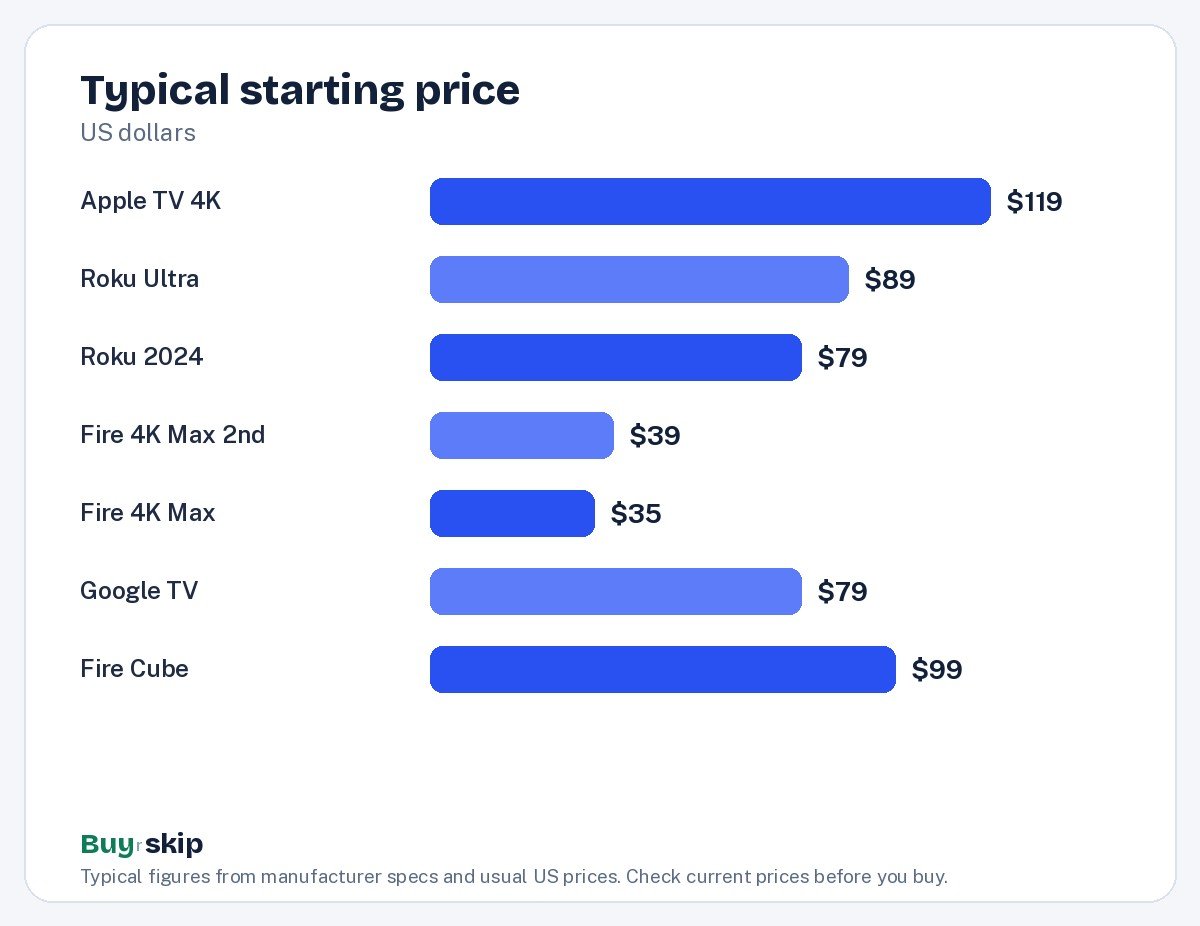
| Product | Best for | Our verdict | Typical price |
|---|---|---|---|
| Apple TV 4K (3rd generation) | Fastest, cleanest experience | Buy | about $119–$149 |
| Roku Ultra | Most people | Buy | about $89–$100 |
| Roku Ultra (2024) | Simple interface and great remote | Buy | about $79–$99 |
| Amazon Fire TV Stick 4K Max (2nd Gen) | Budget 4K and Alexa homes | Buy | about $39–$59 |
| Amazon Fire TV Stick 4K Max | Alexa homes on a budget | Consider | about $35–$60 |
| Google TV Streamer | Android and Google Home users | Consider | about $79–$99 |
| Amazon Fire TV Cube (3rd Gen) | Hands-free Alexa streaming | Skip | about $99–$139 |
Prices move often in this category, so check the current price before you buy.
The best streaming devices in 2026
Best overall Our verdict: Buy
Apple TV 4K (3rd generation)
Typical price: about $119–$149
Fastest, cleanest experience. Buy it if you want the fastest, cleanest streaming box with no ads on the home screen, especially if you use an iPhone.
- Pros
- ✓ Very fast A15 Bionic chip
- ✓ No ads on the home screen
- ✓ Dolby Vision, HDR10+ and Dolby Atmos
- ✓ Works as a HomeKit and Matter hub
- Cons
- ✕ Pricier than sticks
- ✕ Siri Remote is easy to lose
Check price on Amazon Paid link
The Apple TV 4K is the streamer to buy if you care most about how the thing feels to use every night. Its A15 Bionic chip makes menus and app launches noticeably quicker than any stick, and the home screen shows your apps rather than a wall of promoted shows. It handles Dolby Vision, HDR10+ and Dolby Atmos, so it can get the most out of a good TV and soundbar, and it comes in 64GB or 128GB versions.
It is the obvious choice for iPhone owners: AirPlay, Apple accounts and Apple services all work without fuss. It also works as a HomeKit and Matter hub, which matters if you are building a smart home. The trade-offs are price and the small Siri Remote, which is easy to lose in a couch because it has no finder feature. Skip it if you just want the cheapest route to 4K; a Fire TV stick or Roku does that for far less.
Best for most people Our verdict: Buy
Roku Ultra
Typical price: about $89–$100
Most people. Buy it if you want a simple, neutral platform with every major app and a remote you can find.
- Pros
- ✓ Easy home screen
- ✓ Rechargeable voice remote with finder
- ✓ Wi-Fi 6 and Ethernet
- ✓ Dolby Vision and HDR10+
- Cons
- ✕ Home screen shows ads
- ✕ Not as fast as Apple TV
Check price on Amazon Paid link
The Roku Ultra has long been the safe recommendation for households that do not want to think about ecosystems. Roku’s home screen is a simple grid of apps, it carries every major service, and it does not favor Apple, Google or Amazon content. You get Dolby Vision and HDR10+, Wi-Fi 6, and an Ethernet port for a wired connection, which helps when your router is far from the TV.
The rechargeable voice remote has a lost-remote finder, a small feature that families end up loving. The catches are ads on the home screen and an interface that is not as quick as the Apple TV. This listing and the Roku Ultra (2024) cover the same product line; the 2024 model is the newer one with the backlit Voice Remote Pro, so buy this older version only if it is clearly cheaper when you shop.
Best value Our verdict: Buy
Roku Ultra (2024)
Typical price: about $79–$99
Simple interface and great remote. Buy it if you want a simple, neutral interface, every major app and a remote that's easy to find in the couch.
- Pros
- ✓ Simple, app-neutral interface
- ✓ Backlit rechargeable Voice Remote Pro
- ✓ Wi-Fi 6 and Ethernet
- ✓ Dolby Vision support
- Cons
- ✕ Home screen shows ads
- ✕ Not as fast as Apple TV
Check price on Amazon Paid link
The Roku Ultra (2024) is the current version of Roku’s top box and our value pick, since it usually sells for about $79–$99. It keeps everything people like about Roku, including the neutral app grid and broad app support, and adds the backlit, rechargeable Voice Remote Pro with a lost-remote finder. Backlighting sounds minor until you are trying to find the volume button during a dark movie.
It supports 4K Dolby Vision and HDR10+, connects over Wi-Fi 6, and has Ethernet and USB ports. It suits cord cutters, families and anyone setting up a TV for a parent who just wants things to work. The trade-off is the same as every Roku: ads on the home screen, and it is not as snappy as the Apple TV 4K. If you want a premium, ad-free home screen, spend the extra on Apple.
Best budget Our verdict: Buy
Amazon Fire TV Stick 4K Max (2nd Gen)
Typical price: about $39–$59
Budget 4K and Alexa homes. Buy it if you want a fast 4K stick for under $60 and use Alexa at home.
- Pros
- ✓ Low price
- ✓ Wi-Fi 6E
- ✓ Ambient art mode
- ✓ Alexa voice remote
- Cons
- ✕ Ad-heavy interface
- ✕ Only 16GB storage
Check price on Amazon Paid link
The Fire TV Stick 4K Max (2nd Gen) is the cheapest way to get a fast, modern 4K streamer, at about $39–$59. It plugs straight into an HDMI port and supports 4K Dolby Vision and HDR10+, and its Wi-Fi 6E helps on newer routers. The Alexa voice remote is handy, and an ambient art mode can show artwork or photos when the TV is idle.
It is a good fit for Alexa homes, bedroom TVs and travel, since it tucks behind a TV and weighs next to nothing. The downside is the interface: Amazon fills the home screen with ads and pushes its own content first. Storage is 16GB, which is fine for most people but tight if you install lots of apps. If ads on the home screen bother you, a Roku or the Apple TV will be more pleasant every day.
Also great Our verdict: Consider
Amazon Fire TV Stick 4K Max
Typical price: about $35–$60
Alexa homes on a budget. Buy it if you want 4K streaming for little money and use Alexa.
- Pros
- ✓ Very affordable, often on sale
- ✓ Wi-Fi 6E
- ✓ Alexa voice control
- ✓ Ambient photo mode
- Cons
- ✕ Busy, ad-heavy interface
- ✕ Amazon content pushed first
Check price on Amazon Paid link
The original Amazon Fire TV Stick 4K Max is the older generation of the stick above. The newer 2nd Gen model is the one to buy at similar money, and this older version is worth it only at a clear discount. When it does drop well below the 2nd Gen price, it still offers 4K HDR with Dolby Vision and HDR10+, Alexa voice control and an ambient photo mode.
The same complaints apply: a busy, ad-heavy interface that puts Amazon content first. It is a reasonable pick for a guest room or a second TV if the price is right, but compare it against the 2nd Gen stick before you check out.
Best for Google Home Our verdict: Consider
Google TV Streamer
Typical price: about $79–$99
Android and Google Home users. Buy it if you use Google Home and want a streamer that doubles as a Matter and Thread hub.
- Pros
- ✓ Great content recommendations
- ✓ Thread border router and Matter hub
- ✓ Remote finder button
- ✓ Ethernet port
- Cons
- ✕ Interface can feel sluggish at times
- ✕ Recommendations lean on ads
Check price on Amazon Paid link
The Google TV Streamer makes the most sense for Android phone owners and Google Home users. Google TV is good at pulling shows from all your services into one set of recommendations, and the box doubles as a Thread border router and Matter hub, so it can anchor a Google-based smart home. It has 32GB of storage, an Ethernet port, a remote finder button, and support for 4K Dolby Vision and HDR10+.
The trade-offs are speed and ads. Owners report the interface can feel sluggish at times, and the recommendations lean on promoted content. If you want the smoothest experience, the Apple TV 4K is better; if you want the simplest one, a Roku is. Buy this one when the smart home hub is the point.
Skip it Our verdict: Skip
Amazon Fire TV Cube (3rd Gen)
Typical price: about $99–$139
Hands-free Alexa streaming. Buy it if you want hands-free Alexa voice control of your TV and cable box from across the room.
- Pros
- ✓ Hands-free Alexa
- ✓ HDMI input and Ethernet
- ✓ Fast processor
- Cons
- ✕ Costs much more than the 4K Max stick
- ✕ Same ad-heavy interface
Check price on Amazon Paid link
The Fire TV Cube is a capable box. It has a fast processor, a built-in Alexa speaker for hands-free voice control from across the room, an HDMI input for a cable or satellite box, and Ethernet. The problem is value. At about $99–$139 it costs much more than the Fire TV sticks while running the same ad-heavy interface, and for streaming alone the Fire TV Stick 4K Max (2nd Gen) does nearly the same job for about half the price.
Keep in mind that a separate smart speaker can also give you hands-free Alexa in the living room, and it works with a Fire TV stick for basic voice control, so the Cube’s main advantage is narrower than it looks. Only buy it if hands-free Alexa control of your TV and cable box is something you will use daily. Otherwise get the 4K Max stick, or put the money toward an Apple TV 4K if you want a genuinely better experience.
How to choose streaming devices
Start with the phone and smart home you already use
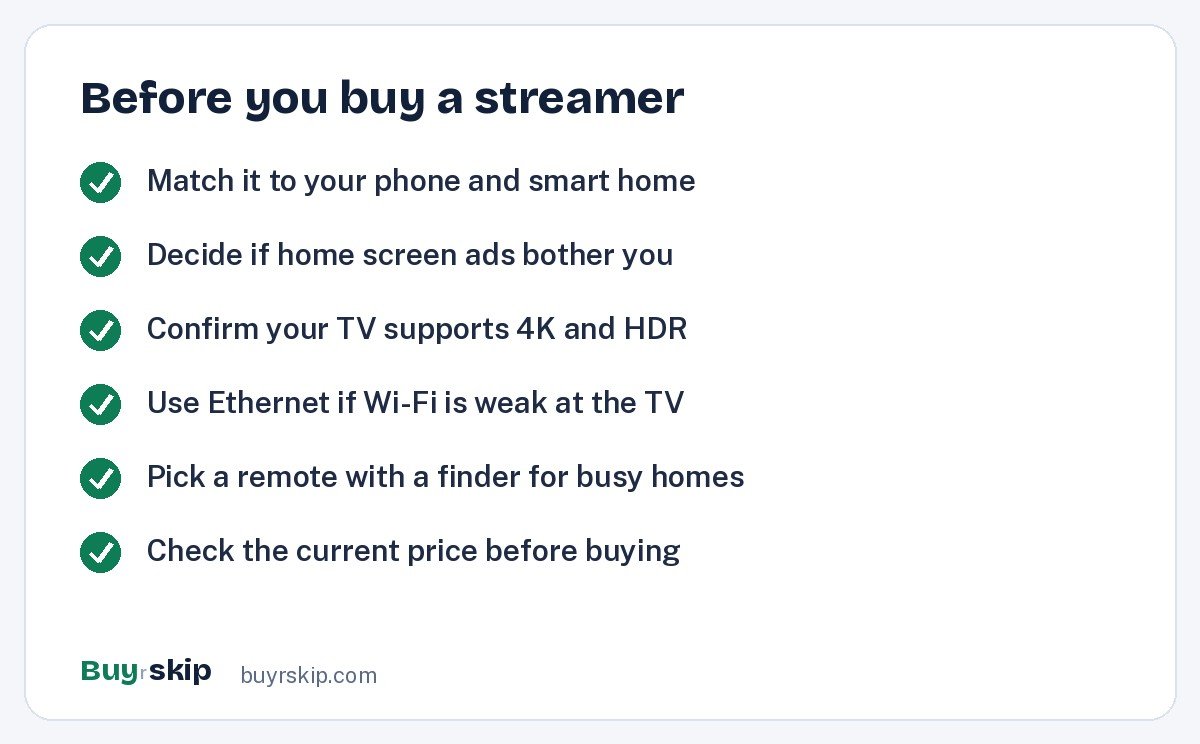
The biggest quality-of-life gain comes from matching your ecosystem. If your household runs on iPhones, the Apple TV 4K gives you AirPlay and Apple services with no friction. If you live in Google Home, the Google TV Streamer adds a Matter and Thread hub. If you talk to Alexa all day, a Fire TV stick fits in. If your family is mixed, a Roku stays neutral.
Decide how much you mind ads
Every device here except the Apple TV shows ads or promoted content on the home screen. Roku keeps them fairly contained; Amazon puts its own shows and sponsored rows front and center. If ads on the screen you see every evening annoy you, the Apple TV is the only clean option on this list, and that alone justifies its price for many people.
Check HDR formats against your TV
All seven devices support 4K with both Dolby Vision and HDR10+, so you are covered whichever HDR format your TV uses. What matters more is whether your TV can show those formats at all. Older 1080p sets get no benefit from 4K HDR, though a fast streamer still helps there by replacing slow built-in apps. If you are also shopping for a set, our TV buying guide explains HDR in plain terms.
Think about Wi-Fi and Ethernet
Streaming 4K needs a steady connection. The Roku Ultra models, the Google TV Streamer and the Fire TV Cube have Ethernet ports, which is the most reliable option if a cable can reach. Sticks rely on Wi-Fi; the Fire TV Stick 4K Max (2nd Gen) supports Wi-Fi 6E, which helps if you own a newer router. If your Wi-Fi is weak near the TV, a box with Ethernet and a Cat 6 Ethernet cable beats any stick.
Do not underrate the remote
You touch the remote far more than the box. Roku’s lost-remote finder and the backlit Voice Remote Pro on the Roku Ultra (2024) solve real household problems. The Siri Remote on the Apple TV is pleasant but easy to lose, so some owners add a Siri Remote case to make it bigger and easier to find.
Storage, speed and how long it will last
Storage matters less than it used to, because streaming apps keep most content in the cloud. It does matter if you install many apps or games. The Fire TV sticks have 16GB, the Google TV Streamer has 32GB, and the Apple TV comes with 64GB or 128GB. Processor speed matters more: a faster chip keeps menus responsive as apps grow heavier with each update, which is why a quicker box tends to feel good for longer. If you keep devices for many years, paying more up front for the Apple TV’s A15 Bionic chip is a reasonable bet. If you replace gear often or are buying for a spare room, a cheap stick is the smarter spend.
Stick or box?
Sticks like the Fire TV Stick 4K Max plug straight into the TV’s HDMI port and hide behind it, which is tidy and great for wall-mounted TVs and travel. Boxes like the Apple TV, the Roku Ultra models and the Google TV Streamer sit on a shelf, add Ethernet ports, and generally have more room for faster hardware. If your TV is mounted and the HDMI ports are hard to reach, a stick is simpler; if the TV sits on a media console with a router nearby, a box with a wired connection is the more reliable setup.
Rules of thumb
- If you want the fastest, cleanest box and can spend more, buy the Apple TV 4K.
- If you want simple and neutral at a fair price, buy the Roku Ultra (2024).
- If you want 4K for as little as possible, buy the Fire TV Stick 4K Max (2nd Gen).
- If you want a Google smart home hub, buy the Google TV Streamer.
- If you are tempted by the Fire TV Cube, buy it only for hands-free Alexa.
Frequently asked questions
Do I need a streaming device if I have a smart TV?
Not always, but often it helps. Built-in TV apps can be slow, cluttered or stop receiving updates after a few years, while a streaming device gets regular updates and usually runs faster. A $40 to $100 streamer is a cheap way to make an older smart TV feel quicker. If your TV’s apps are fast and you like its interface, you can skip one.
Is the Apple TV 4K worth the extra money over a Roku?
It is if speed and a clean, ad-free home screen matter to you, or if you use an iPhone. The A15 Bionic chip makes everything feel quicker, and it doubles as a HomeKit and Matter hub. If you mostly open the same two or three apps and do not mind ads, the Roku Ultra (2024) does the job well for less.
What is the difference between the two Fire TV Stick 4K Max models?
The 2nd Gen is the newer model and the one to buy. Both stream 4K with Dolby Vision and HDR10+ and include an Alexa voice remote, but the 2nd Gen is the current version. Buy the original 4K Max only when it is clearly cheaper than the 2nd Gen, and check current prices first since both are often discounted.
Which streaming device has the fewest ads?
The Apple TV 4K has no ads on its home screen, which makes it the clear choice for ad-averse viewers. Roku shows ads but keeps them to a limited area, and Google TV and Fire TV put more promoted content up front. Note that individual apps such as ad-supported streaming tiers will still show their own ads on any device.
Can a streaming device replace a cable box?
For many people, yes, through live TV services like YouTube TV, Sling or Hulu + Live TV, which run on all of these devices. If you want to keep your cable box, the Fire TV Cube’s HDMI input and hands-free Alexa can control it, though that is a niche reason to spend more. A good soundbar often matters more to the experience.
The bottom line
For most people who can stretch to about $119–$149, the Apple TV 4K (3rd generation) is the best streaming device: fast, ad-free and built to last for years of updates. If you would rather keep spending low, the Roku Ultra (2024) is the best value and the Fire TV Stick 4K Max (2nd Gen) is the best budget pick. If you are planning a bigger upgrade, see our list of the best TVs too.
Check price on Amazon: Apple TV 4K (3rd generation)
Paid link. Typical price about $119–$149; check the current price on Amazon.