We research products independently from specs, manufacturer documentation, warranty terms and owner feedback. When you buy through links on this page, we may earn a commission at no extra cost to you. As an Amazon Associate we earn from qualifying purchases.
Quick answer
Quick answer: For most homes, the TP-Link Deco X55 AX3000 Mesh Wi-Fi System (3-pack) is the router to buy. Its three Wi-Fi 6 nodes cover up to about 6,500 sq ft, every node has Ethernet ports, and it typically costs about $149–$199. If you rent an apartment or a small home, the TP-Link Archer AX55 AX3000 Wi-Fi 6 Router is the budget pick and usually runs under $100.
Picking the best wifi routers comes down to one honest question: how big is the space you need to cover, and how fast is the internet plan feeding it? Most people overspend on speed they cannot use, or buy a single router for a home that really needs mesh. This list sorts four popular options into three worth buying and one to skip. Our picks are based on published specs, manufacturer documentation, warranty terms, independent review consensus and patterns in owner feedback, not on in-house lab work.
Quick picks
| Product | Best for | Our verdict | Typical price |
|---|---|---|---|
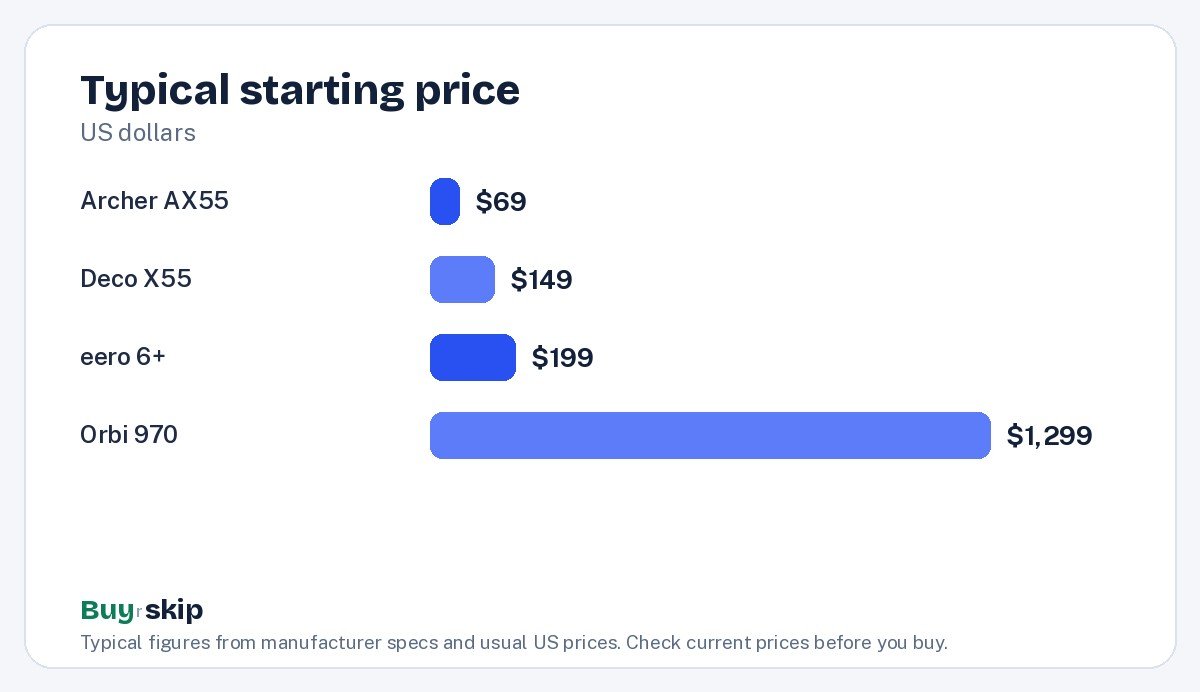
| TP-Link Deco X55 AX3000 Mesh Wi-Fi System (3-pack) | Most homes | Buy | about $149–$199 |
| Amazon eero 6+ Mesh Wi-Fi System (3-pack) | Easiest setup | Buy | about $199–$299 |
| TP-Link Archer AX55 AX3000 Wi-Fi 6 Router | Apartments and small homes | Buy | about $69–$99 |
| NETGEAR Orbi 970 Series Quad-Band WiFi 7 Mesh System | Multi-gig homes with big budgets | Skip | about $1,299–$1,799 |
Prices move often, so check the current price before you buy.
The best Wi-Fi routers in 2026
Best overall Our verdict: Buy
TP-Link Deco X55 AX3000 Mesh Wi-Fi System (3-pack)
Typical price: about $149–$199
Most homes. Buy it if you have dead zones in a medium or large home and want reliable mesh Wi-Fi without overspending.
- Pros
- ✓ Covers large homes
- ✓ Simple app setup
- ✓ Ethernet ports on every node
- Cons
- ✕ Some security features need a subscription
- ✕ Not Wi-Fi 7
Check price on Amazon Paid link
The Deco X55 is the mesh system we would point most households toward. It is a three-pack of Wi-Fi 6 (AX3000) units that TP-Link rates for up to about 6,500 square feet, which is enough for most medium and large single-family homes, including two-story layouts with a basement. The units talk to each other and hand your phone or laptop off as you move, so the dead zone in the back bedroom or the garage usually goes away.
The detail that sets it apart from cheaper mesh kits is that every node has Ethernet ports. That means you can plug a game console, smart TV or desktop into whichever node sits nearby, and if your home already has Ethernet in the walls, you can wire the nodes together for a sturdier backbone. Setup runs through the Deco app and is straightforward.
The trade-offs are modest. Some of the extra security and parental-control features sit behind a subscription, and this is Wi-Fi 6, not Wi-Fi 7. For the vast majority of US internet plans, that is not a real limitation. Skip it if you live in a small apartment, where a single router like the Archer AX55 does the job for less.
Best for easy setup Our verdict: Buy
Amazon eero 6+ Mesh Wi-Fi System (3-pack)
Typical price: about $199–$299
Easiest setup. Buy it if you want the simplest mesh setup with a built-in Zigbee and Thread hub for smart home devices.
- Pros
- ✓ Very easy setup
- ✓ Built-in smart home hub
- ✓ Automatic updates
- Cons
- ✕ Only two Ethernet ports per node
- ✕ eero Plus subscription for extras
Check price on Amazon Paid link
The eero 6+ is the mesh system for people who never want to log into a router settings page. Setup through the eero app takes minutes, updates install automatically, and the whole thing is designed to be left alone. It also doubles as a smart home hub, with built-in Zigbee and Thread support, so if you use Alexa or are building out smart plugs, locks and sensors, it can save you buying a separate hub.
The three-pack covers up to about 4,500 square feet, which is a bit less than the Deco X55 but plenty for most homes under that size. Where it falls behind is wired connections: each node has only two Ethernet ports, so if you have a desk full of wired gear, you may need a small switch. Some extras, such as advanced security filtering and deeper controls, need an eero Plus subscription.
Buy the eero 6+ if simplicity and smart home features matter more than price per square foot. Skip it if you want advanced settings without paying monthly, or if you want the most coverage for the money, in which case the Deco X55 is the better deal.
Best budget Our verdict: Buy
TP-Link Archer AX55 AX3000 Wi-Fi 6 Router
Typical price: about $69–$99
Apartments and small homes. Buy it if you live in an apartment or small home and want to replace a slow ISP router.
- Pros
- ✓ Great value
- ✓ Four gigabit LAN ports
- ✓ Easy app
- Cons
- ✕ Single unit range is limited
- ✕ Not Wi-Fi 6E or 7
Check price on Amazon Paid link
Not everyone needs mesh. If you live in an apartment, a condo or a compact single-story home, one good router placed near the middle of the space is often all it takes. The Archer AX55 is a Wi-Fi 6 (AX3000) router that typically costs well under $100, and it is a big step up from the basic router many internet providers hand out.
It also has a practical port layout: one WAN port for your modem and four gigabit LAN ports for wired devices, which is more wired connections than either mesh pick gives you on a single unit. The app makes setup and basic management easy.
The limit is physics. A single router has finite range, and thick walls, multiple floors or a long ranch layout will leave weak spots. It is also not Wi-Fi 6E or Wi-Fi 7. If your home is large or multistory, skip it and buy the Deco X55 mesh kit instead.
Skip it Our verdict: Skip
NETGEAR Orbi 970 Series Quad-Band WiFi 7 Mesh System
Typical price: about $1,299–$1,799
Gigabit-plus homes with huge budgets. Buy it if you have multi-gig internet in a large home and want the fastest mesh money can buy.
- Pros
- ✓ Extremely fast
- ✓ 10 Gbps ports
- ✓ Huge coverage
- Cons
- ✕ Very expensive
- ✕ Most internet plans cannot use the speed
Check price on Amazon Paid link
The Orbi 970 is an impressive piece of hardware. It is a quad-band Wi-Fi 7 mesh system with 10 Gbps ports and very large coverage, and if you have multi-gig fiber in a big house full of Wi-Fi 7 devices, it is about as fast as home mesh gets.
The problem is value. It typically costs about $1,299–$1,799, which is several times the price of our top pick, and most home internet plans cannot use anywhere near the speed it offers. Your phone, laptop and TV also need Wi-Fi 7 support to take full advantage, and many devices in US homes today do not have it. For most people, the money buys headroom that never gets used.
Skip it and buy the TP-Link Deco X55 for whole-home coverage, or the eero 6+ if you want the easiest setup. Revisit the Orbi 970 only if you already pay for multi-gig service and have the devices to match.
How to choose Wi-Fi routers
Single router or mesh?
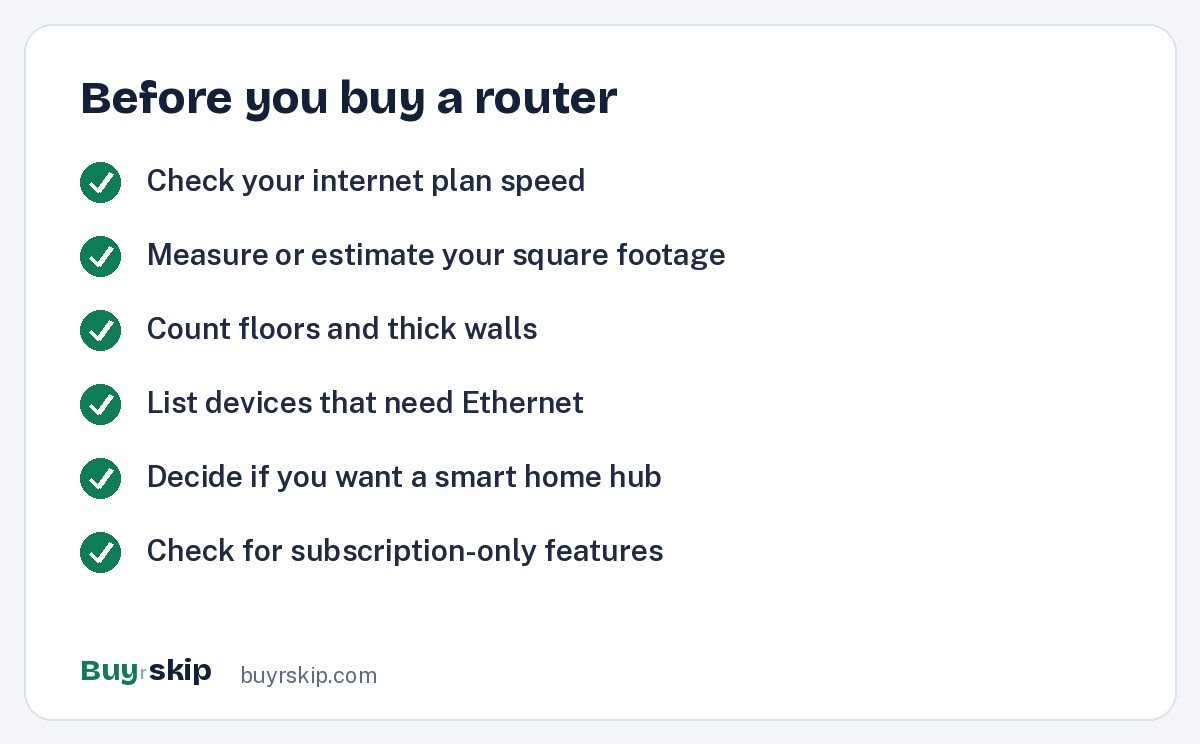
This is the biggest decision. A single router sends signal from one spot, so it works best in smaller spaces. Mesh uses several units spread around the home that share one network name. If you live in an apartment or a small single-story home, buy the Archer AX55. If you have more than one floor, a long layout, or a room where the signal always drops, buy a mesh kit such as the Deco X55.
Match the router to your internet plan
A router cannot make your internet plan faster than what you pay for. It can only make sure you get that speed around the house. If your plan is around 1 Gbps or less, Wi-Fi 6 is a sensible match, and that covers most US households. Wi-Fi 7 and 10 Gbps ports, like those on the Orbi 970, only pay off when you have multi-gig service and devices that support it. Look up your plan speed on your provider bill before you shop.
Coverage numbers are a ceiling, not a promise
Manufacturer coverage figures, such as up to about 6,500 sq ft for the Deco X55 and up to about 4,500 sq ft for the eero 6+, assume good conditions. Brick, plaster, concrete, mirrors and large appliances all cut range. If your home sits near the upper limit of a kit’s rating, or has dense walls, lean toward the system with more rated coverage, or plan on wiring the nodes together with Ethernet.
Count your wired devices
Gaming consoles, desktop PCs, streaming boxes and network storage often work better on a cable. Count them. If you have several in one room, the four LAN ports on the Archer AX55 or the ports on every Deco X55 node will serve you better than the two ports per eero 6+ node. An inexpensive five-port gigabit switch can also add ports anywhere.
Smart home hub or not
If you are building an Alexa-centered smart home with Zigbee or Thread gear, the built-in hub in the eero 6+ is a real perk. If you do not use those devices, it adds nothing, and the Deco X55 gives you more coverage and ports for less.
Watch for subscriptions
Both TP-Link and eero put some security and parental-control extras behind paid plans. The core Wi-Fi works without them. Decide up front whether you need those features, and factor the yearly cost into the comparison if you do.
Placement matters as much as the hardware
Even the best router struggles inside a cabinet or behind a TV. Put a single router up high and near the center of the home. With mesh, place the first node by your modem and the others roughly halfway between it and the areas that had weak signal, rather than in the far corners. If you are wiring a few rooms anyway, quality Cat 6 Ethernet cables are cheap and reliable.
Frequently asked questions
Do I need a mesh Wi-Fi system or is one router enough?
One router is usually enough for an apartment or a small single-story home. Mesh makes sense when you have multiple floors, a long or spread-out layout, or rooms where the signal regularly drops. If you are unsure, start by moving your current router to a central, open spot. If dead zones remain, a mesh kit such as the TP-Link Deco X55 is the fix most homes need.
Is Wi-Fi 7 worth it in 2026?
For most households, not yet. Wi-Fi 7 helps when you have multi-gig internet and phones, laptops and other devices that support the standard. Many US internet plans top out at around 1 Gbps or less, and Wi-Fi 6 handles that well. A pricey Wi-Fi 7 mesh system like the NETGEAR Orbi 970 mostly buys speed headroom that a typical home will not use.
Can I use my own router instead of the one from my internet provider?
In most cases, yes. Many providers let you connect your own router to their modem, or put their combined modem and router into bridge mode so your router handles Wi-Fi. Check your provider’s support pages for the exact steps, since some gateway devices need a setting changed. Replacing a basic provider router with something like the Archer AX55 often improves range and reliability.
Are mesh subscriptions required?
No. The TP-Link Deco X55 and the Amazon eero 6+ both provide full Wi-Fi without any subscription. The paid plans add extras such as advanced security filtering, ad blocking or deeper parental controls. If you only need fast, reliable Wi-Fi around the house, you can skip the subscription and still get the core features you are paying for.
How many mesh nodes do I need?
A three-pack covers most homes. The Deco X55 three-pack is rated for up to about 6,500 square feet and the eero 6+ three-pack for up to about 4,500 square feet. Very large homes, homes with thick walls, or properties with a detached garage or office may need an extra node. Smaller homes can sometimes get by with a two-pack if the brand sells one.
The bottom line
For most US homes, the TP-Link Deco X55 AX3000 Mesh Wi-Fi System (3-pack) is the best mix of coverage, wired ports and price. Choose the Amazon eero 6+ Mesh Wi-Fi System (3-pack) if you want the simplest setup and a built-in smart home hub, and the TP-Link Archer AX55 AX3000 Wi-Fi 6 Router if you live in a smaller space and want to spend less. Leave the Orbi 970 to multi-gig households with a large budget.
If you are upgrading the rest of your setup too, see our picks for the best streaming devices and the best smart speakers, both of which depend on solid Wi-Fi.
Check price on Amazon: TP-Link Deco X55 AX3000 Mesh Wi-Fi System (3-pack)
Paid link. Typical price about $149–$199; check the current price on Amazon.