We research products independently from specs, manufacturer documentation, warranty terms and owner feedback. When you buy through links on this page, we may earn a commission at no extra cost to you. As an Amazon Associate we earn from qualifying purchases.
Quick answer
Buy the Samsung T9 Portable SSD 2TB if you move large video files and your computer has a USB 3.2 Gen 2×2 (20 Gbps) port, because that is the only way to unlock its extra speed. For everyone else, including most Mac owners, the Samsung T7 Shield 2TB is the smarter buy: it is rugged, fast enough for nearly any computer and usually costs noticeably less.
The Samsung T9 vs T7 Shield question comes up constantly, because the two drives look similar, both come from the same brand, and both are sold in the same 2TB size. The real difference is not the drive. It is the port on your computer. This guide explains who actually benefits from the newer, faster T9 and who should save money with the T7 Shield. Our picks are based on specs, manufacturer documentation, warranty terms, independent review consensus and owner-feedback patterns, not on in-house trials.
Quick picks
| Product | Best for | Our verdict | Typical price |
|---|---|---|---|
| Samsung T9 Portable SSD 2TB | Video and fast transfers | Buy | about $180–$250 |
| Samsung T7 Shield 2TB | Everyday backups | Buy | about $130–$180 |
Storage prices swing often, so check the current price for both before you buy.
The best portable SSDs in 2026
Best for speed Our verdict: Buy
Samsung T9 Portable SSD 2TB
Typical price: about $180–$250
Video and fast transfers. Buy it if you move large video files and have a fast USB port.
- Pros
- ✓ Very fast on 20 Gbps ports
- ✓ Rugged rubber shell
- ✓ Compact
- Cons
- ✕ Full speed needs USB 3.2 Gen 2×2
Check price on Amazon Paid link
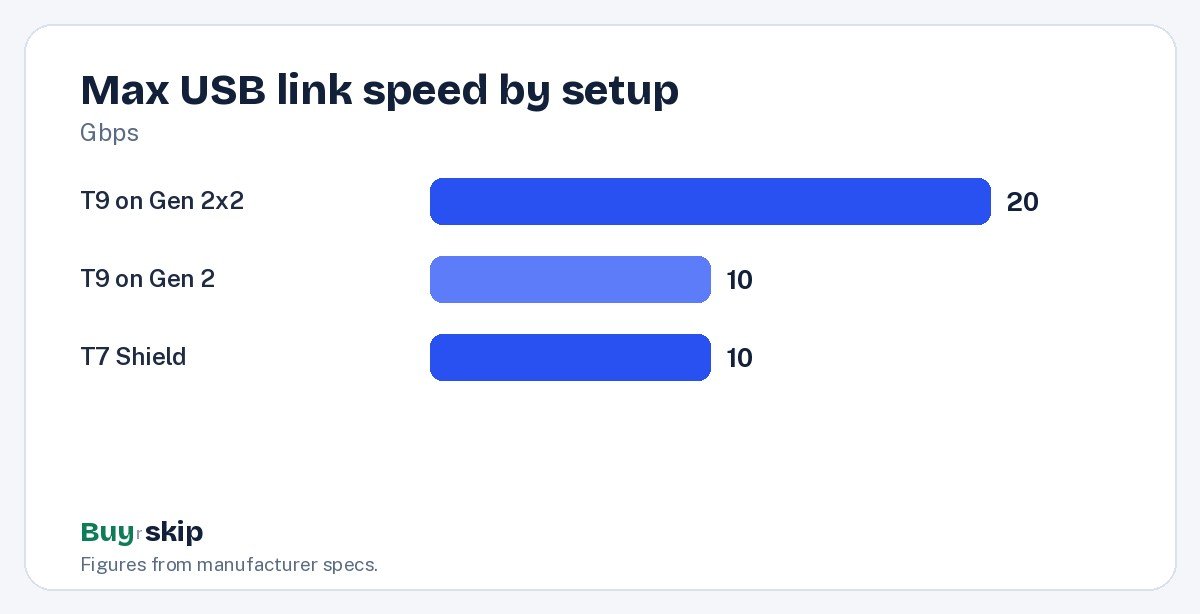
The T9 is the newer of the two drives and the faster one, with an interface rated up to 20 Gbps. On a computer with a USB 3.2 Gen 2×2 port, it moves large files roughly twice as fast as a 10 Gbps drive like the T7 Shield. For video editors, photographers dumping big card loads and anyone shuttling project folders between machines, that time saving adds up every single day.
It also has a rugged rubber shell and a compact body, so it travels well in a camera bag or laptop sleeve. The catch is that full speed needs a USB 3.2 Gen 2×2 port, and those are far less common than you might expect. Many Windows desktops and some Windows laptops have one, but Apple’s Macs do not support Gen 2×2, so on a Mac the T9 runs at roughly the same 10 Gbps class speed as the T7 Shield.
Skip the T9 if your computer only has older or 10 Gbps USB ports; the Samsung T7 Shield 2TB will be just as fast in practice for less money. Buy it at about $180–$250 if you have the right port and work with large files.
Best value Our verdict: Buy
Samsung T7 Shield 2TB
Typical price: about $130–$180
Everyday backups. Buy it if you want a tough, fast drive at a fair price.
- Pros
- ✓ IP65 rugged
- ✓ Fast for most computers
- ✓ Good price per TB
- Cons
- ✕ Slower than Gen 2×2 drives
Check price on Amazon Paid link
The T7 Shield is the drive most people should buy. It is fast on nearly any modern computer, uses a 10 Gbps USB connection that almost every recent laptop and desktop supports at full speed, and carries an IP65 rating for dust and water resistance. That rugged shell makes it a good fit for students, travelers and anyone who tosses a drive into a backpack.
It also offers a good price per terabyte, typically about $130–$180 for 2TB. For backups, photo libraries, game storage and moving files between work and home, it has more speed than you will usually notice.
The T7 Shield is the older design, and the newer Samsung T9 Portable SSD 2TB does beat it on a 20 Gbps port. That is its only real weakness. If the price gap between the two shrinks to almost nothing, the T9 is the better long-term buy, even if you cannot use its full speed today. Otherwise, the T7 Shield is worth buying at its usual discount. Skip it only if you truly need the fastest possible transfers and have a Gen 2×2 port to use them.
How to choose portable SSDs
Check your port before anything else
This is the decision that settles Samsung T9 vs T7 Shield for most buyers. Look up your computer’s exact USB ports in its spec sheet or manual. You are looking for “USB 3.2 Gen 2×2” or “20 Gbps.” Thunderbolt and USB4 ports are fast, but they do not always support Gen 2×2 mode, and Macs do not support it at all.
- If you have a USB 3.2 Gen 2×2 port and edit video, buy the Samsung T9 Portable SSD 2TB.
- If you have a Mac, or only 10 Gbps or slower ports, buy the Samsung T7 Shield 2TB.
- If you are unsure, buy the T7 Shield; it costs less and will not leave speed unused.
Use a cable that can keep up
A slow cable can quietly cap a fast drive. Use the cable that comes with the drive when you can, and if you need a longer or replacement one, buy a cable rated for the speed you want, such as a 20 Gbps USB-C cable. A cheap charging cable may only support USB 2.0 speeds, which is far slower.
Pick the right capacity
These two drives are compared here at 2TB, which suits most people for backups, a working photo library or a few large video projects. If you shoot 4K video often, you may fill 2TB faster than you think, so consider your workflow and how often you will clear old projects off the drive.
Durability and portability
Both drives are built to travel. The T7 Shield has an IP65 rating, which means it is protected against dust and water jets. The T9 has a rugged rubber shell too. Neither drive is meant to be dropped repeatedly or soaked, so a padded portable SSD carrying case is cheap insurance.
Match the drive to how you work
Think about what you actually do with the drive each week. Copying a few gigabytes of documents or photos takes moments on either model, so the T9’s extra speed only shows up with big transfers: hundreds of gigabytes of camera footage, large game libraries or whole project folders. If that describes your routine and your port supports it, the time saved can justify the higher price. If the drive will mostly sit in a bag as a backup, or hold music and photos, the Samsung T7 Shield 2TB does the same job for less. Students and travelers in particular get more from the T7 Shield’s IP65 rating and lower price than from peak speed.
Do not treat one drive as your only backup
A portable SSD is a great working drive and a good backup, but any single drive can fail, get lost or get stolen. For anything you cannot replace, keep a second copy on another drive or in cloud storage. Both Samsung drives support password protection through Samsung’s software, which is worth turning on if you carry personal or work files.
Frequently asked questions
Is the Samsung T9 faster than the T7 Shield on a Mac?
Not in a meaningful way. Macs do not support USB 3.2 Gen 2×2, the 20 Gbps mode the T9 needs for its top speed. On a Mac, both drives connect at roughly the same 10 Gbps class speed, so the Samsung T7 Shield 2TB is the better value for Mac owners.
Will these drives work with an iPhone, iPad or game console?
Many recent iPhones, iPads and Android phones with USB-C can read and write to external SSDs, which is handy for recording video directly or offloading files. Game consoles often support external USB storage too, with limits on which games can run from it. Check your device’s support pages, as format and power requirements vary.
Which is better for video editing?
If your editing computer has a USB 3.2 Gen 2×2 port, the Samsung T9 Portable SSD 2TB is the better choice, because large media files will copy much faster. If you edit on a Mac or a laptop without Gen 2×2, the T7 Shield gives you the same practical speed for less money. Camera users may also like our best mirrorless camera guide.
Is the T7 Shield too old to buy in 2026?
No. It is the older of the two designs, but its 10 Gbps interface still matches the fastest USB port on most laptops and desktops, so it does not leave speed on the table for most people. Buy it at its usual lower price. If a sale or price change puts it within a few dollars of the T9, the newer drive is the better pick.
Do portable SSDs get hot?
Fast SSDs can get warm during long, sustained transfers, such as copying hundreds of gigabytes in one go. That is normal, and drives are designed to manage it, sometimes by slowing down briefly. Give the drive some air rather than burying it under a laptop or in a pocket during big copies.
Do portable SSDs need to be formatted?
They usually arrive formatted to work with both Windows and Mac. If you will only use the drive with one system, reformatting to that system’s native format can be worthwhile. Back up any files first, because formatting erases the drive.
The bottom line
For most people, the Samsung T7 Shield 2TB is the right drive: rugged, fast on almost any computer and cheaper. The Samsung T9 Portable SSD 2TB is the better tool for video work, but only if your computer has a 20 Gbps USB 3.2 Gen 2×2 port to unlock its speed. If you are shopping for a new machine at the same time, check port specs in our best laptops picks.
Check price on Amazon: Samsung T9 Portable SSD 2TB
Paid link. Typical price about $180–$250; check the current price on Amazon.