We research products independently from specs, manufacturer documentation, warranty terms and owner feedback. When you buy through links on this page, we may earn a commission at no extra cost to you. As an Amazon Associate we earn from qualifying purchases.
Quick answer
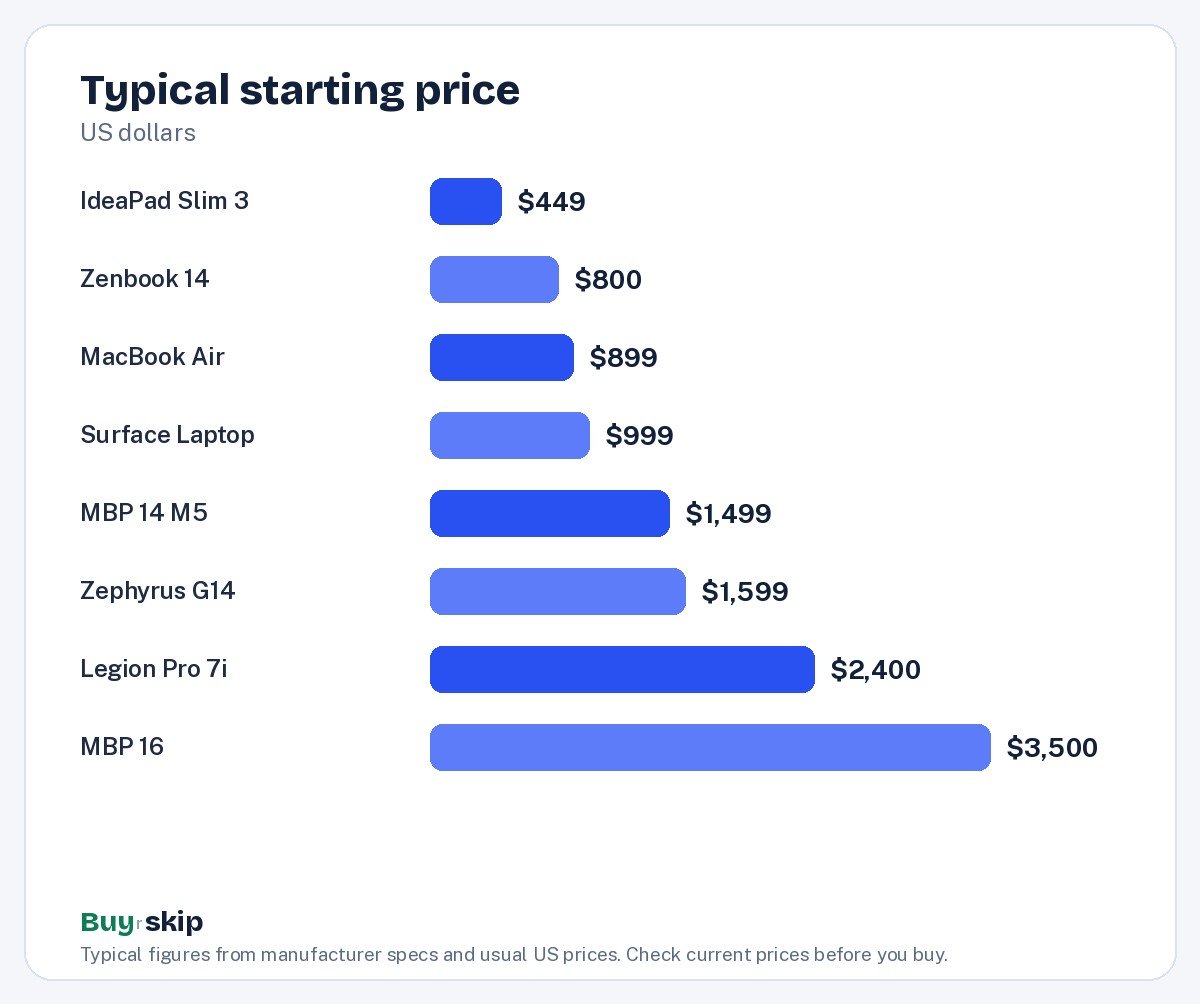
The Apple 2025 MacBook Air 13-inch Laptop with M4 chip is the best laptop for most people: silent, light at 2.7 lb, rated for up to 18 hours of battery and fast enough for years, for about $899–$999. If you need Windows, the ASUS Zenbook 14 OLED is the best value. On a tight budget, the Lenovo IdeaPad Slim 3 15.6-inch Laptop covers schoolwork and streaming for about $449–$649. Gamers should look at the ASUS ROG Zephyrus G14 (2025) Gaming Laptop.
The best laptops for one person can be the wrong buy for another, so this list is organized around what you actually do. A student who writes papers and streams video needs a very different machine from a video editor or a gamer, and paying for power you will not use is the most common laptop mistake. We cover 15 laptops: Apple’s MacBooks from the Air to the 16-inch Pro, gaming laptops from ASUS, Razer and Lenovo, Windows creator and business machines, budget picks, and one popular model to skip. Our picks are based on specs, manufacturer documentation, warranty terms, independent review consensus and owner-feedback patterns.
Quick picks
| Product | Best for | Our verdict | Typical price |
|---|---|---|---|
| Apple MacBook Pro 16-Inch (M4 Max) | Pro video and 3D work | Buy | about $3,500–$4,500 |
| Apple 2025 MacBook Air 13-inch Laptop with M4 chip | Most people | Buy | about $899–$999 |
| Apple MacBook Air 13-inch (M4) | Students and most people | Buy | about $900–$1,200 |
| Apple MacBook Pro 14-inch (M4 Pro) | Video and photo editing | Buy | about $1,800–$2,500 |
| Apple 2025 MacBook Pro 14-inch Laptop with M5 chip | Creators and power users | Buy | about $1,499–$1,699 |
| Razer Blade 16 Gaming Laptop | Premium gaming and creators | Buy | about $2,800–$4,500 |
| ASUS ROG Zephyrus G16 | Thin gaming laptop | Buy | about $2,000–$3,500 |
| ASUS ROG Zephyrus G14 (2025) Gaming Laptop | Portable gaming | Buy | about $1,599–$2,199 |
| Lenovo Legion Pro 7i | Maximum frame rates | Buy | about $2,400–$3,500 |
| ASUS Zenbook 14 OLED | Windows on a budget | Buy | about $800–$1,100 |
| Lenovo IdeaPad Slim 3 15.6-inch Laptop | Budget buyers | Buy | about $449–$649 |
| Lenovo ThinkPad X1 Carbon (Gen 12) | Business travelers | Consider | about $1,500–$2,200 |
| ASUS ProArt P16 | Windows creators | Consider | about $2,300–$3,500 |
| Microsoft Surface Laptop 7th Edition 13.8-inch (Snapdragon X Elite) | Windows fans who want long battery life | Consider | about $999–$1,399 |
| Microsoft Surface Laptop Go 3 | Nobody, at its usual price | Skip | about $599–$799 |
Laptop prices change constantly and depend on configuration, so check the current price for the exact memory and storage you want.
The best laptops in 2026
Best premium Our verdict: Buy
Apple MacBook Pro 16-Inch (M4 Max)
Typical price: about $3,500–$4,500
Pro video and 3D work. Buy it if you edit 4K–8K video, grade color or render 3D for a living.
- Pros
- ✓ Exceptional performance
- ✓ Long battery even under load
- ✓ Superb XDR display
- Cons
- ✕ Very expensive
- ✕ Heavy for travel
Check price on Amazon Paid link
The Apple MacBook Pro 16-Inch (M4 Max) is the most powerful laptop here and the one to buy if your income depends on heavy creative work. If you edit 4K to 8K video, grade color or render 3D, its M4 Max chip delivers desktop-class performance, and it keeps that performance on battery, where many Windows workstations slow down. Battery life stays long even under load, and the 16.2-inch Liquid Retina XDR display is superb for judging color and HDR footage.
The trade-offs are price and weight. At about $3,500–$4,500, it is very expensive, and it is heavy for daily travel. Skip it if you mostly browse and write; you will never use the power, and the Apple 2025 MacBook Air 13-inch Laptop with M4 chip does those jobs for a quarter of the price.
Best overall Our verdict: Buy
Apple 2025 MacBook Air 13-inch Laptop with M4 chip
Typical price: about $899–$999
Most people. Buy it if you want a thin, silent laptop that lasts a full day on a charge and stays fast for years.
- Pros
- ✓ Silent fanless design
- ✓ Up to 18 hours of rated battery life
- ✓ 16GB of memory standard
- ✓ Drives two external displays with the lid open
- Cons
- ✕ Only two USB-C ports
- ✕ Storage upgrades are pricey at checkout
Check price on Amazon Paid link
The Apple 2025 MacBook Air 13-inch Laptop with M4 chip is the laptop most people should buy. It is fanless, so it is completely silent, it weighs 2.7 lb, and Apple rates its battery at up to 18 hours, which means a full day of classes or work without hunting for an outlet. 16GB of memory is now standard, which helps it stay fast for years, and it can drive two external displays with the lid open, a welcome change for desk setups.
The 13.6-inch Liquid Retina screen is sharp and bright, and it handles school, office work, travel and photo editing comfortably.
The limits are ports and upgrade costs: there are only two USB-C ports, and storage upgrades are pricey at checkout, so decide what you need before you buy. Skip it if you need Windows-only software or play a lot of PC games. For almost everyone else, at about $899–$999, it is the easiest laptop recommendation of 2026.
Also great Our verdict: Buy
Apple MacBook Air 13-inch (M4)
Typical price: about $900–$1,200
Students and most people. Buy it if you want a light, silent laptop with outstanding battery life.
- Pros
- ✓ Excellent battery life
- ✓ Fanless and silent
- ✓ Light and well built
- ✓ Great speakers and screen
- Cons
- ✕ Limited ports
- ✕ Upgrades are expensive at purchase
Check price on Amazon Paid link
The Apple MacBook Air 13-inch (M4) is the same M4 MacBook Air as our top pick, listed separately and often in different configurations. You get the same excellent battery life, fanless and silent design, light and well-built body, and strong speakers and screen. Its typical price, about $900–$1,200, runs higher simply because it covers configurations with more storage or memory.
Treat the two Air listings as one laptop. Compare them for the configuration and color you want and buy whichever is cheaper today. The same caveats apply: limited ports, expensive upgrades at purchase, and no Windows or serious gaming. It is a great choice for students and anyone who wants a light, quiet laptop.
Also great Our verdict: Buy
Apple MacBook Pro 14-inch (M4 Pro)
Typical price: about $1,800–$2,500
Video and photo editing. Buy it if you edit video, code or render heavy projects and want top performance on battery.
- Pros
- ✓ Very fast
- ✓ Superb mini-LED display
- ✓ Plenty of ports including HDMI and SD
- Cons
- ✕ Heavy price
- ✕ Heavier than the Air
Check price on Amazon Paid link
The Apple MacBook Pro 14-inch (M4 Pro) is a very fast laptop with a superb mini-LED display and plenty of ports, including HDMI and an SD card slot. Its M4 Pro chip is a Pro-tier chip, so it has more headroom than a base chip for long video exports, large photo libraries and heavy code builds.
It is now the older generation, though. The Apple 2025 MacBook Pro 14-inch Laptop with M5 chip is newer and typically costs less, so the M4 Pro model is worth it only at a clear discount, or if you specifically need the extra cores of a Pro chip for sustained heavy workloads. It is also heavier than the Air and expensive at about $1,800–$2,500. Skip it if you mostly browse and write; the Air is plenty.
Best for creators Our verdict: Buy
Apple 2025 MacBook Pro 14-inch Laptop with M5 chip
Typical price: about $1,499–$1,699
Creators and power users. Buy it if you edit video or photos, compile code or run long workloads that would make a fanless laptop slow down.
- Pros
- ✓ Bright Liquid Retina XDR display
- ✓ Fan keeps performance steady under load
- ✓ HDMI, SD card slot and MagSafe built in
- ✓ Excellent speakers
- Cons
- ✕ Heavier than the Air
- ✕ Base storage fills fast for video work
Check price on Amazon Paid link
The Apple 2025 MacBook Pro 14-inch Laptop with M5 chip is the pick for creators and power users who have outgrown the Air. The key difference is active cooling: its fan keeps performance steady under long workloads, such as video exports, code compiles or music projects, that would make the fanless Air slow down. The 14.2-inch Liquid Retina XDR display is bright and excellent for photo and video work, and Apple rates battery life at up to 24 hours.
It also brings back the ports many creators want: HDMI, an SD card slot and MagSafe charging, plus excellent speakers. It weighs 3.4 lb, so it is heavier than the Air, and base storage fills fast for video work, so budget for more storage or an external drive. Skip it if you mostly browse, write and stream; the MacBook Air does that for hundreds less.
Best premium gaming Our verdict: Buy
Razer Blade 16 Gaming Laptop
Typical price: about $2,800–$4,500
Premium gaming and creators. Buy it if you want desktop-class gaming in a slim, premium laptop.
- Pros
- ✓ Top-tier graphics
- ✓ Premium aluminum build
- ✓ Fast OLED display
- Cons
- ✕ Runs hot under load
- ✕ Very expensive
Check price on Amazon Paid link
The Razer Blade 16 Gaming Laptop is a premium gaming laptop for people who want desktop-class gaming in a slim, well-made body. It pairs top-tier graphics with a premium aluminum build and a fast OLED display, so it also works well as a creator machine for video editing and 3D.
The trade-offs are heat, battery and price. It runs hot under load, battery life is not a strength, and at about $2,800–$4,500, it is very expensive. Skip it if you want long battery life or the best value; the Lenovo Legion Pro 7i gives you more performance for the money if you do not mind the weight, and the ASUS ROG Zephyrus G16 is a lighter, cheaper thin-and-light alternative.
Best thin gaming laptop Our verdict: Buy
ASUS ROG Zephyrus G16
Typical price: about $2,000–$3,500
Thin gaming laptop. Buy it if you want a thin gaming laptop that also works as a creator machine.
- Pros
- ✓ Beautiful OLED screen
- ✓ Thin and light for its power
- ✓ Good battery for gaming
- Cons
- ✕ Fans get loud
- ✕ Pricey top configs
Check price on Amazon Paid link
The ASUS ROG Zephyrus G16 is a thin gaming laptop that doubles as a creator machine. Its OLED screen is beautiful, the body is thin and light for its power, and owners note good battery life for a gaming laptop. It suits students and professionals who game at night and edit or code by day.
The fans get loud under load, and top configurations are pricey, with a range of about $2,000–$3,500. Skip it if you want the quietest laptop. If you want something smaller and easier to carry, the ASUS ROG Zephyrus G14 (2025) Gaming Laptop is the 14-inch alternative.
Best portable gaming Our verdict: Buy
ASUS ROG Zephyrus G14 (2025) Gaming Laptop
Typical price: about $1,599–$2,199
Portable gaming. Buy it if you want a gaming laptop you can actually carry to class or on a plane without a backpack full of bricks.
- Pros
- ✓ Sharp 120Hz OLED display
- ✓ Aluminum chassis feels premium
- ✓ Light for a gaming laptop
- ✓ USB-C charging for light work
- Cons
- ✕ Gets loud under gaming loads
- ✕ Premium pricing
Check price on Amazon Paid link
The ASUS ROG Zephyrus G14 (2025) Gaming Laptop is a gaming laptop you can actually carry to class or on a plane. It packs a sharp 14-inch 3K OLED display at 120Hz and up to an NVIDIA GeForce RTX 5080 Laptop GPU into an aluminum chassis weighing about 3.3 lb. USB-C charging for light work means you can leave the big power brick at home on some days.
It gets loud under gaming loads and carries premium pricing, about $1,599–$2,199. Skip it if you want the most frame rate per dollar; bigger 16-inch gaming laptops often cost less for the same GPU. Buy it if portability matters as much as performance.
Best for maximum frame rates Our verdict: Buy
Lenovo Legion Pro 7i
Typical price: about $2,400–$3,500
Maximum frame rates. Buy it if you want maximum gaming performance and do not mind weight.
- Pros
- ✓ Excellent cooling and speed
- ✓ Great keyboard
- ✓ Lots of ports
- Cons
- ✕ Heavy
- ✕ Short battery life
Check price on Amazon Paid link
The Lenovo Legion Pro 7i is for gamers who want maximum performance and do not care about weight. Its strong cooling keeps it fast under long gaming sessions, it has a great keyboard, and it offers lots of ports for monitors, mice, headsets and drives.
It is heavy, and battery life is short, so it is really a desktop replacement that you move occasionally. At about $2,400–$3,500, it is still expensive. Skip it if you carry your laptop every day; the ASUS ROG Zephyrus G14 (2025) Gaming Laptop is far easier to travel with.
Best value Our verdict: Buy
ASUS Zenbook 14 OLED
Typical price: about $800–$1,100
Windows on a budget. Buy it if you want a light Windows laptop with a gorgeous screen for the money.
- Pros
- ✓ Vivid OLED display
- ✓ Light and portable
- ✓ Good battery for Windows
- Cons
- ✕ Glossy screen reflects
- ✕ Speakers are average
Check price on Amazon Paid link
The ASUS Zenbook 14 OLED is the best value Windows laptop on this list. It gives you a vivid OLED display, a light and portable body, and good battery life for a Windows laptop, for about $800–$1,100. For students and office workers who need Windows, it is the natural alternative to the MacBook Air.
The glossy screen reflects light, which can be annoying near windows, and the speakers are average. Skip it if you need a dedicated graphics card for gaming. Buy it if you want a light Windows laptop with a gorgeous screen for the money.
Best budget Our verdict: Buy
Lenovo IdeaPad Slim 3 15.6-inch Laptop
Typical price: about $449–$649
Budget buyers. Buy it if you need a reliable, roomy Windows laptop for schoolwork, email and streaming on a tight budget.
- Pros
- ✓ Low price
- ✓ Full-size keyboard with number pad
- ✓ Plenty of ports, including HDMI
- ✓ Easy to find configurations with 16GB
- Cons
- ✕ Screen is dim outdoors
- ✕ Plastic build
Check price on Amazon Paid link
The Lenovo IdeaPad Slim 3 15.6-inch Laptop is the budget pick for schoolwork, email, browsing and streaming. It has a 15.6-inch Full HD screen, a full-size keyboard with a number pad, plenty of ports including HDMI, and it is easy to find configurations with 16GB of memory, which we recommend for smooth multitasking. It weighs about 3.5 lb.
The screen is dim outdoors and the build is plastic, so it does not feel premium. Skip it if you care about a bright screen or a premium feel; the ASUS Zenbook 14 OLED is the step up. At about $449–$649, it is a reliable, roomy laptop for a tight budget.
Best for business travel Our verdict: Consider
Lenovo ThinkPad X1 Carbon (Gen 12)
Typical price: about $1,500–$2,200
Business travelers. Buy it if you type all day and want a light, durable business laptop.
- Pros
- ✓ Superb keyboard
- ✓ Very light
- ✓ Business security features
- Cons
- ✕ Expensive
- ✕ Integrated graphics only
Check price on Amazon Paid link
The Lenovo ThinkPad X1 Carbon (Gen 12) is built for people who type all day and travel often. Its keyboard is the best in this group, it is very light, and it includes business security features that IT departments like.
It is expensive for its specs at about $1,500–$2,200, and it has integrated graphics only, so it is not for gaming or heavy video work. Skip it if you want the best value; the ASUS Zenbook 14 OLED offers a light Windows laptop for much less. Consider it if keyboard quality and durability matter most.
Best for Windows creators Our verdict: Consider
ASUS ProArt P16
Typical price: about $2,300–$3,500
Windows creators. Buy it if you edit photos and video on Windows and want a color-accurate OLED.
- Pros
- ✓ 4K OLED display
- ✓ Creative dial
- ✓ Strong performance
- Cons
- ✕ Expensive
- ✕ Average battery
Check price on Amazon Paid link
The ASUS ProArt P16 is the Windows answer for photo and video editors. It has a 4K OLED display suited to color-accurate work, a creative dial for adjusting tools in apps, and strong performance.
It is expensive, about $2,300–$3,500, and battery life is average. Skip it if gaming is your priority; the gaming laptops here are better tuned for that. Consider it if you edit on Windows and want a color-accurate OLED; if you are open to macOS, the Apple 2025 MacBook Pro 14-inch Laptop with M5 chip costs less and lasts longer on battery.
Best Windows battery life Our verdict: Consider
Microsoft Surface Laptop 7th Edition 13.8-inch (Snapdragon X Elite)
Typical price: about $999–$1,399
Windows fans who want long battery life. Buy it if you want a premium Windows laptop with a great touchscreen and battery life that rivals a MacBook.
- Pros
- ✓ Sharp 120Hz touchscreen
- ✓ Long battery life for Windows
- ✓ Excellent keyboard and haptic touchpad
- ✓ Copilot+ PC AI features
- Cons
- ✕ Some apps and games still struggle on Windows on Arm
- ✕ Pricier than similar Intel and AMD laptops
Check price on Amazon Paid link
The Microsoft Surface Laptop 7th Edition 13.8-inch (Snapdragon X Elite) is a premium Windows laptop with battery life that rivals a MacBook. Its Qualcomm Snapdragon X Elite chip is efficient, its 13.8-inch 120Hz touchscreen is sharp, and the keyboard and haptic touchpad are excellent. It weighs 2.96 lb and supports Copilot+ PC AI features.
The catch is Windows on Arm: some apps and games still struggle, especially older apps, niche drivers and games with anti-cheat. It is also pricier than similar Intel and AMD laptops. Skip it if you rely on older Windows software. Consider it if your apps run well on Arm and you want long battery life on Windows.
Skip it Our verdict: Skip
Microsoft Surface Laptop Go 3
Typical price: about $599–$799
Nobody, at its usual price. Buy it if you find it deeply discounted and only need a small, light laptop for browsing and notes.
- Pros
- ✓ Compact and light
- ✓ Nice keyboard for its size
- ✓ Fingerprint reader
- Cons
- ✕ Low-resolution 1536 x 1024 screen
- ✕ Older 12th-gen Intel Core i5
- ✕ No keyboard backlight
- ✕ Overpriced for what you get
Check price on Amazon Paid link
The Microsoft Surface Laptop Go 3 is compact and light at 2.49 lb, with a nice keyboard for its size and a fingerprint reader. But at its usual price, it is poor value. The 12.4-inch screen is low resolution at 1536 x 1024, the Intel Core i5-1235U is an older 12th-gen chip, and there is no keyboard backlight.
Skip it. For a small, light laptop, buy the Apple 2025 MacBook Air 13-inch Laptop with M4 chip. For Windows, the ASUS Zenbook 14 OLED has a far better screen, and the Lenovo IdeaPad Slim 3 15.6-inch Laptop costs less. Only consider the Go 3 if you find it deeply discounted and only need it for browsing and notes.
How to choose a laptop
macOS or Windows
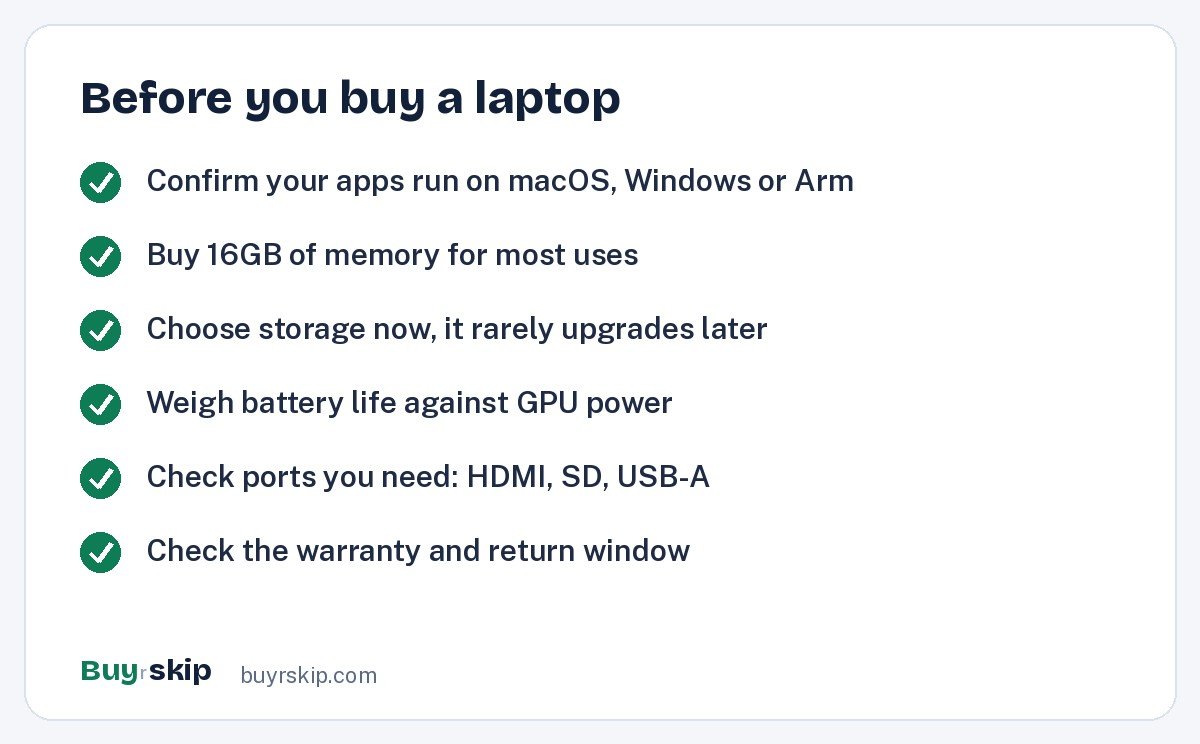
Start with software. If you use Windows-only apps or play PC games, a MacBook is the wrong choice no matter how good it is. If you just need a browser, office apps and creative tools available on both, the Apple 2025 MacBook Air 13-inch Laptop with M4 chip is the best all-rounder. If you need Windows, the ASUS Zenbook 14 OLED is the value pick. Windows on Arm laptops like the Surface Laptop 7th Edition offer long battery life, but check that your apps run well first.
How much power you really need
Most people overbuy. For browsing, writing, streaming and photo editing, the MacBook Air or Zenbook is plenty. If you export video, compile code or run long workloads, step up to the Apple 2025 MacBook Pro 14-inch Laptop with M5 chip, whose fan keeps performance steady. Only pro video, color and 3D work justify the Apple MacBook Pro 16-Inch (M4 Max).
Gaming laptops: portability versus power
Gaming laptops trade size for speed. If you carry it daily, buy the ASUS ROG Zephyrus G14 (2025) Gaming Laptop. If you want a thin 16-inch that also handles creator work, buy the ASUS ROG Zephyrus G16. If it rarely leaves your desk, the Lenovo Legion Pro 7i gives the most performance with the best cooling. Expect fan noise and shorter battery life from all of them.
Memory, storage and upgrades
Buy enough memory and storage at checkout, because most modern laptops, including all MacBooks, cannot be upgraded later. We recommend 16GB of memory for most people, which is now standard on the MacBook Air and easy to find on the IdeaPad Slim 3. For storage, think about photos, video and games; if you edit video, plan for an external drive.
Screen, battery and weight
OLED screens, like those on the Zenbook, Zephyrus and ProArt, have deep contrast but can be glossy. Battery ratings are best-case figures; Apple rates the MacBook Air at up to 18 hours and the 14-inch MacBook Pro with M5 at up to 24 hours, and gaming laptops last far less. If you carry your laptop every day, stay near 3 lb: the Air at 2.7 lb and the Surface Laptop at 2.96 lb are the lightest good picks here.
Ports and accessories
Thin laptops often have few ports. The MacBook Air has two USB-C ports, while the MacBook Pro 14-inch adds HDMI and an SD slot, and the Legion and IdeaPad have plenty of ports. If you need more, a USB-C hub solves most problems. A padded laptop sleeve protects your investment in a bag, and a laptop stand helps your neck at a desk. For a full desk setup, see our best monitors, best keyboards and best computer mice picks.
Frequently asked questions
What is the best laptop for most people?
The Apple 2025 MacBook Air 13-inch Laptop with M4 chip. It is silent, light at 2.7 lb, rated for up to 18 hours of battery, comes with 16GB of memory and costs about $899–$999. If you need Windows, the ASUS Zenbook 14 OLED is the best value alternative with a vivid OLED screen and good battery life.
What is the best laptop for students?
The MacBook Air with M4 is the best student laptop if your school’s software runs on macOS: it is light, silent and lasts all day. For Windows, the ASUS Zenbook 14 OLED is light and affordable, and the Lenovo IdeaPad Slim 3 covers schoolwork, email and streaming for about $449–$649. Check your course requirements before you buy.
Should I buy the M4 Pro or M5 MacBook Pro 14-inch?
The M5 model is the newer generation and usually costs less. The M4 Pro model is older but uses a Pro-tier chip with more headroom for sustained heavy work. Buy the M5 for most creative work, and choose the M4 Pro only at a clear discount or if you know you need the extra cores.
Are gaming laptops good for school or work?
They can be, but they are heavier, louder and have shorter battery life than everyday laptops. The ASUS ROG Zephyrus G14 (2025) is the best compromise because it weighs about 3.3 lb and supports USB-C charging for light work. If you game only occasionally, a regular laptop plus a game console may suit you better.
Is Windows on Arm ready for everyday use?
For many people, yes. The Surface Laptop 7th Edition with Snapdragon X Elite handles browsing, office apps and streaming well with long battery life. But some apps and games still struggle, especially older software, niche drivers and anti-cheat games. Check that the apps you rely on run well on Arm before you buy.
Why skip the Surface Laptop Go 3?
At its usual price, it is poor value. It has a low-resolution 1536 x 1024 screen, an older 12th-gen Intel Core i5 and no keyboard backlight. The MacBook Air, ASUS Zenbook 14 OLED and Lenovo IdeaPad Slim 3 are better buys. Consider it only if you find it deeply discounted.
The bottom line
Buy the Apple 2025 MacBook Air 13-inch Laptop with M4 chip if you want the best laptop for most people: silent, light, long-lasting and fast enough for years. If you need Windows, the ASUS Zenbook 14 OLED is the value pick, and the Lenovo IdeaPad Slim 3 15.6-inch Laptop is the budget choice. Creators should step up to the Apple 2025 MacBook Pro 14-inch Laptop with M5 chip, and gamers who travel should pick the ASUS ROG Zephyrus G14 (2025) Gaming Laptop.
Skip the Surface Laptop Go 3 at its usual price. Configurations change prices a lot, so check the current price for the exact memory and storage you want. If you are weighing a laptop against a tablet, our best tablets list can help.
Check price on Amazon: Apple 2025 MacBook Air 13-inch Laptop with M4 chip
Paid link. Typical price about $899–$999; check the current price on Amazon.