We research products independently from specs, manufacturer documentation, warranty terms and owner feedback. When you buy through links on this page, we may earn a commission at no extra cost to you. As an Amazon Associate we earn from qualifying purchases.
Quick answer
The Apple iPad 11-inch (A16 chip) is the best tablet for most people. It is fast, starts with 128GB of storage, gets years of software updates and costs about $299–$349. Students and note-takers should step up to the Apple iPad Air 11-inch (M3) for its laminated screen and Apple Pencil Pro support. On Android, the Samsung Galaxy Tab S10 FE includes an S Pen in the box.
The best tablets cover a surprising range of jobs: a TV in bed, a digital notebook for class, a sketchpad, a homework device for kids or a light laptop replacement with a keyboard. That range is why there is no single right answer. A $99 tablet can be perfect for Kindle books and Netflix, while an artist may be glad to spend over $1,000. This guide covers six tablets from Apple, Samsung and Amazon and explains which one fits which person. Our picks are based on specs, manufacturer documentation, warranty terms, independent review consensus and owner-feedback patterns.
Quick picks
| Product | Best for | Our verdict | Typical price |
|---|---|---|---|
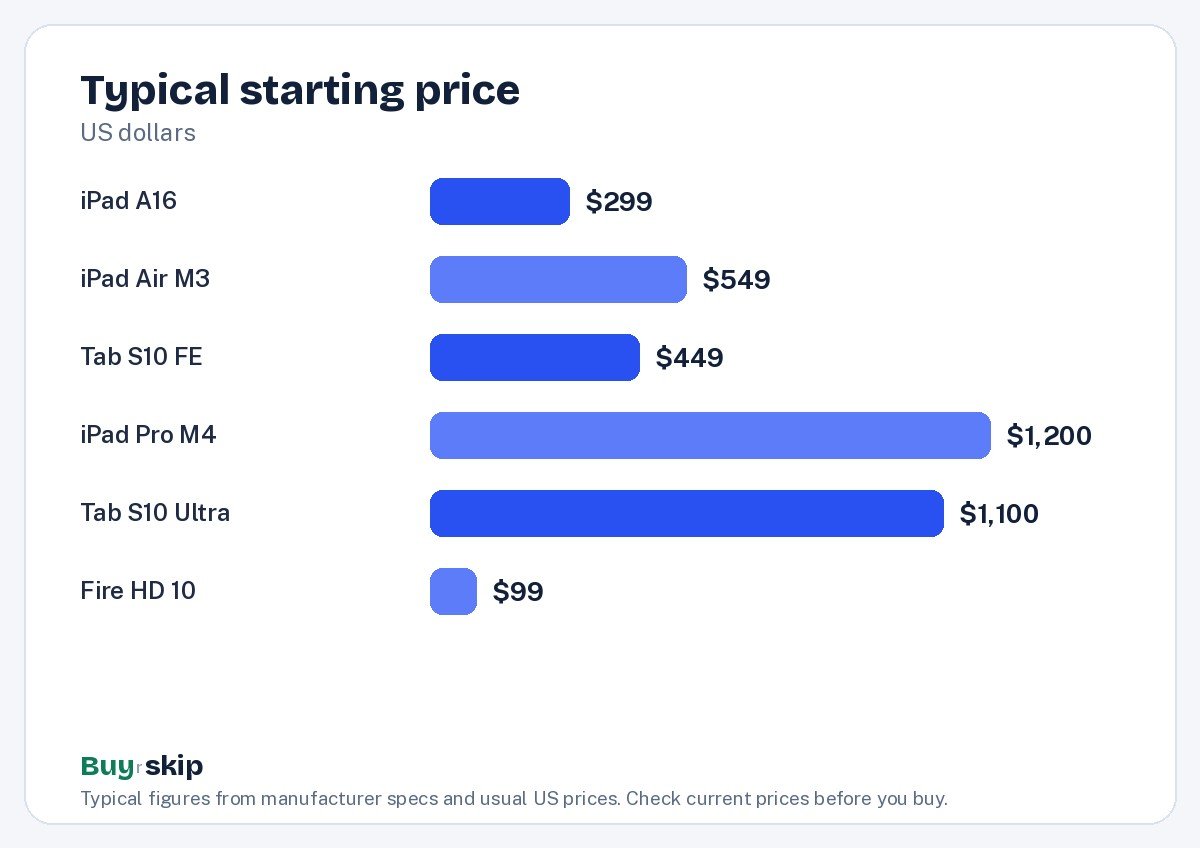
| Apple iPad 11-inch (A16 chip) | Most people | Buy (9.0/10) | about $299–$349 |
| Apple iPad Air 11-inch (M3) | Students and note-takers | Buy (8.9/10) | about $549–$599 |
| Samsung Galaxy Tab S10 FE | Android users | Buy (8.1/10) | about $449–$529 |
| Apple iPad Pro 13-inch (M4) | Artists and pros | Consider (8.6/10) | about $1,200–$1,500 |
| Samsung Galaxy Tab S10 Ultra | Android power users | Consider (8.3/10) | about $1,100–$1,300 |
| Amazon Fire HD 10 Tablet (2023 release) | Budget streaming and kids | Consider (7.1/10) | about $99–$149 |
Tablet prices drop often around back-to-school season and holidays, so check the current price before you buy.
The best tablets in 2026
Best overall Our verdict: Buy
Apple iPad 11-inch (A16 chip)
Typical price: about $299–$349
Most people. Buy it if you want a fast, well-supported tablet for streaming, reading, homework and video calls.
- Pros
- ✓ Fast A16 chip
- ✓ 128GB of storage to start
- ✓ Years of software updates
- ✓ Works with Apple Pencil (USB-C)
- Cons
- ✕ Screen is not laminated
- ✕ No Apple Intelligence support
Check price on Amazon Paid link
The Apple iPad 11-inch (A16 chip) is the tablet we recommend to most people because it does everything a typical tablet owner needs, at the lowest price Apple charges for an iPad. The A16 chip is fast for streaming, browsing, video calls, homework and most games, and the 11-inch Liquid Retina display is sharp and bright enough for movies and reading.
It starts with 128GB of storage, which is enough for apps, downloaded shows and photos for most people. Apple rates the battery at up to 10 hours, and iPads typically receive software updates for many years, which helps it hold value. It also works with the Apple Pencil (USB-C) for notes and doodles.
There are two compromises. The screen is not laminated, so there is a small gap between the glass and the display that makes drawing feel less direct and adds a bit of reflection. It also does not support Apple Intelligence features. If either matters to you, the iPad Air is the step up. For streaming, reading, school and family use, this is the one to buy. It is also the easiest iPad to recommend as a gift, because almost everyone who wants an iPad wants it for exactly these jobs, and its price leaves room in the budget for a case and a Pencil.
Best for students Our verdict: Buy
Apple iPad Air 11-inch (M3)
Typical price: about $549–$599
Students and note-takers. Buy it if you take handwritten notes, sketch or edit photos and want a tablet that can stand in for a laptop with a keyboard.
- Pros
- ✓ M3 chip with headroom for years
- ✓ Laminated, anti-reflective screen
- ✓ Apple Pencil Pro and Magic Keyboard support
- ✓ Supports Apple Intelligence
- Cons
- ✕ 60Hz screen
- ✕ Accessories add up fast
Check price on Amazon Paid link
The Apple iPad Air 11-inch (M3) is the iPad for people who will actually use it as a tool. Its M3 chip has plenty of headroom for years of updates, light photo editing and multitasking, and it supports Apple Intelligence features. The display is laminated with an anti-reflective coating, which makes Apple Pencil writing feel closer to pen on paper and reduces glare in bright rooms.
It works with the Apple Pencil Pro and Magic Keyboard, so it can stand in for a laptop for note-taking, essays and email. At 1.01 lb, it is light enough to carry all day in a backpack.
The trade-offs: the screen runs at 60Hz, so scrolling is not as smooth as on the iPad Pro, and accessories add up fast. Add a Pencil Pro and Magic Keyboard and the total climbs well past the tablet price of about $549–$599. If you only stream and read, the base iPad does that for about $250 less.
Best Android tablet Our verdict: Buy
Samsung Galaxy Tab S10 FE
Typical price: about $449–$529
Android users. Buy it if you use an Android phone and want a big-screen tablet with a stylus included and expandable storage.
- Pros
- ✓ S Pen included
- ✓ microSD storage expansion
- ✓ IP68 water and dust resistance
- ✓ Long Samsung update promise
- Cons
- ✕ Midrange chip
- ✕ LCD rather than AMOLED
Check price on Amazon Paid link
The Samsung Galaxy Tab S10 FE is the tablet to buy if you use an Android phone and want a big screen with a stylus included. The S Pen comes in the box, which saves real money compared with buying an Apple Pencil separately, and it is good for handwritten notes, marking up PDFs and sketching.
It has a 10.9-inch LCD at 90Hz, which makes scrolling smoother than a 60Hz screen. It also adds features no iPad here offers: microSD storage expansion and an IP68 rating for water and dust resistance, which is reassuring around kids, kitchens and pools. Samsung’s long update promise means it should stay current for years.
The compromises are a midrange chip and an LCD rather than an AMOLED panel, so colors and contrast are not as rich as Samsung’s flagship tablets. Heavy gamers should look at the faster Tab S10 Ultra. For Android users who want a capable all-rounder at about $449–$529, it is a strong pick. It is also a smart family tablet, since the water resistance and included pen mean fewer accessories to buy and less worry about spills.
Best premium Our verdict: Consider
Apple iPad Pro 13-inch (M4)
Typical price: about $1,200–$1,500
Artists and pros. Buy it if you draw, edit or want the best tablet screen available.
- Pros
- ✓ Stunning OLED display
- ✓ Extremely thin
- ✓ Very fast
- Cons
- ✕ Very expensive with accessories
- ✕ iPadOS limits
Check price on Amazon Paid link
The Apple iPad Pro 13-inch (M4) has the best tablet screen available. Its tandem OLED display delivers deep blacks, high brightness and vivid color, which makes it a joy for watching films and a serious canvas for drawing and photo or video editing. It is extremely thin and very fast, with power to spare for demanding creative apps.
It earns a Consider because of price and purpose. At about $1,200–$1,500 before accessories, and much more once you add a keyboard and Pencil, it costs as much as a high-end laptop. iPadOS has also improved, but it still limits some laptop-style workflows, such as file management and certain pro apps.
Buy it if you draw, edit photos or video, or simply want the best tablet display. If you mostly watch video and browse, the base iPad or iPad Air will feel nearly as good day to day for a fraction of the cost. If you are torn between the Pro and the Air, ask whether you will notice the OLED screen and extra speed every day. Artists and video editors usually will; casual users usually will not.
Best big-screen Android Our verdict: Consider
Samsung Galaxy Tab S10 Ultra
Typical price: about $1,100–$1,300
Android power users. Buy it if you want a big Android tablet with the pen in the box.
- Pros
- ✓ Huge AMOLED screen
- ✓ S Pen included
- ✓ DeX desktop mode
- Cons
- ✕ Very large
- ✕ Expensive
Check price on Amazon Paid link
The Samsung Galaxy Tab S10 Ultra is Samsung’s biggest, most capable tablet. Its huge AMOLED screen is excellent for movies, split-screen multitasking and drawing, and the S Pen is included. DeX desktop mode turns the interface into a windowed, laptop-like layout, which suits people who want to work from a tablet with a keyboard.
The size is the trade-off. It is very large, which makes it hard to hold one-handed and awkward on a couch or in a small bag. It is also expensive at about $1,100–$1,300.
It is a Consider because most Android users will be happier with the Tab S10 FE, which is lighter, cheaper and still includes the pen. Buy the Ultra if you want the biggest Android screen and plan to use it for work or creative projects at a desk. It also makes a good shared screen for two people watching a film on a flight or reviewing designs together, where its size becomes an advantage rather than a burden.
Best budget Our verdict: Consider
Amazon Fire HD 10 Tablet (2023 release)
Typical price: about $99–$149
Budget streaming and kids. Buy it if you want a cheap screen for Prime Video, Netflix and Kindle books and you live in Amazon's world.
- Pros
- ✓ Very low price
- ✓ Full HD 10.1-inch screen
- ✓ Good for Kindle, Audible and Prime Video
- ✓ Long battery life
- Cons
- ✕ No Google Play Store
- ✕ Lock-screen ads unless you pay to remove them
- ✕ Sluggish for anything demanding
Check price on Amazon Paid link
The Amazon Fire HD 10 Tablet (2023 release) is a big screen for very little money. Its 10.1-inch Full HD display is fine for Prime Video, Netflix, Kindle books and Audible, and Amazon rates the battery at up to 13 hours. At about $99–$149, it is an easy pick for a kitchen recipe screen, a travel entertainment device or a first tablet for kids. Amazon’s kids profiles and parental controls are built in, which makes it easy to set limits on what children can open and for how long.
The catches are real, though. Fire OS does not include the Google Play Store, so many apps are missing, and the lock screen shows ads unless you pay to remove them. It is also sluggish for anything demanding, such as heavy games or lots of multitasking. If you need Google apps or a smooth, fast tablet, spend more on the base iPad or the Galaxy Tab S10 FE.
How to choose tablets
Pick the platform first
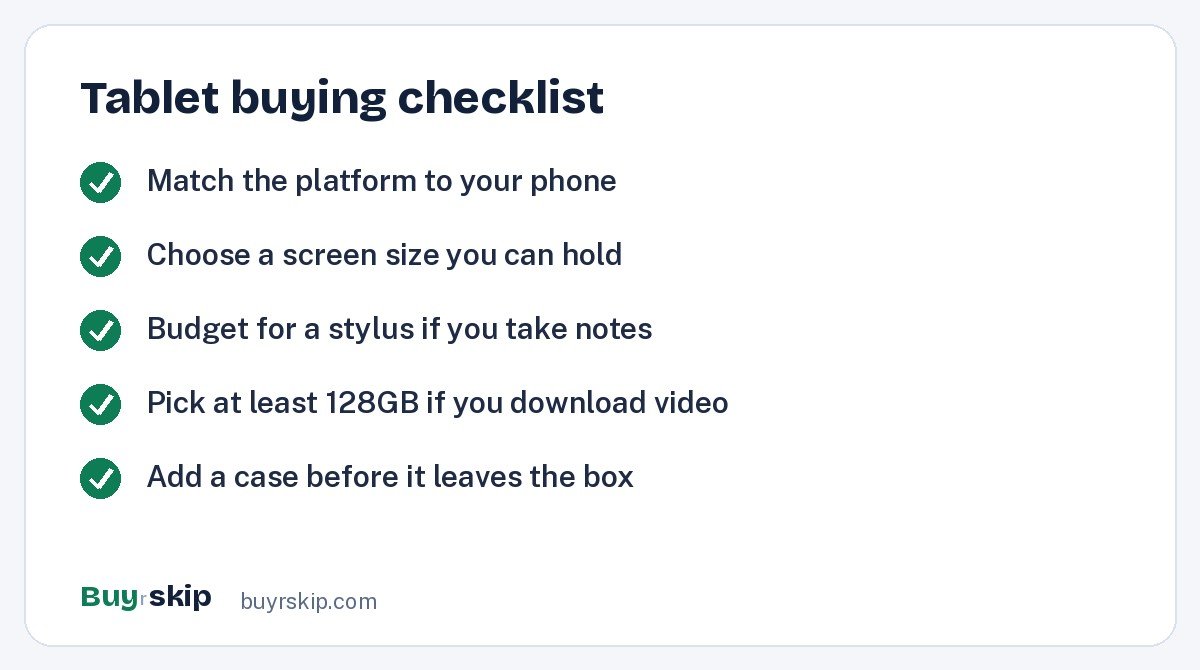
Your phone and existing apps usually decide this. If you have an iPhone, an iPad fits naturally with AirDrop, iMessage and shared apps; buy the base iPad unless you need more. If you use Android, a Samsung tablet shares your Google account and apps; buy the Samsung Galaxy Tab S10 FE. If you mostly use Amazon services and want the lowest price, the Fire HD 10 works, with the app limits noted above.
Screen type and size
LCD screens, like those on the base iPad and Tab S10 FE, are bright and sharp for most uses. OLED and AMOLED, found on the iPad Pro and Tab S10 Ultra, add deeper blacks and richer contrast. A laminated screen, as on the iPad Air, reduces glare and makes stylus writing feel more direct. Bigger screens are better for movies and multitasking, but an 11-inch tablet is far easier to hold in bed or carry around.
Stylus and keyboard plans
If you will take handwritten notes or draw, budget for a stylus from day one. Samsung includes the S Pen with the Tab S10 FE and Ultra. Apple sells its Pencil separately, and models differ: the base iPad works with the Apple Pencil (USB-C), while the Air and Pro support the Apple Pencil Pro. If you want a laptop replacement, add a keyboard case to the budget; our best keyboards guide covers Bluetooth options that pair with tablets.
Storage and memory
128GB is a comfortable starting point for most people who stream and use cloud storage. If you download a lot of video for flights or keep large creative files, step up a storage tier. Android tablets like the Tab S10 FE also accept microSD cards, which is a cheap way to add space.
Software support and longevity
A tablet that gets updates for years stays safer and keeps working with new apps. Apple and Samsung both have strong track records on updates, which is why their tablets often feel useful for a long time. Budget tablets with limited app stores age faster.
What each price tier gets you
Under about $150, you get a basic screen for video and reading, with compromises in speed and app access; that is the Fire HD 10. Around $300 to $350, the base iPad gives you a fast, well-supported tablet that suits nearly everyone. Between about $450 and $600, you pay for extras: an included S Pen, water resistance and microSD on the Tab S10 FE, or a laminated screen, M3 chip and Pencil Pro support on the iPad Air. Above $1,000, the iPad Pro and Tab S10 Ultra add premium screens, more power and bigger sizes. The rule is simple: buy the cheapest tier that does what you need, and spend the difference on a case and a stylus if you will use one.
Protect it for kids and travel
Tablets get dropped, especially with kids. A protective case and screen protector are cheap insurance; search for a case with a stand that fits your exact model. For kids, the Fire HD 10 and the base iPad both work well with parental controls set up properly, and a volume-limited kids headphones pair is worth adding.
Frequently asked questions
Which iPad should I buy in 2026?
For most people, the base iPad 11-inch (A16 chip). It is fast, starts with 128GB and covers streaming, reading, school and video calls. Choose the iPad Air if you take lots of handwritten notes, want Apple Intelligence features or plan to use a keyboard as a laptop replacement. The iPad Pro makes sense mainly for artists and editors who will use its OLED screen and power.
Is the Samsung Galaxy Tab S10 FE good for students?
Yes, especially for Android users. It includes the S Pen for notes, supports microSD expansion for files and has IP68 water and dust resistance, which helps in a backpack. Its midrange chip handles notes, browsing, video and schoolwork well. It is less suited to demanding games or heavy creative apps, where Samsung’s more expensive tablets are faster.
Is the Amazon Fire HD 10 a good tablet?
It is a good cheap screen for Amazon content, Netflix and Kindle books, and its battery life is long. It is not a good general-purpose tablet. It lacks the Google Play Store, shows lock-screen ads unless you pay to remove them, and feels slow for demanding apps. If you need full app access, spend more on an iPad or Galaxy tablet.
Can a tablet replace a laptop?
For some people, yes. With a keyboard case, an iPad Air, iPad Pro or Galaxy Tab S10 Ultra can handle email, documents, browsing and video calls. Limits show up with complex file management, some pro software and heavy multitasking. If your work depends on desktop apps, a laptop is still the safer buy; our best laptops guide can help.
Do I need an Apple Pencil for an iPad?
No. You can use an iPad entirely with touch. A Pencil is worth it if you take handwritten notes, annotate PDFs or draw. Check compatibility before you buy: the base iPad works with the Apple Pencil (USB-C), while the iPad Air (M3) and iPad Pro (M4) support the Apple Pencil Pro.
What is the best tablet for kids?
For young kids who mainly watch shows and read, the Fire HD 10 is affordable and easy to replace if it gets damaged, though its app selection is limited. For school-age kids who need homework apps and a longer life, the base iPad is the better investment. Either way, add a sturdy case, set up parental controls and keep screen-time limits in place.
The bottom line
The Apple iPad 11-inch (A16 chip) is the best tablet for most people: fast, well supported and fairly priced. Step up to the iPad Air for serious note-taking, pick the Galaxy Tab S10 FE if you are on Android, and choose the Fire HD 10 only as a cheap streaming screen.
If reading is your main use, also see our best e-readers.
Check price on Amazon: Apple iPad 11-inch (A16 chip)
Paid link. Typical price about $299–$349; check the current price on Amazon.