We research products independently from specs, manufacturer documentation, warranty terms and owner feedback. When you buy through links on this page, we may earn a commission at no extra cost to you. As an Amazon Associate we earn from qualifying purchases.
Quick answer
The best keyboard for most people is the Logitech MX Keys S Wireless Keyboard: quiet, precise scissor keys, smart backlighting and one-tap switching between three computers on Mac or Windows. If you want a mechanical feel, the Keychron K2 Max Wireless Mechanical Keyboard packs hot-swap switches into a compact 75% layout for about the same price. The best budget pick is the Logitech Wave Keys Wireless Ergonomic Keyboard, which eases wrist strain for well under $70.
The best keyboards are the ones you stop noticing after ten minutes of typing. That sounds simple, but the right choice depends on whether you share an office, how many computers you switch between, whether your wrists ache by Friday and whether you actually enjoy the click of a mechanical switch. A keyboard is also one of the few computer accessories you touch for hours every day, so a small upgrade pays off quickly. Our picks are based on specs, manufacturer documentation, warranty terms, independent review consensus and owner-feedback patterns.
Quick picks
| Product | Best for | Our verdict | Typical price |
|---|---|---|---|
| Logitech MX Keys S Wireless Keyboard | Office work | Buy | about $99–$119 |
| Logitech MX Keys S | Typing all day | Buy | about $100–$120 |
| Keychron Q1 Max | Enthusiasts | Buy | about $200–$230 |
| Keychron K2 Max Wireless Mechanical Keyboard | Mechanical keyboard fans | Buy | about $99–$129 |
| Logitech Wave Keys Wireless Ergonomic Keyboard | Wrist comfort on a budget | Buy | about $49–$69 |
| Apple Magic Keyboard with Touch ID and Numeric Keypad | Desktop Mac owners | Consider | about $179–$199 |
Keyboard prices shift with retailer promotions, so check the current price before you buy.
The best keyboards in 2026
Best overall Our verdict: Buy
Logitech MX Keys S Wireless Keyboard
Typical price: about $99–$119
Office work. Buy it if you type all day on Mac or Windows and want a quiet, comfortable keyboard that switches between computers.
- Pros
- ✓ Comfortable, quiet scissor keys
- ✓ Pairs with up to three devices
- ✓ Smart backlighting
- ✓ Works with Mac and Windows
- Cons
- ✕ Backlight drains the battery faster
- ✕ Full-size layout takes desk space
Check price on Amazon Paid link
The Logitech MX Keys S Wireless Keyboard is the keyboard we would recommend to almost anyone who types for a living. Its low-profile scissor keys are quiet enough for shared offices and video calls, yet precise and comfortable over long sessions. Smart backlighting turns on as your hands approach, which helps in dim rooms. It pairs with up to three devices over Bluetooth or a Logi Bolt receiver, so you can tap a key to jump from a work laptop to a personal desktop or a tablet. It works with both Mac and Windows, with dual-labeled keys.
Logitech rates the battery at up to 10 days with the backlight on and up to 5 months with it off, so the backlight is the main drain. Turning it off or down stretches charging far apart. Owner feedback tends to praise the key feel above everything else: the slightly dished keycaps guide your fingertips to the center of each key, which cuts down on typos once you adjust. The full-size layout includes a number pad, which is great for spreadsheets but takes desk space and pushes your mouse farther out.
Skip it if you love the click and travel of mechanical switches, or if you need a compact board for a small desk. Expect about $99–$119.
Also great Our verdict: Buy
Logitech MX Keys S
Typical price: about $100–$120
Typing all day. Buy it if you want a quiet, comfortable keyboard that switches between computers.
- Pros
- ✓ Comfortable dished keys
- ✓ Smart backlighting
- ✓ Works across 3 devices
- Cons
- ✕ No mechanical feel
- ✕ Backlight drains battery
Check price on Amazon Paid link
The Logitech MX Keys S is the same keyboard as our top pick, listed under a shorter name. It has the same comfortable dished keys, smart backlighting and three-device switching. We list it separately because both listings appear in stores at slightly different prices, about $100–$120 here versus about $99–$119.
Because the hardware is the same, everything we say about the top pick applies here: the quiet keys, the Mac and Windows support and the generous battery life with the backlight off. Treat the two as interchangeable and buy whichever is cheaper on the day you shop, as long as the seller is Logitech or an authorized retailer and the warranty applies. The trade-offs are the same too: no mechanical feel, and the backlight drains the battery faster. If you are on a Mac and want Touch ID at your desk instead, look at the Apple Magic Keyboard. If you are on a budget, the Wave Keys costs about half as much.
Best premium Our verdict: Buy
Keychron Q1 Max
Typical price: about $200–$230
Enthusiasts. Buy it if you want a premium mechanical keyboard you can customize.
- Pros
- ✓ Solid aluminum build
- ✓ Hot-swappable switches
- ✓ Wireless and wired
- Cons
- ✕ Heavy
- ✕ Tall without a wrist rest
Check price on Amazon Paid link
The Keychron Q1 Max is for people who want their keyboard to feel like a piece of hardware rather than an accessory. Its solid aluminum body gives a dense, steady typing feel, and hot-swappable switches let you change the feel later without soldering. It runs wireless or wired, so it suits a work setup by day and gaming by night.
That build has a cost. It is heavy, so it stays on your desk rather than in your bag, and it sits tall enough that most owners add a wrist rest. At about $200–$230 it is the priciest keyboard here. Skip it if you want something light to carry or you are not sure mechanical keyboards are for you; the K2 Max is a cheaper way to find out.
It also makes sense for people who spend serious hours writing or coding and want a board that feels the same in year five as on day one. Hot-swap sockets mean a worn or failed switch is a quick fix rather than a reason to replace the keyboard. For enthusiasts who like to tinker with switches and keycaps, the Q1 Max is a keyboard you keep for years and customize over time rather than replace.
Best mechanical Our verdict: Buy
Keychron K2 Max Wireless Mechanical Keyboard
Typical price: about $99–$129
Mechanical keyboard fans. Buy it if you want the feel of a mechanical keyboard in a compact layout that works well with a Mac.
- Pros
- ✓ Satisfying mechanical feel
- ✓ Hot-swappable switches
- ✓ Mac and Windows keycaps included
- ✓ Bluetooth, 2.4GHz and wired
- Cons
- ✕ Tall without a wrist rest
- ✕ Heavier than slim keyboards
Check price on Amazon Paid link
The Keychron K2 Max Wireless Mechanical Keyboard is the easiest way into mechanical keyboards. The 75% layout (84 keys) drops the number pad but keeps the arrow and function keys, so your mouse sits closer and your shoulders stay more relaxed. Switches are hot-swappable, and Keychron includes both Mac and Windows keycaps, which is unusual and makes it one of the better mechanical choices for Mac users.
Connection options cover everything: Bluetooth, a 2.4GHz wireless receiver for lower lag and USB-C wired. That makes it a good fit for coding, writing and casual gaming on one board.
The cons are typical of mechanical keyboards. It is tall without a wrist rest and heavier than slim boards like the MX Keys S. Mechanical switches are also louder, so skip it if you share an office where clacky keys bother people. Expect about $99–$129, roughly the same as the Logitech, which makes the choice purely about feel.
Best budget Our verdict: Buy
Logitech Wave Keys Wireless Ergonomic Keyboard
Typical price: about $49–$69
Wrist comfort on a budget. Buy it if you want a more comfortable typing posture without learning a fully split keyboard.
- Pros
- ✓ Wave layout eases wrist strain
- ✓ Cushioned palm rest
- ✓ Runs for years on AAA batteries
- ✓ Affordable
- Cons
- ✕ No backlight
- ✕ Large footprint
Check price on Amazon Paid link
The Logitech Wave Keys Wireless Ergonomic Keyboard is the gentlest way to try an ergonomic keyboard. Instead of a fully split design that takes weeks to learn, it uses a subtle wave-shaped key layout and a cushioned palm rest to ease your wrists into a more natural angle. Most people adapt within a day or two.
It connects over Bluetooth or a Logi Bolt receiver and runs on two AAA batteries, which Logitech says last for years. That means no charging cable and no dead keyboard on a Monday morning. Like the MX Keys S, it can use Logitech’s Bolt receiver for a steadier connection in offices crowded with Bluetooth devices. For people who spend all day in email and documents, it delivers a lot of comfort for little money.
There is no backlight, and the footprint is large because the palm rest is built in. If you need a compact board or type in the dark, look elsewhere. At about $49–$69 it is the cheapest keyboard here and the best value for anyone whose wrists or forearms complain after long workdays.
Best for Mac desktops Our verdict: Consider
Apple Magic Keyboard with Touch ID and Numeric Keypad
Typical price: about $179–$199
Desktop Mac owners. Buy it if you use a Mac with Apple silicon and want Touch ID at your desk for logins and Apple Pay.
- Pros
- ✓ Touch ID for Macs with Apple silicon
- ✓ Slim and quiet
- ✓ USB-C charging, long battery life
- Cons
- ✕ Expensive
- ✕ Very flat typing angle
- ✕ No backlight
Check price on Amazon Paid link
The Apple Magic Keyboard with Touch ID and Numeric Keypad earns a consider rather than a buy. Its standout feature is Touch ID, which lets you unlock a Mac with Apple silicon, approve Apple Pay and fill passwords with a fingerprint at your desk. For iMac, Mac mini and Mac Studio owners, that convenience is real. It is slim, quiet and charges over USB-C with long battery life.
The downsides add up. At about $179–$199 it is expensive, the typing angle is very flat, and there is no backlight. Touch ID does not work on Windows PCs, and it needs a Mac with Apple silicon. Many owners pair it with a wrist rest or small riser to soften the flat angle. If you do not need Touch ID, the Logitech MX Keys S Wireless Keyboard offers backlighting, multi-device switching and a more comfortable shape for less.
How to choose a keyboard
Mechanical or low-profile
This is the biggest decision. Low-profile scissor keys, like those on the MX Keys S and Apple Magic Keyboard, are quiet and feel like a good laptop. Mechanical switches, like those on the Keychron boards, have more travel and a distinct feel and sound that many typists love.
- If you share an office or take many calls, buy the Logitech MX Keys S Wireless Keyboard.
- If you want a mechanical feel without spending much, buy the Keychron K2 Max Wireless Mechanical Keyboard.
- If you already love mechanical keyboards and want a premium build, buy the Keychron Q1 Max.
Layout and desk space
A full-size keyboard includes a number pad, which helps with spreadsheets and data entry. A 75% layout drops the number pad, saving space and letting your mouse sit closer. If you crunch numbers all day, stay full-size. If your desk is small or your shoulders tense up, a compact board like the K2 Max helps. Pair it with a good mouse; see our best computer mice for options.
Ergonomics and wrist comfort
If your wrists ache, a keyboard alone will not fix everything, but it helps. The Logitech Wave Keys Wireless Ergonomic Keyboard is the easiest step toward a natural typing angle. Tall mechanical boards benefit from a keyboard wrist rest. Your chair and desk height matter just as much; our guides to the best office chairs and best standing desks cover the rest of the setup.
Connections and multi-device switching
If you switch between a work laptop and a personal computer, look for multi-device pairing. Both Logitech MX Keys S listings handle three devices. The K2 Max adds a 2.4GHz receiver option for lower lag. A wired connection is the most reliable choice for gaming.
Backlighting and power
A backlight is useful in dim rooms and for people who glance down at the keys, but it is also the biggest drain on a wireless keyboard’s battery. Logitech’s own rating for the MX Keys S shows the gap clearly: about 10 days with the backlight on versus about 5 months with it off. Rechargeable keyboards like the MX Keys S and Apple Magic Keyboard need an occasional USB-C top-up. Battery-powered boards like the Wave Keys skip charging entirely but need fresh AAA cells eventually.
Decision rule: if you type in the dark, buy a backlit board like the Logitech MX Keys S Wireless Keyboard and keep a cable handy. If you never want to think about charging, the Logitech Wave Keys Wireless Ergonomic Keyboard is the low-maintenance choice.
Build quality and longevity
Keyboards last a long time when they are built well. The aluminum Keychron Q1 Max is the sturdiest here, and hot-swappable switches on both Keychron boards mean a single bad switch can be replaced instead of retiring the whole keyboard. Plastic-bodied boards are lighter and easier to move, which matters if you carry your keyboard between home and office. Check warranty terms before buying, since coverage varies by brand and seller.
Mac or Windows
All of these work with Macs, but some fit better. The Keychron K2 Max includes Mac keycaps, the Logitech boards have dual labels, and the Apple Magic Keyboard is the only one with Touch ID. On Windows, skip the Apple keyboard entirely.
Price and value
Here is how the typical starting prices compare.
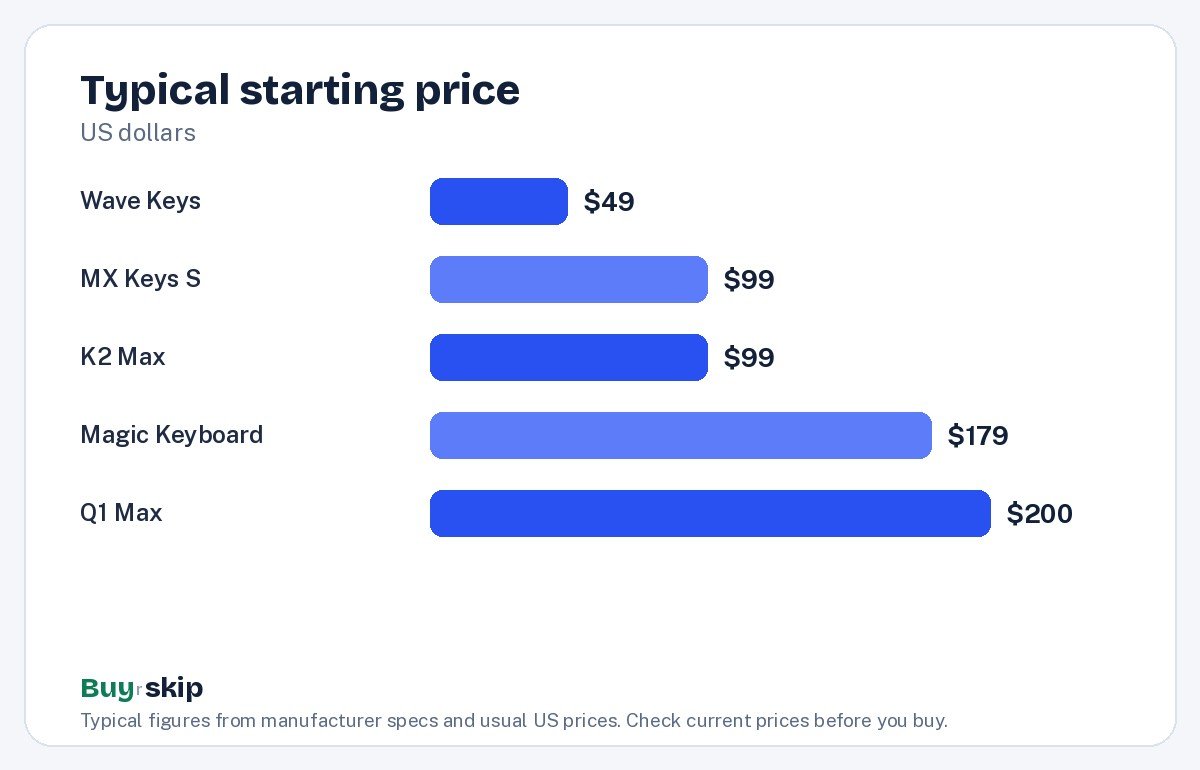
The Logitech Wave Keys Wireless Ergonomic Keyboard is the clear value pick, while the MX Keys S and K2 Max offer the best balance of price and features.
Frequently asked questions
Is a mechanical keyboard better for typing?
Not automatically. Mechanical switches have more travel and a crisper feel that many typists prefer, and hot-swap boards like the Keychron K2 Max let you try different switch types. But quiet low-profile keys, like those on the Logitech MX Keys S, are just as accurate for many people and far better for shared offices and calls. Choose based on feel and noise, not speed claims.
Why are there two Logitech MX Keys S listings?
The Logitech MX Keys S Wireless Keyboard and the Logitech MX Keys S are the same keyboard sold under different listing names, often at slightly different prices. They share the same keys, backlight and three-device switching. Buy whichever is cheaper from Logitech or an authorized seller so your warranty is honored.
Does the Apple Magic Keyboard Touch ID work on Windows?
No. Touch ID on the Apple Magic Keyboard with Touch ID and Numeric Keypad works only with Macs that use Apple silicon. On a Windows PC or an older Intel Mac it works as a regular Bluetooth keyboard without fingerprint unlock, which makes the high price hard to justify. Windows users should choose a Logitech or Keychron board.
What is the best keyboard for wrist pain?
Among these picks, the Logitech Wave Keys Wireless Ergonomic Keyboard is the best starting point. Its wave-shaped layout and cushioned palm rest put your wrists in a more natural position without the learning curve of a split keyboard. Pair it with good chair and desk height. If pain persists, talk to a doctor or physical therapist.
Is a 75% keyboard hard to get used to?
For most people, no. A 75% layout like the Keychron K2 Max keeps the arrow keys, function row and common navigation keys, and drops mainly the number pad. If you rarely type long strings of numbers, you may not miss it at all. If you do data entry, stick with a full-size board like the MX Keys S or the Apple Magic Keyboard with numeric keypad.
How long do wireless keyboard batteries last?
It depends heavily on backlighting. Logitech rates the MX Keys S at up to 10 days with the backlight on and up to 5 months without it. The Wave Keys runs on two AAA batteries that Logitech says last for years. The Apple Magic Keyboard charges over USB-C and has long battery life.
The bottom line
The Logitech MX Keys S Wireless Keyboard is the best keyboard for most people: quiet, comfortable, backlit and able to switch between three computers on Mac or Windows. If you want a mechanical feel, the Keychron K2 Max Wireless Mechanical Keyboard costs about the same and adds hot-swap switches and Mac keycaps. On a budget or with sore wrists, the Logitech Wave Keys Wireless Ergonomic Keyboard is a smart, inexpensive upgrade.
If you are building a new desk setup, a quality desk mat keeps your keyboard from sliding and protects the desk surface.
Check price on Amazon: Logitech MX Keys S Wireless Keyboard
Paid link. Typical price about $99–$119; check the current price on Amazon.