We research products independently from specs, manufacturer documentation, warranty terms and owner feedback. When you buy through links on this page, we may earn a commission at no extra cost to you. As an Amazon Associate we earn from qualifying purchases.
Quick answer
If you own a PS5, the Sony DualSense Wireless Controller is the controller to buy, with excellent haptics and adaptive triggers that also work in many PC games. For Xbox and Windows PC, the Xbox Wireless Controller is the comfortable, reliable standard. For the best value on PC or Switch, the 8BitDo Ultimate 2 Wireless Controller adds drift-resistant sticks, back buttons and a charging dock for about the same price.
The best game controllers depend first on what you play on. A controller that is perfect for a PS5 may be a poor fit for a Switch, and the cheapest option is not always the best value once you factor in batteries and stick drift. This guide covers the official pads for PlayStation and Xbox, a strong third-party option for PC and Switch, and one premium pad most people should skip. Our picks are based on specs, manufacturer documentation, warranty terms, independent review consensus and owner-feedback patterns.
Quick picks
| Product | Best for | Our verdict | Typical price |
|---|---|---|---|
| Sony DualSense Wireless Controller | PS5 owners | Buy | about $64–$75 |
| Xbox Wireless Controller | Xbox and PC | Buy | about $54–$65 |
| 8BitDo Ultimate 2 Wireless Controller | PC and Switch value | Buy | about $59–$69 |
| Sony DualSense Edge Wireless Controller | Competitive PS5 players | Skip | about $179–$219 |
Controller prices shift with colors and promotions, so check the current price before you buy.
The best game controllers in 2026
Best for PS5 Our verdict: Buy
Sony DualSense Wireless Controller
Typical price: about $64–$75
PS5 owners. Buy it if you own a PS5 and want a spare controller, or want great haptics on PC.
- Pros
- ✓ Excellent haptic feedback
- ✓ Adaptive triggers
- ✓ Works on PC and Mac
- Cons
- ✕ Battery life is average
- ✕ Stick drift reports over time
Check price on Amazon Paid link
The DualSense is the controller that ships with the PS5, and it is still the best one for most PlayStation owners. Its haptic feedback is far more detailed than old-style rumble, letting games convey textures, impacts and weather through your hands. The adaptive triggers can add resistance, so pulling a bowstring or squeezing a brake feels different from firing a light pistol. In games that support these features, they make a real difference.
It is also a good choice on PC and Mac. It connects over Bluetooth or USB-C, and many PC games recognize it, with some supporting its haptics and triggers when wired. Charging is over USB-C.
There are two known weaknesses. Battery life is average, so heavy players will be charging often, and a PS5 controller charging station is worth considering if you own two. Owners also report stick drift over time, which affects many controllers with traditional sticks. If you play mostly on Xbox or Switch, buy a controller designed for that platform instead.
Best for Xbox and PC Our verdict: Buy
Xbox Wireless Controller
Typical price: about $54–$65
Xbox and PC. Buy it if you play on Xbox or Windows PC and want a comfortable, familiar controller.
- Pros
- ✓ Very comfortable shape
- ✓ Works on Xbox, PC, phones and tablets
- ✓ Share button and textured grips
- Cons
- ✕ Uses AA batteries by default
- ✕ No built-in rechargeable battery
Check price on Amazon Paid link
The Xbox Wireless Controller is the safe, comfortable choice for Xbox consoles and Windows PCs. Its shape is one of the most comfortable in gaming, with textured grips and an offset stick layout that many players prefer for long sessions. It works on Xbox, Windows PCs, phones and tablets, which makes it ideal for cloud gaming as well. There is also a Share button for capturing clips and screenshots.
Its biggest quirk is power. It uses two AA batteries by default and has no built-in rechargeable battery. Some people like this, because you can swap in fresh batteries in seconds and never wait for a charge. Others find it a hassle. The fix is cheap: buy rechargeable AA batteries or Microsoft’s rechargeable kit.
Skip it if you hate dealing with batteries or if you play mainly on PS5 or Switch. On PC, it competes closely with the 8BitDo Ultimate 2 Wireless Controller, which adds a charging dock and back buttons at a similar price, but Xbox console owners should stick with the official pad.
Best value Our verdict: Buy
8BitDo Ultimate 2 Wireless Controller
Typical price: about $59–$69
PC and Switch value. Buy it if you want a controller with drift-resistant sticks for PC or Switch at a fair price.
- Pros
- ✓ Drift-resistant TMR/Hall-effect sticks
- ✓ Charging dock included
- ✓ Extra back buttons
- Cons
- ✕ Not for PS5 or Xbox consoles
- ✕ Software is basic
Check price on Amazon Paid link
The 8BitDo Ultimate 2 is the controller to get if you play on PC, Switch or Android and want the most for your money. Its headline feature is TMR sticks, a magnetic design similar in principle to Hall-effect sticks, which avoids the physical wear that causes drift in many traditional sticks. For players who have replaced a drifting controller before, that alone is a strong reason to buy.
It also includes a charging dock, so the controller always lives on a charger, and extra back buttons you can map to common actions. Connectivity is flexible: 2.4 GHz wireless with a dongle, Bluetooth, or a USB-C cable.
The limits are clear. It does not work on PS5 or Xbox consoles, so it is not a replacement for a console’s official pad. It has no PS5-style haptics, and 8BitDo’s configuration software is basic compared with what the big brands offer. If you play primarily on Xbox, get the Xbox Wireless Controller. If you are a PS5 player, get the Sony DualSense Wireless Controller.
Skip it Our verdict: Skip
Sony DualSense Edge Wireless Controller
Typical price: about $179–$219
Competitive PS5 players. Buy it if you play competitive shooters on PS5 and want back paddles and replaceable stick modules.
- Pros
- ✓ Back buttons and profiles
- ✓ Replaceable stick modules
- ✓ Carrying case
- Cons
- ✕ Very expensive
- ✕ Shorter battery life than the standard DualSense
Check price on Amazon Paid link
The DualSense Edge is Sony’s pro controller for PS5. It adds back buttons, switchable profiles and replaceable stick modules, so if a stick wears out you can swap the module rather than replace the whole controller. It comes with a carrying case and works on PS5 and PC.
For most people, it is not worth the money. It costs nearly three times as much as a standard DualSense, and its battery runs out faster than the regular controller’s, which is a frustrating trade at this price. The back buttons and profiles are genuinely useful for competitive shooters, but casual and single-player gamers will not get much from them.
Buy the Sony DualSense Wireless Controller instead. You get the same haptics and adaptive triggers, longer battery life and enough money left over for a game or two. Consider the Edge only if you play competitive shooters on PS5 seriously and want back paddles without third-party add-ons.
How to choose game controllers
Start with your platform
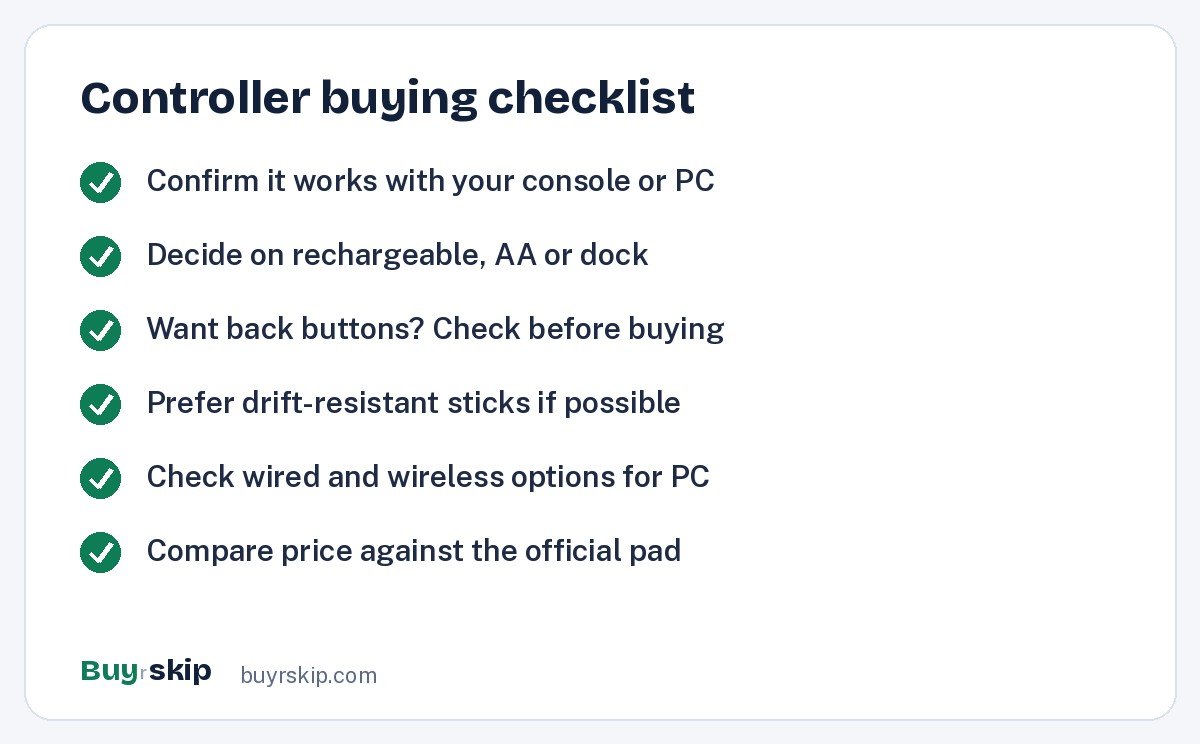
Platform support is the single most important factor, and it narrows the choice fast.
- If you play on PS5, buy the Sony DualSense Wireless Controller.
- If you play on Xbox, buy the Xbox Wireless Controller.
- If you play on Switch or Android, the 8BitDo Ultimate 2 Wireless Controller is the best pick here.
- If you play on Windows PC, any of the three works; choose the Xbox pad for comfort, the 8BitDo for value and features, or the DualSense for haptics.
Third-party controllers usually cannot replace official pads on PlayStation and Xbox consoles, so check compatibility carefully.
Think about stick drift
Stick drift happens when a worn analog stick registers movement you did not make. It is a common complaint with traditional potentiometer sticks over time. Magnetic stick designs, such as the TMR sticks in the 8BitDo Ultimate 2, are designed to avoid that wear. The DualSense Edge takes a different approach, letting you replace the stick module. If drift has burned you before and your platform allows it, prioritize drift-resistant sticks.
Batteries and charging
Rechargeable controllers like the DualSense charge over USB-C but need frequent top-ups with heavy use. The Xbox controller runs on AA batteries, which you can swap instantly. The 8BitDo includes a dock, the most convenient option of all. Consider how you play: if you often forget to charge, a dock or swappable batteries will save you frustration.
Comfort and layout
Comfort matters more than any single feature, because you may hold a controller for hours at a time. There are two main layouts. PlayStation controllers place both sticks side by side below the face buttons, while Xbox controllers offset the left stick up high and the d-pad below it. Neither is objectively better, but most people strongly prefer the one they grew up with. The 8BitDo Ultimate 2 follows the Xbox-style offset layout, which many PC players find natural.
Size and weight matter too. The Xbox controller is widely praised for fitting a broad range of hands, and its textured grips help during long sessions. The DualSense is a bit larger and heavier than older PlayStation pads, which some players like and others find tiring. If you can, hold a friend’s controller before buying, especially if you are switching from one platform’s layout to another.
Extra buttons and features
Back buttons let you jump, reload or crouch without taking your thumbs off the sticks, which helps in fast games. The 8BitDo Ultimate 2 and DualSense Edge have them; the standard DualSense and Xbox controller do not. Haptics and adaptive triggers are unique to Sony’s controllers and add most in PS5 exclusives.
Price and value
Most good controllers cost between about $55 and $75. The chart shows the typical starting price for each pick.
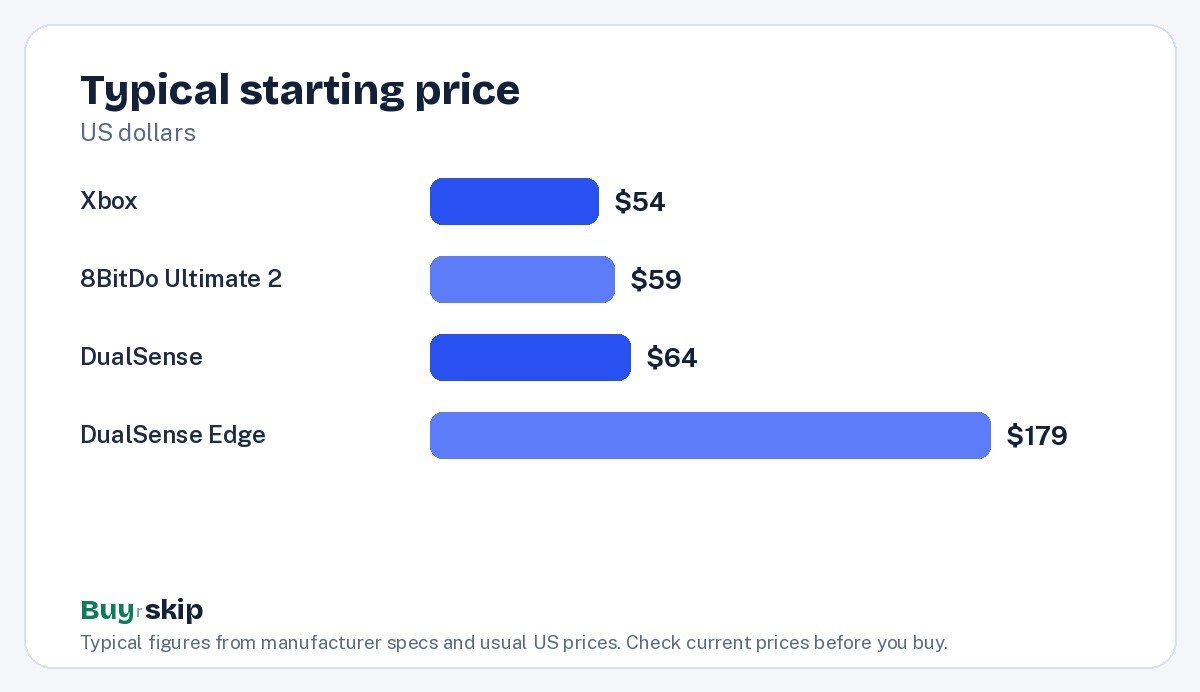
At these prices, the extra features of the 8BitDo make it excellent value on PC and Switch, while the official pads remain the best fit for their own consoles. The DualSense Edge sits far above the rest, which is why it needs a strong reason to justify itself. If you are still picking a platform, our guide to the best game consoles can help, and pairing a controller with one of the best gaming headsets completes a couch setup.
Frequently asked questions
Can I use a PS5 controller on PC?
Yes. The Sony DualSense Wireless Controller works on Windows PCs and Macs over Bluetooth or a USB-C cable. Many PC games recognize it automatically, and some support its haptics and adaptive triggers, typically when connected by cable. For games that expect an Xbox controller, Steam can translate inputs so the DualSense works smoothly.
Why does the Xbox controller still use AA batteries?
Microsoft’s design lets you choose how to power it: disposable AAs, rechargeable AAs or an official rechargeable kit. The upside is that you never have to wait for a charge, since you can swap batteries in seconds. The downside is ongoing cost if you use disposables. Rechargeable AAs are the simplest long-term fix for most owners of the Xbox Wireless Controller.
Does the 8BitDo Ultimate 2 work on Xbox or PS5?
No. The 8BitDo Ultimate 2 Wireless Controller is designed for PC, Switch and Android, and it does not support PS5 or Xbox consoles. If you want a controller for your console, buy the official pad. If you mainly play on PC or Switch, the 8BitDo is one of the best values available thanks to its drift-resistant sticks, back buttons and charging dock.
Is the DualSense Edge worth it?
For most players, no. The Sony DualSense Edge Wireless Controller costs nearly three times as much as a standard DualSense and has shorter battery life. Its back buttons, profiles and replaceable stick modules are useful for competitive shooters, so serious PS5 players may find it worthwhile. Everyone else gets better value from the regular DualSense.
How can I avoid stick drift?
You cannot fully prevent it on traditional sticks, but you can reduce the risk and the cost. Keep controllers clean and stored away from dust, and avoid pressing sticks hard into the edges. For new purchases, magnetic stick designs like the TMR sticks on the 8BitDo Ultimate 2 are built to resist drift. Check the warranty on any controller you buy, since drift within the warranty period is often covered.
What is the best controller for Nintendo Switch?
Of the controllers on this list, the 8BitDo Ultimate 2 Wireless Controller is the best fit for Switch. It connects wirelessly, includes a charging dock, adds back buttons and uses drift-resistant TMR sticks, which addresses one of the most common complaints Switch owners have about stick wear. The Sony and Microsoft controllers are not designed for Switch play, so skip them if Switch is your main platform.
The bottom line
Buy the controller made for your platform. PS5 owners should get the Sony DualSense Wireless Controller, Xbox owners the Xbox Wireless Controller, and PC or Switch players the 8BitDo Ultimate 2 Wireless Controller, which is the best value here. Skip the Sony DualSense Edge Wireless Controller unless competitive PS5 play is your priority and the price does not sting.
Check price on Amazon: Sony DualSense Wireless Controller
Paid link. Typical price about $64–$75; check the current price on Amazon.