We research products independently from specs, manufacturer documentation, warranty terms and owner feedback. When you buy through links on this page, we may earn a commission at no extra cost to you. As an Amazon Associate we earn from qualifying purchases.
Quick answer
Quick answer: the SteelSeries Arctis Nova Pro Wireless is the best gaming headset if you want premium wireless sound, active noise cancelling and hot-swap batteries that mean you never stop to charge. For most players, the SteelSeries Arctis Nova 7 Wireless is the better value, with 2.4 GHz and Bluetooth at the same time and up to 38 hours of battery. On a budget, the wired Razer BlackShark V2 X costs about $39–$59.
The best gaming headsets do three jobs at once: they make footsteps and explosions easy to place, they keep your voice clear to teammates, and they stay comfortable through a long session. The right pick depends on your platform, whether you want wireless, and how long you play at a stretch. Our picks are based on specs, manufacturer documentation, warranty terms, independent review consensus and owner-feedback patterns.
Quick picks
| Product | Best for | Our verdict | Typical price |
|---|---|---|---|
| SteelSeries Arctis Nova Pro Wireless | Serious gamers | Buy | about $330–$380 |
| SteelSeries Arctis Nova 7 Wireless | Most gamers | Buy | about $149–$199 |
| Razer BlackShark V2 Pro | Competitive play | Buy | about $180–$200 |
| HyperX Cloud III Wireless | Comfort and battery | Buy | about $99–$169 |
| Razer BlackShark V2 X | Budget | Buy | about $39–$59 |
| Logitech G PRO X 2 LIGHTSPEED | Competitive PC players | Consider | about $199–$249 |
Headset prices swing often around sales events, so check the current price before buying.
The best gaming headsets in 2026
Best overall Our verdict: Buy
SteelSeries Arctis Nova Pro Wireless
Typical price: about $330–$380
Serious gamers. Buy it if you want premium wireless sound that never needs a charging break.
- Pros
- ✓ Swappable batteries
- ✓ Active noise cancelling
- ✓ Base station with controls
- Cons
- ✕ Expensive
Check price on Amazon Paid link
The SteelSeries Arctis Nova Pro Wireless is the headset for people who play a lot and never want to plug in. Its standout feature is a hot-swap battery system: one battery sits in the headset while a spare charges in the base station, so when you run low you swap in a fresh one in seconds. Active noise cancelling blocks out fans, roommates and street noise, which also makes it useful for work calls.
The base station is more than a charger. It gives you physical controls for volume and settings, so you are not digging through menus mid-match. The main downside is price, at about $330–$380, and it is not a light headset. Skip it if weight matters most to you; the Razer BlackShark V2 Pro is far lighter. If you want the most complete wireless headset here and play for hours at a time, this is it.
It also suits people whose headset pulls double duty. Because ANC quiets the room and the base station makes switching volume quick, it works well for a workday of calls followed by an evening of gaming. If you only play an hour or two at a time, the hot-swap batteries matter less, and the Nova 7 covers your needs for much less money.
Best value Our verdict: Buy
SteelSeries Arctis Nova 7 Wireless
Typical price: about $149–$199
Most gamers. Buy it if you want a comfortable wireless headset for PC or PlayStation that also connects to your phone.
- Pros
- ✓ Simultaneous 2.4 GHz and Bluetooth
- ✓ Comfortable ski-goggle headband
- ✓ Long battery life
- Cons
- ✕ No active noise cancelling
- ✕ Mic is good, not great
Check price on Amazon Paid link
The SteelSeries Arctis Nova 7 Wireless is the best choice for most gamers. It connects over 2.4 GHz to your PC, PS5 or Switch and over Bluetooth to your phone at the same time, so you can take a call or listen to a group chat while you play. SteelSeries rates the battery at up to 38 hours, which covers a week of evening sessions for many players, and the ski-goggle headband spreads weight evenly so it stays comfortable.
It lacks active noise cancelling, and the mic is good rather than great. Note the platform caveat too: this standard version is for PC, PlayStation, Switch and mobile. If you need Xbox wireless, buy the Xbox-specific version of the headset instead. At about $149–$199, it delivers most of what the Nova Pro offers for roughly half the price.
The simultaneous connection is the feature owners tend to appreciate most over time. Being able to hear a phone call, a podcast or a Discord chat on your phone while game audio runs through the dongle removes the need for a second set of earbuds. If you never use your phone while playing, the HyperX Cloud III Wireless gives you longer rated battery life for a similar or lower price.
Best for competitive play Our verdict: Buy
Razer BlackShark V2 Pro
Typical price: about $180–$200
Competitive play. Buy it if you want a light, comfortable wireless headset with a clear mic.
- Pros
- ✓ Very light
- ✓ Clear microphone
- ✓ Long battery
- Cons
- ✕ No ANC
Check price on Amazon Paid link
The Razer BlackShark V2 Pro is built for competitive players who wear a headset for hours and want to forget it is there. It is very light, which reduces pressure on your head and neck, and its clear microphone is one of its strongest points, so callouts come through cleanly. Battery life is long, so you can go several days between charges.
The trade-off is that there is no active noise cancelling. In a noisy room you will hear more of what is around you. At about $180–$200, it is priced close to the Nova 7, so the decision comes down to priorities: pick the BlackShark V2 Pro for lighter weight and mic clarity, or the Nova 7 for simultaneous Bluetooth. Skip it if you want ANC; the Nova Pro is the one with it.
The light weight is the real reason to choose it. Competitive players often wear a headset for long ranked sessions, and a heavy headset becomes a distraction by the third hour. Combined with a mic that keeps callouts clear, it is a focused tool for people who care more about performance than extras.
Best for comfort Our verdict: Buy
HyperX Cloud III Wireless
Typical price: about $99–$169
Comfort and battery. Buy it if you want a comfortable wireless headset with very long battery life at a fair price.
- Pros
- ✓ Plush memory-foam cushions
- ✓ Very long battery life
- ✓ Clear detachable mic
- Cons
- ✕ No Bluetooth
- ✕ Plain design
Check price on Amazon Paid link
The HyperX Cloud III Wireless brings the famously comfortable Cloud design to a wireless headset. Plush memory-foam cushions make it easy to wear for long sessions, and HyperX rates the battery at up to 120 hours, the longest in this guide. It connects through a 2.4 GHz USB-C dongle, which works with PC, PS5 and Switch, and the detachable mic is clear.
What it does not have is Bluetooth, so you cannot connect to your phone at the same time as your console. The design is also plain, which some will see as a plus. At about $99–$169, it is a fair price for this much comfort and battery. Buy it if you charge as rarely as possible and want a comfortable fit. Skip it if you need phone audio alongside gaming; get the Nova 7.
The low end of its price range makes it one of the easiest wireless upgrades from a wired budget headset. For a teenager’s console setup, or for anyone who forgets to charge things, a rated battery that long means the headset is almost always ready when you sit down to play.
Best budget Our verdict: Buy
Razer BlackShark V2 X
Typical price: about $39–$59
Budget. Buy it if you want a light, comfortable wired headset for under $60 that works with almost anything.
- Pros
- ✓ Very light
- ✓ Works with any 3.5 mm jack
- ✓ Clear mic for the price
- Cons
- ✕ Wired only
- ✕ Basic build
Check price on Amazon Paid link
The Razer BlackShark V2 X is the best gaming headset under $60. It is wired over a 3.5 mm jack, so it works with almost anything that has a headphone port: PCs, consoles via the controller, laptops, phones with a jack and tablets. Razer lists it at about 240 g, so it is very light, and the mic is clear for the price.
You give up wireless freedom and premium materials. The build is basic, which is expected at about $39–$59, and the cable means you are tethered to the controller or PC. It is a great choice for kids, a second headset for a guest controller, or anyone who just wants something that works. If you want to ditch the cable for not much more, look at the HyperX Cloud III Wireless when it is near the low end of its price range.
Because it is so cheap, it is also a sensible spare. Many households keep one wired headset for a second controller, a work laptop or a child’s tablet, and the BlackShark V2 X handles all of those without pairing or charging.
Also great Our verdict: Consider
Logitech G PRO X 2 LIGHTSPEED
Typical price: about $199–$249
Competitive PC players. Buy it if you play competitive PC games and want premium drivers, build quality and long battery.
- Pros
- ✓ Large graphene drivers
- ✓ Sturdy aluminum and steel build
- ✓ Wireless and Bluetooth
- Cons
- ✕ Expensive
- ✕ Heavier than rivals
Check price on Amazon Paid link
The Logitech G PRO X 2 LIGHTSPEED is aimed at competitive PC players who want premium hardware. It uses large graphene drivers and a sturdy aluminum and steel build, and it connects three ways: LIGHTSPEED wireless, Bluetooth and a 3.5 mm cable. Logitech rates the battery at up to 50 hours. It also works with PS5.
It lands as a Consider because of value and weight. At about $199–$249, it costs more than the Nova 7 and the BlackShark V2 Pro, and it is heavier than those rivals. Cheaper wireless headsets cover most players’ needs. Buy it if you specifically want a metal build and multi-connection flexibility. Otherwise, the Razer BlackShark V2 Pro is lighter and the Nova 7 is cheaper.
The three-way connection is genuinely handy if you move between a gaming PC, a phone and a device with only a headphone jack. A sturdy metal frame is also less likely to crack at the headband than plastic, which matters for players who take their headset on and off many times a day or pack it in a bag.
How to choose gaming headsets
Sound quality matters, but platform support, comfort and battery decide whether you keep a headset for years.
Platform compatibility
Check your platform before anything else. Many 2.4 GHz wireless headsets support PC, PlayStation and Switch, but Xbox requires headsets built specifically for its wireless system.
- If you play on PC, PS5 or Switch and want phone audio too, buy the Arctis Nova 7.
- If you play on Xbox and want wireless, look for the Xbox-specific version of the Nova 7.
- If you play on several devices and want one cheap headset for all, the wired BlackShark V2 X plugs into almost anything.
Wired vs wireless
Wired headsets are cheaper, never need charging and work across more devices. Wireless headsets let you move freely and keep your desk tidy. A 2.4 GHz dongle connection is what you want for gaming, since standard Bluetooth alone usually adds delay. Bluetooth is best used as a second connection for phones.
Battery life
Battery claims vary hugely. The chart below uses each maker’s rated maximum, and real use with RGB lighting or ANC on is usually lower.
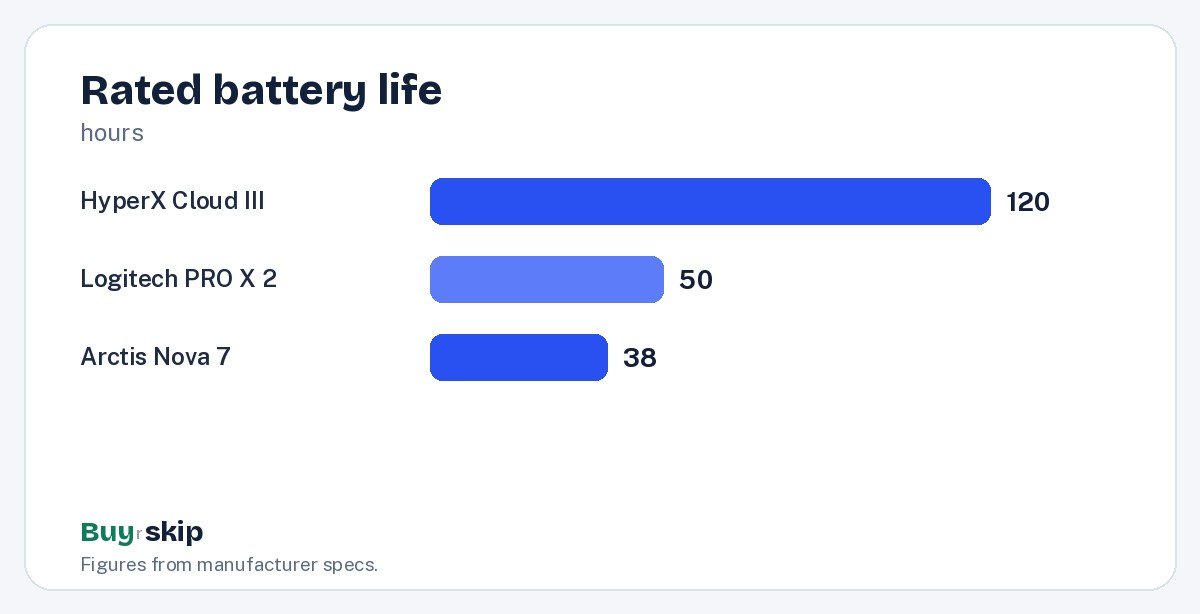
- If you hate charging, the HyperX Cloud III Wireless lasts longest.
- If you want zero downtime, the Nova Pro hot-swap batteries remove the problem entirely.
Comfort and weight
A headset that hurts after an hour is the wrong headset. Lighter models like the BlackShark V2 Pro and V2 X put less pressure on your head. Memory-foam cushions, like those on the Cloud III, help with clamping. If you wear glasses, softer cushions usually feel better. Heavier premium builds, like the Logitech, trade weight for durability. The ski-goggle band on the Arctis Nova 7 is another approach, spreading the load across the top of your head rather than one pressure point.
Microphone quality
Teammates hear your mic, not your headset. The Razer BlackShark V2 Pro and HyperX Cloud III Wireless are noted for clear mics. If you also stream or record, a dedicated microphone will always sound better; our home studio picks cover that upgrade.
Noise cancelling
Active noise cancelling is useful if you game in a shared or noisy space. Among these picks, only the Arctis Nova Pro Wireless has it. If you play in a quiet room, you can skip ANC and save money.
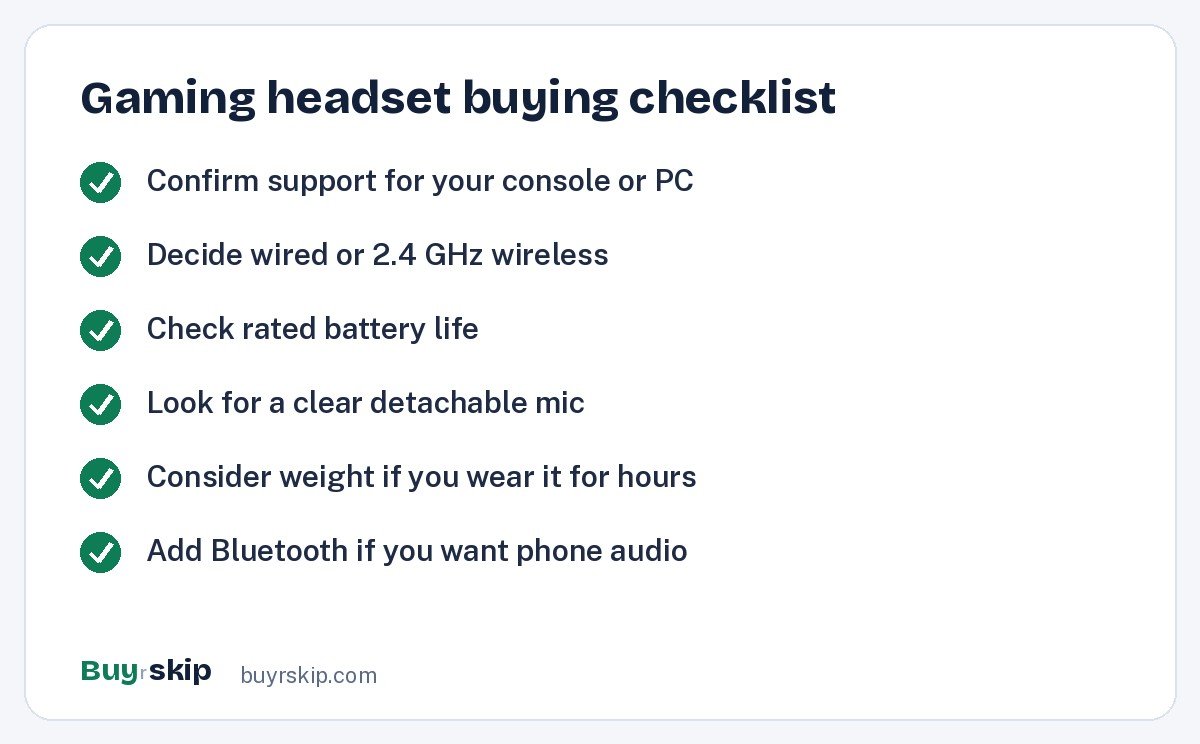
Accessories can extend a headset’s life. Replacement memory-foam ear pads refresh worn cushions, and a headset stand keeps your desk tidy.
Budget tiers
Gaming headset prices fall into three rough bands, and each band buys something different.
- Under $60: wired only. The BlackShark V2 X is light, clear and works almost anywhere.
- About $100 to $250: good wireless. The Cloud III Wireless, Arctis Nova 7, BlackShark V2 Pro and Logitech G PRO X 2 live here, and the choice comes down to battery, Bluetooth, weight and build.
- Over $300: premium extras. The Arctis Nova Pro Wireless adds ANC, hot-swap batteries and a control base.
If you are unsure, the middle band is where most players get the best value.
Frequently asked questions
Do I need a wireless gaming headset?
No, but it is more convenient. Wired headsets like the Razer BlackShark V2 X are cheap, light and never need charging. Wireless models like the SteelSeries Arctis Nova 7 Wireless let you move around and keep cables off your desk. If you sit close to your PC or play with the controller in hand, wired works well.
Which gaming headset is best for PS5?
The SteelSeries Arctis Nova 7 Wireless and HyperX Cloud III Wireless both support PS5 over 2.4 GHz, and the Logitech G PRO X 2 LIGHTSPEED lists PS5 too. The Nova 7 adds simultaneous Bluetooth, while the Cloud III offers longer rated battery life. Any wired 3.5 mm headset also works through the DualSense controller.
Will these headsets work with Xbox?
Not all of them wirelessly. Xbox uses its own wireless system, so most PC and PlayStation dongle headsets will not connect. The standard Arctis Nova 7 is not for Xbox wireless; SteelSeries sells an Xbox-specific version. A wired 3.5 mm headset like the Razer BlackShark V2 X works through an Xbox controller’s headphone jack.
Is active noise cancelling worth it for gaming?
It helps in noisy rooms, like a shared apartment or a dorm. The SteelSeries Arctis Nova Pro Wireless is the only pick here with ANC, and it doubles as a work headset for calls. If you play in a quiet room, the extra cost buys you less, and a lighter headset may be the better choice.
Can I use a gaming headset for music and calls?
Yes. Headsets with Bluetooth, like the Arctis Nova 7 and Logitech G PRO X 2, connect to your phone for music and calls. If music is your main use, a dedicated pair of headphones will usually sound better; see our best noise-cancelling headphones guide.
How long should a gaming headset last?
With reasonable care, a good headset should last several years. Ear pads usually wear out first, and on many models they can be replaced. Rechargeable batteries slowly lose capacity over time, which is one advantage of the Arctis Nova Pro’s swappable batteries and of wired models like the BlackShark V2 X, which have no battery at all. Keep the headset on a stand rather than tossed in a drawer to protect the headband and cable.
The bottom line
The SteelSeries Arctis Nova Pro Wireless is the best gaming headset for serious players, with hot-swap batteries, ANC and a handy base station. Most people will be just as happy with the Arctis Nova 7 Wireless for about half the price. Competitive players should look at the light Razer BlackShark V2 Pro, and comfort seekers at the HyperX Cloud III Wireless.
On a budget, the wired Razer BlackShark V2 X is hard to beat for under $60.
Check price on Amazon: SteelSeries Arctis Nova Pro Wireless
Paid link. Typical price about $330–$380; check the current price on Amazon.