We research products independently from specs, manufacturer documentation, warranty terms and owner feedback. When you buy through links on this page, we may earn a commission at no extra cost to you. As an Amazon Associate we earn from qualifying purchases.
Quick answer
Quick answer: the Shure SM7B is the best home studio microphone for podcasts and vocals, with a rich broadcast sound that rejects room noise. Pair it with the Focusrite Scarlett 2i2 (4th Gen), the best audio interface for most home recording, which has clean preamps and auto gain. If you want something simpler for streaming, the Shure MV7+ connects over USB or XLR for about $250–$280.
The best home studio gear does not need to fill a room. For most podcasters, singers and streamers, a good microphone and a clean audio interface cover the essentials, and the rest is your room, your headphones and your technique. The three picks below are proven, widely used tools that work well together or on their own. Our picks are based on specs, manufacturer documentation, warranty terms, independent review consensus and owner-feedback patterns.
Quick picks
| Product | Best for | Our verdict | Typical price |
|---|---|---|---|
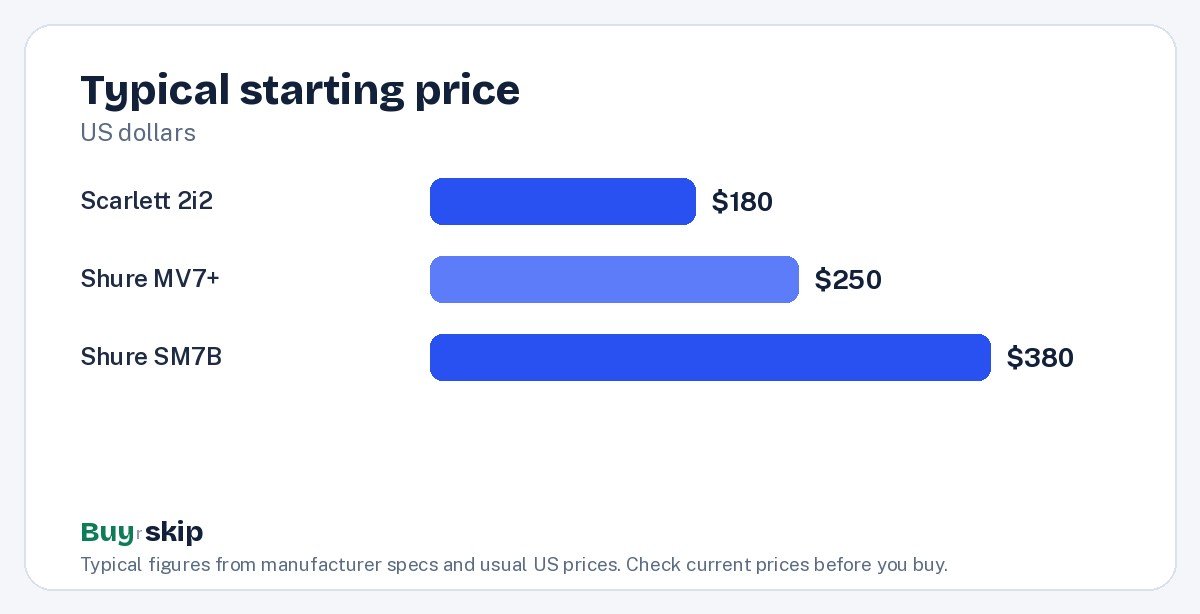
| Shure SM7B | Podcasts and vocals | Buy | about $380–$400 |
| Focusrite Scarlett 2i2 (4th Gen) | Home recording | Buy | about $180–$200 |
| Shure MV7+ | Streamers | Buy | about $250–$280 |
Prices on audio gear change through the year, so check the current price before you buy.
The best home studio gear in 2026
Best overall Our verdict: Buy
Shure SM7B
Typical price: about $380–$400
Podcasts and vocals. Buy it if you want a broadcast-standard voice sound.
- Pros
- ✓ Rich broadcast sound
- ✓ Rejects room noise
- ✓ Built to last
- Cons
- ✕ Needs lots of gain
Check price on Amazon Paid link
The Shure SM7B is the microphone you have probably seen on podcast sets and in radio studios. It is a dynamic microphone with a rich, warm broadcast sound that flatters most voices. Because it is designed to pick up what is directly in front of it and reject sound from the sides and back, it does a good job of ignoring room noise, keyboard clicks and echo from untreated walls. That makes it especially forgiving in a spare bedroom or closet studio. It is also built to last, which is why many owners keep one for years.
The catch is gain. The SM7B needs a lot of clean gain to reach a healthy recording level, so it does not pair well with every budget interface or mixer. You will want an interface with strong preamps, and some owners add an inline mic booster to get more headroom. It connects over XLR, so it cannot plug straight into a computer.
At about $380–$400, it is a long-term investment. Buy it if you want a broadcast-standard voice sound and plan to record often. Skip it if you do not have, or do not want to buy, an interface with plenty of gain; the Shure MV7+ is easier to run.
Best audio interface Our verdict: Buy
Focusrite Scarlett 2i2 (4th Gen)
Typical price: about $180–$200
Home recording. Buy it if you record vocals or instruments at home.
- Pros
- ✓ Clean sound
- ✓ Auto gain
- ✓ Solid build
- Cons
- ✕ Two inputs only
Check price on Amazon Paid link
The Focusrite Scarlett 2i2 (4th Gen) is the audio interface we would recommend to most people setting up a home studio. An interface converts your microphone’s signal into something your computer can record, and it gives you headphone and speaker outputs for monitoring. The 2i2 does this cleanly, with low-noise preamps that keep recordings free of hiss. Its auto gain feature listens to your voice or instrument and sets the input level for you, which removes the most common beginner mistake of recording too quietly or clipping.
The build is solid, and the 2i2 is a common choice for recording vocals, guitar and keyboards at home. The main limit is the number of inputs. It has two, which covers a host and a guest, or a vocal and a guitar, but not a full band or a three-person podcast.
At about $180–$200, it is fairly priced for what it does. Buy it if you record vocals or instruments at home. Skip it if you only need one simple USB microphone for calls or streaming; the Shure MV7+ can plug straight into your computer instead.
Best for streaming Our verdict: Buy
Shure MV7+
Typical price: about $250–$280
Streamers. Buy it if you want SM7-style sound with USB simplicity.
- Pros
- ✓ USB and XLR
- ✓ Auto level
- ✓ Good noise rejection
- Cons
- ✕ Pricey for USB
Check price on Amazon Paid link
The Shure MV7+ is for people who want much of the SM7B’s sound character with far less setup. Its key feature is having both USB and XLR outputs. Plug it into your computer over USB and you can start streaming or recording a call in minutes with no interface. Later, if you add an interface like the Scarlett 2i2, you can connect over XLR instead. That makes it a smart first microphone that grows with you.
Auto level helps keep your volume steady as you lean in or back, and its noise rejection is good, which suits gaming setups and shared rooms. The trade-off is price. At about $250–$280, it is pricey for a USB microphone, and it is designed for voice rather than instruments.
Buy it if you want SM7-style sound with USB simplicity for streaming, podcasting or meetings. Skip it if you need a microphone for guitar amps or acoustic instruments; for those, an interface-based setup is the better path.
How to choose home studio gear
Home studio gear is easy to overbuy. These are the decisions that matter most.
USB or XLR
USB microphones plug straight into a computer and are the simplest way to start. XLR microphones need an audio interface but give you more control and more upgrade options over time.
- If you want the easiest possible setup for streaming or calls, buy the Shure MV7+ and use it over USB.
- If you want the classic broadcast sound and plan to grow a studio, buy the Shure SM7B with the Scarlett 2i2.
- If you want flexibility, the MV7+ does both, so you can start on USB and switch to XLR later.
Gain and why it matters
Gain is how much your interface boosts the microphone’s signal. Some dynamic microphones, including the SM7B, are quiet and need a lot of gain. If an interface runs out of clean gain, you have to push it to the limit, which adds hiss. Before buying the SM7B, make sure your interface is known to drive it well, or plan for a inline mic booster.
Dynamic vs condenser
Dynamic microphones like the SM7B and MV7+ reject more background noise, which suits untreated rooms, podcasts and streaming. Condenser microphones capture more detail and room sound, which can be great in a treated space but unforgiving in a bedroom with hard walls. For most home studios, a dynamic mic is the safer choice.
Inputs and how many people you record
Count the microphones and instruments you need to record at once. The Scarlett 2i2 has two inputs, enough for a solo creator with a guest or a singer with a guitar. If you plan a three- or four-person podcast, you will need an interface with more inputs.
Your room and accessories
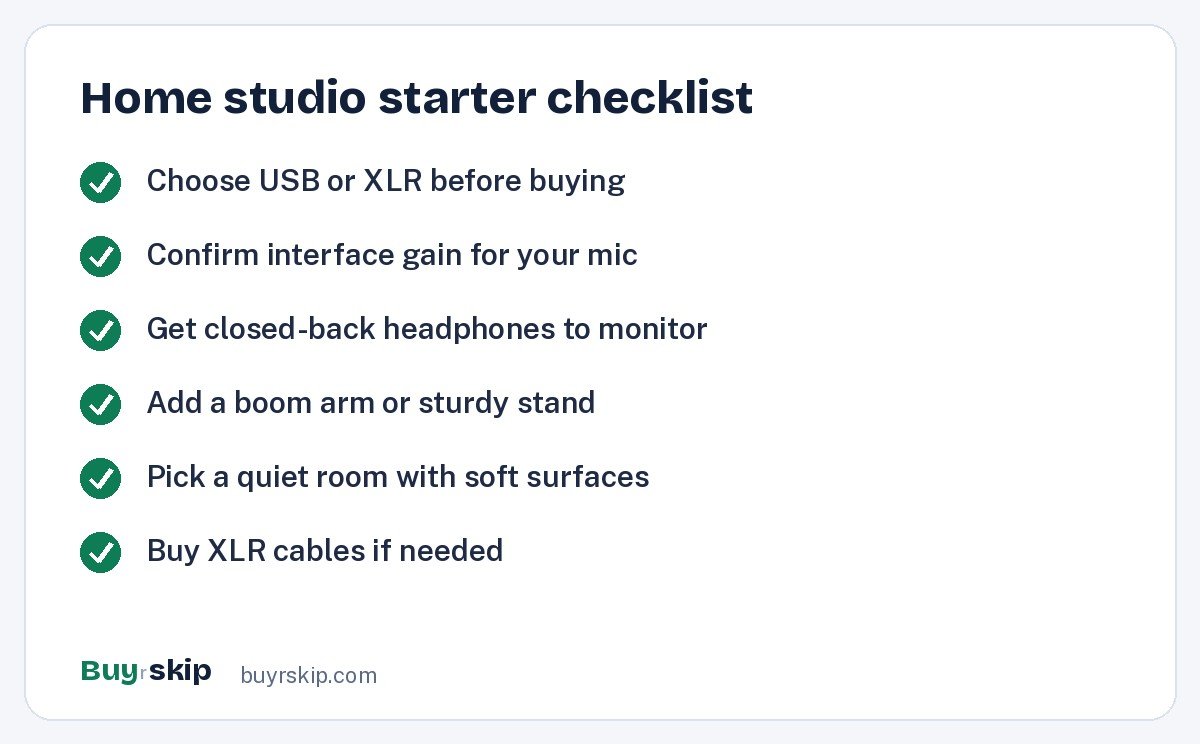
A good microphone in an echoey room still sounds echoey. Soft furnishings, rugs and curtains help. Speak close to a dynamic mic to improve your voice-to-room ratio. A sturdy microphone boom arm keeps the mic at mouth level and off the desk, which also reduces bumps and vibration.
Monitoring
You need to hear yourself to record well. Closed-back headphones stop sound leaking back into the microphone. Both the Scarlett 2i2 and MV7+ let you listen while you record. For more on headphones, see our best audiophile headphones guide, and if you game and stream, our best gaming headsets roundup covers all-in-one options.
Budget and upgrade path
The smartest home studios grow in steps rather than being bought all at once. Decide what you need today and what you might add later, then buy pieces that will still be useful after an upgrade.
- Streamer or remote worker, simplest setup: the Shure MV7+ on USB, plus headphones. About $250–$280 for the mic.
- Musician recording at home: start with the Scarlett 2i2, then add microphones that suit your voice and instruments.
- Podcaster who wants the classic sound: the Shure SM7B with the Scarlett 2i2, which together come to roughly $560–$600 before cables and a stand.
- Starting small, aiming high: buy the MV7+ now, then add the 2i2 later and run the MV7+ over XLR.
This approach keeps every purchase useful. The interface you buy for one microphone will work with the next, and a USB/XLR mic like the MV7+ never becomes obsolete when you add an interface.
The same goes for software: you do not need expensive programs to begin. Free recording apps and the tools bundled with many interfaces are enough to record, edit and export a podcast or demo. Learn to set levels, cut mistakes and apply light compression before spending money on plugins. Good technique and a quiet room improve a recording far more than software does. Spend your first dollars on the microphone, interface and headphones, and upgrade software only when you hit a clear limit.
Frequently asked questions
What do I need to start a home studio?
At minimum, a microphone, a way to connect it to your computer and a pair of headphones. For a simple setup, a USB mic like the Shure MV7+ covers the first two. For a classic broadcast setup, pair the Shure SM7B with the Focusrite Scarlett 2i2 (4th Gen), add an XLR cable and use closed-back headphones to monitor.
Is the Shure SM7B good for beginners?
Its sound is forgiving, but its setup is not the simplest. The SM7B needs an interface with plenty of clean gain, and it connects over XLR only. If you are comfortable buying an interface like the Scarlett 2i2, it is a great first microphone. If you want to plug in and go, the Shure MV7+ is the easier start.
Do I need an audio interface?
Only for XLR microphones and instruments. A USB microphone like the Shure MV7+ connects directly to your computer. If you want to use the SM7B, record guitar or keyboard, or connect studio speakers, you need an interface such as the Focusrite Scarlett 2i2 (4th Gen).
Can I use the Shure MV7+ with an audio interface?
Yes. The MV7+ has both USB and XLR outputs. You can use it over USB on its own, then connect it to an interface like the Scarlett 2i2 over XLR as your setup grows. That flexibility is one of the main reasons to choose it over a USB-only microphone.
Is the Scarlett 2i2 enough for podcasting?
For one or two people, yes. It has two inputs, clean preamps and auto gain, which makes it easy to get good levels. For a podcast with three or more people in the same room, you will need an interface with more inputs.
Why does my recording sound echoey?
Usually it is the room, not the microphone. Hard walls, bare floors and empty corners reflect sound back into the mic. Move closer to the microphone, record in a room with soft furnishings, and hang blankets or add a rug if needed. Dynamic microphones like the Shure SM7B and MV7+ help, since they pick up less of the room than most condenser mics.
The bottom line
For a classic home studio, buy the Shure SM7B and pair it with the Focusrite Scarlett 2i2 (4th Gen). Together they give you a broadcast-standard voice sound with clean, easy recording. If you want simplicity, the Shure MV7+ is the best single purchase for streaming and podcasting, since it works over USB now and XLR later.
Check price on Amazon: Shure SM7B
Paid link. Typical price about $380–$400; check the current price on Amazon.