We research products independently from specs, manufacturer documentation, warranty terms and owner feedback. When you buy through links on this page, we may earn a commission at no extra cost to you. As an Amazon Associate we earn from qualifying purchases.
Quick answer
The UPLIFT V2 Standing Desk is the best standing desk for most home offices: very stable, offered in a huge range of tops and sizes, and backed by a long warranty, for about $600–$900. If you want dual-motor stability for less, the FlexiSpot E7 Standing Desk is the value pick at about $399–$599. On a tight budget, the FlexiSpot EN1 Electric Standing Desk gives you electric lift and presets for about $179–$249.
The best standing desks do one thing well above all else: they stay steady when raised. A desk that wobbles every time you type at standing height is a desk you stop standing at. This guide ranks seven electric desks by stability, height range, load capacity, assembly and value, and adds two accessories that make a sit-stand setup work better: a monitor arm and a monitor light bar. Our picks are based on manufacturer specs and documentation, warranty terms, independent review consensus and the patterns that show up in owner feedback.
Quick picks
| Product | Best for | Our verdict | Typical price |
|---|---|---|---|
| UPLIFT V2 Standing Desk | Most home offices | Buy | about $600–$900 |
| Ergotron LX Desk Monitor Arm | Single monitors | Buy | about $170–$220 |
| BenQ ScreenBar Halo | Late-night work | Buy | about $160–$180 |
| FlexiSpot E7 Standing Desk | Most home offices | Buy | about $399–$599 |
| FlexiSpot E7 Pro | Value and stability | Buy | about $450–$600 |
| Vari Electric Standing Desk 60×30 | Easy setup and support | Buy | about $599–$749 |
| FlexiSpot EN1 Electric Standing Desk | Budget buyers | Buy | about $179–$249 |
| Vari Electric Standing Desk | Quick assembly | Consider | about $550–$750 |
| SHW Electric Height Adjustable Standing Desk | Starter desk | Consider | about $129–$179 |
Standing desk prices vary a lot by top size, material and bundle, so check the current price for the exact configuration you want.
The best standing desks in 2026
Best overall Our verdict: Buy
UPLIFT V2 Standing Desk
Typical price: about $600–$900
Most home offices. Buy it if you want a rock-solid desk configured exactly the way you like.
- Pros
- ✓ Very stable
- ✓ Huge choice of tops and sizes
- ✓ Long warranty
- Cons
- ✕ Many options can confuse
- ✕ Pricier than budget desks
Check price on Amazon Paid link
The UPLIFT V2 Standing Desk is the desk to buy if you want to get it right once. Its main strength is stability: the frame stays steady at standing height, which is where cheaper desks fall short. It is also highly configurable, with a huge choice of desktop sizes, materials and add-ons, so you can match it to a small spare room or a large L-shaped corner. Owner feedback tends to praise how solid it feels when raised, and the controller presets make switching between sitting and standing a one-button job. A long warranty backs the frame, and that matters on a product with motors, a control box and a lot of moving weight.
It suits remote workers, gamers with heavy setups and anyone who spends eight hours a day at a desk. If you run two monitors, a desktop PC and speakers, it handles that kind of load without feeling top-heavy.
The trade-offs are price and choice overload. At about $600–$900 depending on configuration, it costs more than budget desks, and the configurator has so many options that it can be confusing. A practical approach: pick a top size first, then a frame color, then stop. Skip it if you want the cheapest electric desk; the FlexiSpot EN1 Electric Standing Desk is a fraction of the price.
Best for monitors Our verdict: Buy
Ergotron LX Desk Monitor Arm
Typical price: about $170–$220
Single monitors. Buy it if you want a monitor arm that stays put and moves smoothly.
- Pros
- ✓ Smooth movement
- ✓ Sturdy
- ✓ 10-year warranty
- Cons
- ✕ Needs a sturdy desk edge
Check price on Amazon Paid link
A standing desk raises your keyboard and your screen together, but the right screen height still depends on your posture, and that is where the Ergotron LX Desk Monitor Arm helps. It lets you lift, lower, tilt and pull the monitor toward you, and it stays put once positioned. Owner feedback consistently praises its smooth movement and sturdy build, and it carries a 10-year warranty, which is unusually long for an accessory.
An arm also frees desk space under the screen and reduces the effect of small desk wobble on the monitor, since you can bring the screen closer to the wall and set it exactly at eye level when sitting or standing.
The one requirement: it clamps to the desk edge, so it needs a sturdy desktop. Thin laminate tops on very cheap desks may not be a great match. Skip it if your monitor is very heavy or a large ultrawide; check Ergotron’s weight limit against your monitor before buying. If you are shopping for a new screen too, see our best monitors guide.
Best for late-night work Our verdict: Buy
BenQ ScreenBar Halo
Typical price: about $160–$180
Late-night work. Buy it if you work in the evening and want even desk light without screen glare.
- Pros
- ✓ No screen glare
- ✓ Wireless controller
- ✓ Auto-dimming
- Cons
- ✕ Pricey for a light
Check price on Amazon Paid link
The BenQ ScreenBar Halo is a light bar that sits on top of your monitor and lights the desk without throwing glare onto the screen. If you work in the evening, it gives you even light on your keyboard and papers without a desk lamp taking up space. It includes a wireless controller, so you can change brightness without reaching up, and auto-dimming that adjusts to the room.
It fits a standing desk especially well because it moves with your monitor. When you raise the desk, the light comes with it, so you are not re-aiming a lamp every time you switch positions.
The trade-off is price: about $160–$180 is a lot for a light. Skip it if your monitor is very curved or thick at the top, since the clamp may not seat properly. If you only work during daylight, you can leave this one off the list. It also pairs well with a monitor arm, as long as the top of your screen is a shape the clamp can grip. People who spend long evenings coding, writing or gaming get the most from it, since a dark room with a bright screen is a common source of eye fatigue.
Best value Our verdict: Buy
FlexiSpot E7 Standing Desk
Typical price: about $399–$599
Most home offices. Buy it if you want a sturdy dual-motor desk that stays stable at standing height with two monitors on top.
- Pros
- ✓ Dual motors lift heavy setups
- ✓ Stable at standing height
- ✓ Memory presets
- ✓ Wide height range
- Cons
- ✕ Heavy and takes time to assemble
- ✕ Desktop sold separately on some bundles
Check price on Amazon Paid link
The FlexiSpot E7 Standing Desk is the value pick for people who want real stability without UPLIFT pricing. It uses dual motors and a steel frame, lifts up to 355 lb, and covers a height range of about 22.8 to 48.4 inches. That wide range is good news for both shorter and taller users, and the high load limit makes it comfortable with two monitors, a desktop tower and accessories on top. Memory presets let you save sitting and standing heights.
Owner feedback commonly highlights that it stays stable at standing height with dual monitors, which is the main reason to buy a dual-motor desk over a single-motor one.
The trade-offs: it is heavy and takes time to assemble, so plan for a second person. On some bundles, the desktop is sold separately, so read the listing before you compare prices. Skip it if you need a desk under $250 or have a very small room; the FlexiSpot EN1 Electric Standing Desk is cheaper and lighter.
Best for stability on a budget Our verdict: Buy
FlexiSpot E7 Pro
Typical price: about $450–$600
Value and stability. Buy it if you want dual-motor stability at a mid-range price.
- Pros
- ✓ Dual motors
- ✓ Stable frame
- ✓ Good price
- Cons
- ✕ Heavy to assemble
Check price on Amazon Paid link
The FlexiSpot E7 Pro is FlexiSpot’s dual-motor desk with a C-frame. A C-frame sets the legs toward the back of the desk rather than centered under it, which leaves more open legroom at the front. It shares the strengths that make the E7 line popular: dual motors, a stable frame and a fair mid-range price of about $450–$600.
Choose between the E7 and the E7 Pro on frame style and current price. If you like the open legroom of a C-frame and the price gap is small, the Pro makes sense. If the standard E7 is meaningfully cheaper on the day you shop, it gives you the same core benefit of dual-motor stability.
Like the standard E7, it is a good fit for remote workers with two monitors who want a steady surface but do not need UPLIFT’s long list of options. The trade-offs are the same: it is heavy and takes time to assemble. Skip it if you need a very wide desktop; the UPLIFT V2 Standing Desk offers far more size choices.
Best for easy setup Our verdict: Buy
Vari Electric Standing Desk 60×30
Typical price: about $599–$749
Easy setup and support. Buy it if you want a well-built desk that's quick to assemble and backed by a US company with good support.
- Pros
- ✓ Easy assembly
- ✓ Large 60 by 30-inch top
- ✓ Quiet, smooth motor
- ✓ Five-year warranty
- Cons
- ✕ Pricier than FlexiSpot
- ✕ Fewer frame options
Check price on Amazon Paid link
The Vari Electric Standing Desk 60×30 is for people who would rather not spend an afternoon with an Allen key. Vari designs its desks for quick, simple assembly, and owners consistently mention how fast they had it running. You get a large 60 by 30-inch top, a quiet and smooth motor, a height range of 25.5 to 50.5 inches, a 200 lb load capacity and a five-year warranty from a US company with a reputation for good support.
The high top end of that height range is a plus for tall users, and the large top gives room for two monitors and paperwork. The quiet motor is a plus in shared spaces or if you take calls while adjusting the height.
The trade-offs are price and options. At about $599–$749, it costs more than FlexiSpot desks with similar or higher load ratings, and there are fewer frame and size choices than with UPLIFT. Skip it if you want the most height range or features for the money; the FlexiSpot E7 Standing Desk carries a heavier load for less.
Best budget Our verdict: Buy
FlexiSpot EN1 Electric Standing Desk
Typical price: about $179–$249
Budget buyers. Buy it if you want an electric standing desk for a laptop and one monitor on a tight budget.
- Pros
- ✓ Low price
- ✓ Electric height adjustment with presets
- ✓ Desktop included
- Cons
- ✕ Single motor is slower
- ✕ More wobble at full height
Check price on Amazon Paid link
The FlexiSpot EN1 Electric Standing Desk gets you an electric lift for roughly the price of a manual desk. It includes the desktop, has height presets, and covers about 28 to 47.6 inches with a 154 lb load capacity. For a student, a small room or a laptop-plus-one-monitor setup, that is plenty, and at about $179–$249, it is the easiest way to find out whether you will actually stand. Plenty of people buy a standing desk and end up sitting most of the day, so a low-cost first step is a sensible approach.
The compromise is the single motor. It is slower than dual-motor frames, and there is more wobble at full height, which you notice most when typing hard. Its lower minimum height of about 28 inches also makes it less suited to shorter users who need a low sitting position.
Skip it if you use heavy dual monitors or type hard at standing height. In that case, the FlexiSpot E7 Standing Desk is worth the extra money.
Also great Our verdict: Consider
Vari Electric Standing Desk
Typical price: about $550–$750
Quick assembly. Buy it if you want a solid desk that is up and running quickly.
- Pros
- ✓ Quick assembly
- ✓ Smooth and stable
- ✓ Clean design
- Cons
- ✕ Fewer configurations
Check price on Amazon Paid link
This listing for the Vari Electric Standing Desk covers Vari’s electric desk line in general rather than the specific 60 by 30-inch size above. The appeal is the same: minimal assembly, smooth and stable lifting, and a clean design that looks at home in a living room or a shared office.
Vari’s pitch is that the desk arrives mostly ready to go, which suits people who move often, set up offices for others, or simply do not want a long build. If you are deciding between Vari listings, compare the exact top size, height range and warranty on the product page, and buy whichever matches your space at the better current price. Typical pricing runs about $550–$750.
It is a “consider” rather than a “buy” mainly because of value. You pay for convenience and design, and there are fewer configurations than with UPLIFT. Skip it if you want lots of size choices; the UPLIFT V2 Standing Desk is the more flexible desk. If value matters more than assembly time, the FlexiSpot E7 Standing Desk gives you dual motors and a higher load rating for less.
Best starter desk Our verdict: Consider
SHW Electric Height Adjustable Standing Desk
Typical price: about $129–$179
Starter desk. Buy it if you want to try standing while you work without spending much, and you mainly use a laptop.
- Pros
- ✓ Very affordable
- ✓ Electric lift
- ✓ Easy to assemble
- Cons
- ✕ Wobbles at standing height
- ✕ Thin laminate top
- ✕ Basic controls
Check price on Amazon Paid link
The SHW Electric Height Adjustable Standing Desk is the cheapest way onto this list at about $129–$179. It has a single motor, a laminate top in various sizes and basic controls, and owners say it is easy to assemble. For a laptop user who wants to test standing for a few months, it does the job.
The compromises show up quickly. It wobbles at standing height, the laminate top is thin, and the controls are basic. Budget frames and thin tops tend to show wear sooner, so this is a starter desk, not a long-term one. Treat it as a way to learn which height, top size and features you actually want before you spend more.
Skip it if you want a desk that feels solid for years. Spending a little more on the FlexiSpot EN1 Electric Standing Desk gets you presets and a better overall package, and the FlexiSpot E7 Standing Desk is the real upgrade.
How to choose standing desks
Single motor or dual motor
This is the biggest stability decision. Dual-motor desks lift heavier loads and generally wobble less at standing height. If you run two monitors or a desktop PC, buy a dual-motor desk such as the FlexiSpot E7 Standing Desk or the UPLIFT V2 Standing Desk. Single-motor desks like the FlexiSpot EN1 Electric Standing Desk are fine for a laptop and one monitor.
Height range for your body
Check both ends of the range. Shorter users need a low minimum so their elbows sit at about 90 degrees when seated; taller users need a high maximum when standing. The FlexiSpot E7 reaches down to about 22.8 inches, while the Vari 60×30 reaches up to 50.5 inches. If you are tall, measure your standing elbow height before buying.
Load capacity
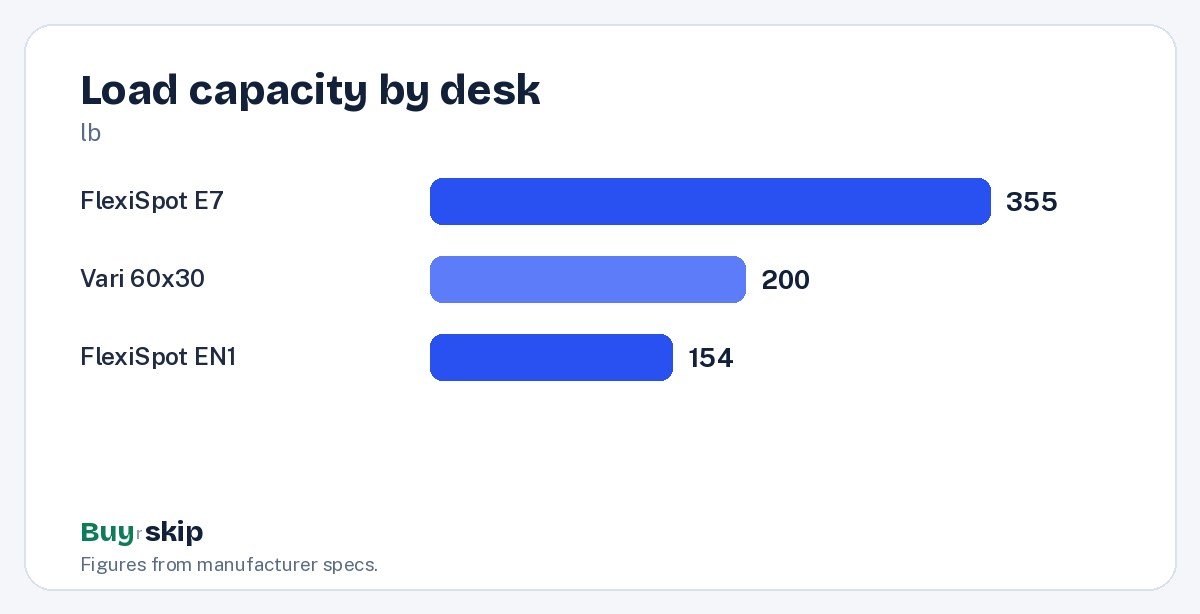
Add up everything that will sit on the desk: monitors, arms, a PC, speakers and the desktop itself. Then leave headroom, because a desk running near its limit tends to move more slowly and strain its motors. The E7 lists 355 lb, the Vari 60×30 lists 200 lb and the EN1 lists 154 lb. More capacity usually means a sturdier frame, even when you do not use all of it.
Desktop size and material
A 60 by 30-inch top comfortably fits two monitors and a keyboard. Smaller rooms may need 48 inches or less. Thin laminate tops are cheaper but less durable and less suited to clamp-on monitor arms. If you plan to add the Ergotron LX Desk Monitor Arm, choose a solid, thick top.
Assembly and support
Most electric desks take time to build and are heavy to move. If you live alone or hate assembly, Vari’s quick setup is worth paying for. Otherwise, plan for two people and an hour or more. A long warranty on the frame and motors is worth more than it looks, because motors and control boxes are the parts most likely to fail.
Match the budget to how you work
Standing desks fall into rough price tiers. Under about $250, you get single-motor frames like the FlexiSpot EN1 and the SHW desk, which suit laptops and trial runs. From about $400 to $600, dual-motor frames like the FlexiSpot E7 Pro add stability and load capacity. From about $550 and up, you are paying for build quality, warranty, easier assembly or configurability, as with Vari and UPLIFT. If you work at the desk all day, every day, the middle or top tier is usually worth it, because a frame that stays steady for years costs less per day than one you replace.
Finish the setup
The desk is only part of an ergonomic workstation. A monitor arm puts the screen at the right height in both positions, a light bar like the BenQ ScreenBar Halo helps evening work, and an anti-fatigue mat makes standing more comfortable on hard floors. A cable management tray keeps cords from snagging when the desk moves. When you sit, the chair matters as much as the desk; see our best office chairs list or our Herman Miller Aeron review.
Frequently asked questions
Is a dual-motor standing desk worth it?
For most people with more than a laptop on the desk, yes. Dual motors lift heavier loads and usually feel steadier at standing height, which is when wobble is most noticeable. If you only use a laptop and one light monitor, a single-motor desk like the FlexiSpot EN1 is a reasonable budget choice.
How tall should my standing desk go?
Set the desk so your elbows are bent at roughly 90 degrees with relaxed shoulders, both when sitting and standing. Measure your elbow height in your work shoes, then confirm the desk’s minimum and maximum heights cover both numbers. Taller users should look closely at the maximum height before buying.
Do I need a monitor arm with a standing desk?
Not always, but it helps. A monitor arm lets you set the screen at eye level independently of the desk height, frees up desktop space and makes small adjustments easy. If your monitor stand already sets the screen at the right height, you can skip it. If not, the Ergotron LX is a strong choice.
How long does standing desk assembly take?
It varies by model. Heavier dual-motor frames like the FlexiSpot E7 take longer and are easier with two people, while Vari designs its desks for quick assembly. Budget for an afternoon if this is your first desk, and keep the box until you know everything works.
Can a cheap standing desk last?
A budget desk can work well for light use, especially with a laptop. The trade-off is durability: thin laminate tops and single-motor frames tend to show wear and wobble sooner. If you plan to use the desk daily for years, spending more on a dual-motor frame with a long warranty is usually the better value.
How often should I switch between sitting and standing?
There is no single rule that suits everyone. Many people alternate several times a day rather than standing for hours at a stretch. Memory presets make switching quick, which helps you actually do it. If standing is uncomfortable, an anti-fatigue mat and supportive shoes help.
The bottom line
The UPLIFT V2 Standing Desk is the best standing desk for most home offices thanks to its stability, configurability and long warranty. If you want dual-motor stability for less, the FlexiSpot E7 Standing Desk is the value buy, and the FlexiSpot EN1 Electric Standing Desk is the budget choice for lighter setups.
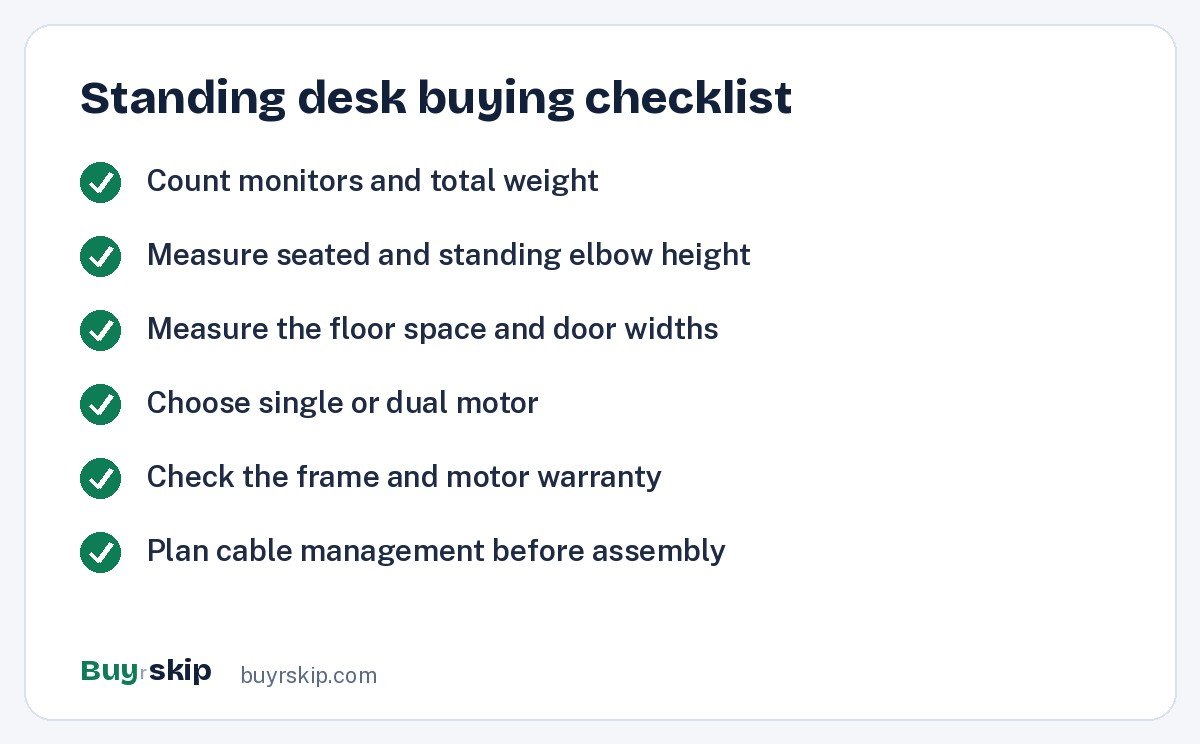
Whichever frame you choose, measure your elbow height and your room before ordering, and count the weight of everything that will sit on top. Add a monitor arm if your screen height is wrong and a light bar if you work late. Check current prices for your exact size and top before ordering.
Check price on Amazon: UPLIFT V2 Standing Desk
Paid link. Typical price about $600–$900; check the current price on Amazon.