We research products independently from specs, manufacturer documentation, warranty terms and owner feedback. When you buy through links on this page, we may earn a commission at no extra cost to you. As an Amazon Associate we earn from qualifying purchases.
Quick answer
The Dell UltraSharp U2723QE 27-inch 4K USB-C Hub Monitor is the best monitor for most home offices: sharp 4K text, an IPS Black panel with better contrast than typical IPS, and a single USB-C cable that charges your laptop and connects your keyboard, mouse and Ethernet. For gaming, the LG UltraGear 27GR95QE OLED pairs 240 Hz with perfect blacks. On a budget, the Dell S2722QC gives you 4K and 65W USB-C charging for about $279–$349.
The best monitors are not one list but three: screens for work, screens for games, and screens for people who want a huge canvas for both. A great office monitor puts sharp text and easy laptop docking first, while a great gaming monitor chases refresh rate and pixel response. Very few screens do both perfectly, so the right choice depends on what fills your screen for most of the day.
Our picks are based on specs, manufacturer documentation, warranty terms, independent review consensus and owner-feedback patterns.
Quick picks
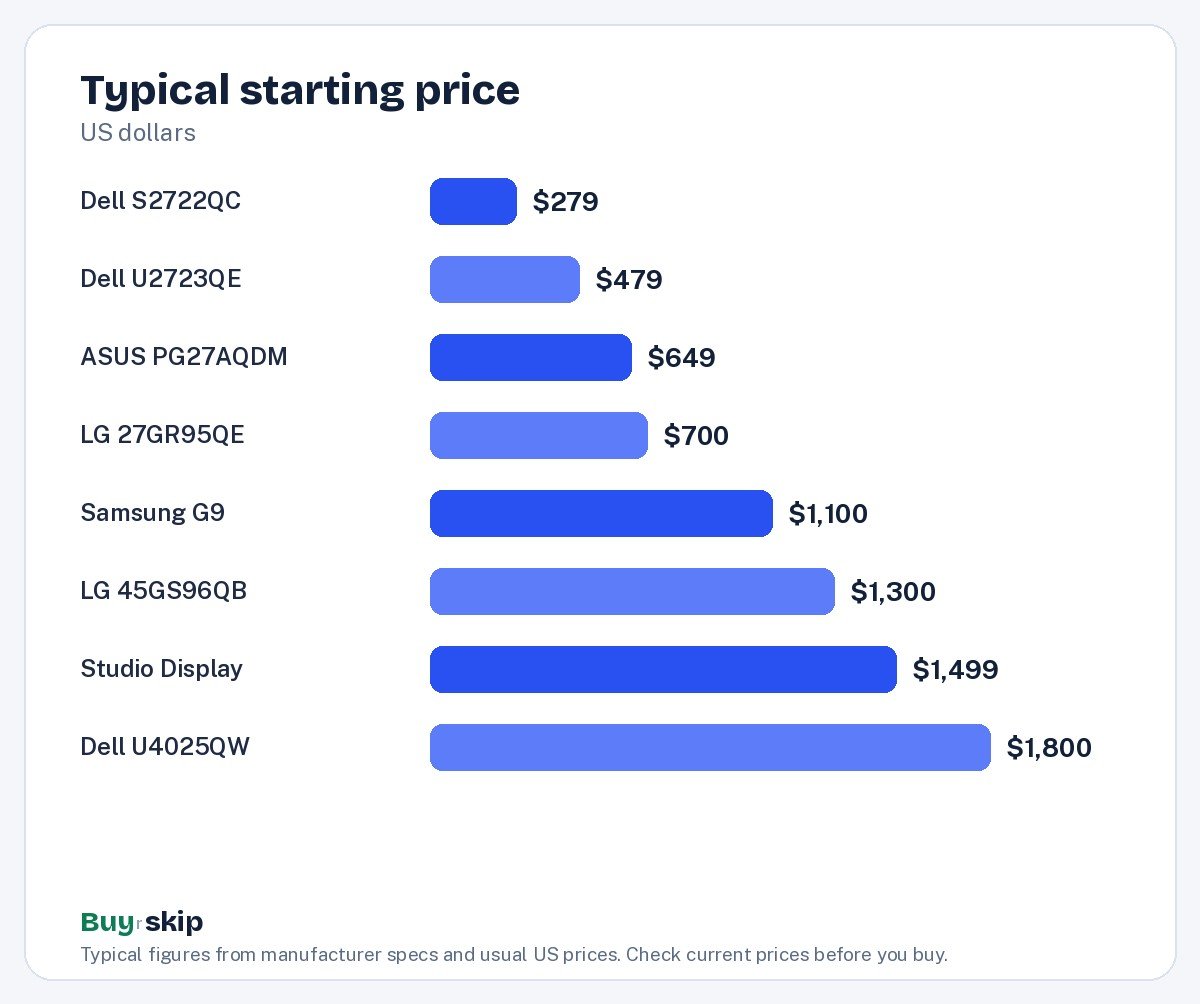
| Product | Best for | Our verdict | Typical price |
|---|---|---|---|
| Dell UltraSharp U2723QE 27-inch 4K USB-C Hub Monitor | Work-from-home setups | Buy | about $479–$649 |
| Dell UltraSharp U2723QE 27-inch 4K | Office and creative work | Buy | about $500–$650 |
| LG UltraGear 27GR95QE OLED | Competitive gaming | Buy | about $700–$900 |
| Dell UltraSharp U4025QW 40-Inch 5K2K Monitor | Multitasking work | Buy | about $1,800–$2,300 |
| ASUS ROG Swift PG27AQDM 27-inch OLED Gaming Monitor | PC and console gamers | Buy | about $649–$899 |
| Dell S2722QC 27-inch 4K UHD USB-C Monitor | Value 4K for laptops | Buy | about $279–$349 |
| Samsung Odyssey OLED G9 49-inch | Immersive gaming and multitasking | Consider | about $1,100–$1,500 |
| LG UltraGear 45GS96QB 45-Inch OLED | Immersive gaming | Consider | about $1,300–$1,800 |
| Apple Studio Display | Mac owners who want a perfect match | Consider | about $1,499–$1,599 |
Monitor prices swing a lot through the year, so check the current price before you buy.
The best monitors in 2026
Best overall Our verdict: Buy
Dell UltraSharp U2723QE 27-inch 4K USB-C Hub Monitor
Typical price: about $479–$649
Work-from-home setups. Buy it if you want one cable that charges your laptop, carries video and connects your keyboard, mouse and Ethernet.
- Pros
- ✓ Sharp 4K with deep IPS Black contrast
- ✓ 90W USB-C power delivery
- ✓ Built-in Ethernet and USB hub
- ✓ Fully adjustable stand
- Cons
- ✕ 60Hz only
- ✕ Pricey for a 60Hz screen
Check price on Amazon Paid link
The Dell UltraSharp U2723QE is the monitor we would put on most work-from-home desks. Its 27-inch, 3840 x 2160 panel makes text and spreadsheets crisp, and Dell’s IPS Black technology delivers deeper contrast than ordinary IPS screens, which helps with photos and dark-mode apps. The real selling point is the hub: one USB-C cable carries video, delivers up to 90W of power to your laptop, and connects the monitor’s built-in Ethernet and USB ports, so your keyboard, mouse and wired network all come along.
The stand is fully adjustable, so you can set the height and angle properly without a separate arm. It also works well with Macs, which lack many ports. The trade-off is refresh rate: it tops out at 60Hz, which is fine for office work but feels sluggish in fast games, and it is pricey for a 60Hz screen. If gaming is the priority, skip it for one of the OLEDs below.
Also great Our verdict: Buy
Dell UltraSharp U2723QE 27-inch 4K
Typical price: about $500–$650
Office and creative work. Buy it if you want a sharp, accurate monitor that docks your laptop with one cable.
- Pros
- ✓ Sharp 4K text
- ✓ Excellent USB-C hub
- ✓ Great contrast for an IPS panel
- Cons
- ✕ 60 Hz only
- ✕ Pricier than basic 4K monitors
Check price on Amazon Paid link
The Dell UltraSharp U2723QE 27-inch 4K is the same U2723QE model as our top pick, listed under a shorter name, so everything above applies: sharp 4K text, an excellent USB-C hub and strong contrast for an IPS panel. It is here so you can compare listings, not because it is a different monitor.
Typical pricing runs about $500–$650. Buy whichever U2723QE listing is cheaper on the day you shop, and confirm the model number U2723QE on the listing so you do not end up with an older or different UltraSharp. Like the top pick, it runs at 60 Hz, so competitive gamers should look elsewhere. For office and creative work where one-cable docking and accurate color matter, it is one of the safest buys in the category.
Best for gaming Our verdict: Buy
LG UltraGear 27GR95QE OLED
Typical price: about $700–$900
Competitive gaming. Buy it if you want extremely fast, vivid gaming at 1440p.
- Pros
- ✓ 240 Hz with near-instant response
- ✓ Perfect blacks
- ✓ Vivid HDR
- Cons
- ✕ Text not as sharp as IPS
- ✕ Matte finish lowers contrast in bright rooms
Check price on Amazon Paid link
The LG UltraGear 27GR95QE OLED is our gaming pick for people who want the fastest, most vivid picture at 1440p. Its 240 Hz OLED panel has near-instant pixel response, so motion looks clean in shooters and racing games, and because each pixel makes its own light, blacks are truly black. HDR games and movies look rich and punchy in a dark room.
There are trade-offs. Text is not as sharp as on an IPS screen, which shows up in long document sessions, and the matte finish lowers perceived contrast in bright rooms. OLED also carries some burn-in risk if you leave static windows, taskbars or spreadsheets up for hours every day. If your monitor is mainly a work tool with occasional gaming, the Dell U2723QE is the better daily screen. If games come first, this is the one.
Best premium Our verdict: Buy
Dell UltraSharp U4025QW 40-Inch 5K2K Monitor
Typical price: about $1,800–$2,300
Multitasking work. Buy it if you want a huge, sharp workspace that docks your laptop with one cable.
- Pros
- ✓ Very sharp ultrawide
- ✓ Thunderbolt hub
- ✓ 120 Hz
- Cons
- ✕ Large
- ✕ Expensive
Check price on Amazon Paid link
The Dell UltraSharp U4025QW is for people who live in many windows at once: video editors, developers, analysts and anyone who currently runs two monitors side by side. The 40-inch ultrawide panel has 5K2K resolution, so it stays very sharp despite its width, and it gives you room for a timeline, a preview and a chat window without stacking anything.
It docks a laptop through a Thunderbolt hub with one cable, and it runs at 120 Hz, which makes scrolling and cursor movement smoother than a typical 60 Hz office screen. The downsides are obvious: it is large, it needs a deep and wide desk, and at about $1,800–$2,300 it is expensive. It is not built for fast gaming. If you want most of the work benefits for far less, two 27-inch 4K screens or the U2723QE will do.
Also great Our verdict: Buy
ASUS ROG Swift PG27AQDM 27-inch OLED Gaming Monitor
Typical price: about $649–$899
PC and console gamers. Buy it if you play fast games and want the deep blacks and instant pixel response only OLED offers.
- Pros
- ✓ 240Hz refresh rate
- ✓ Near-instant pixel response
- ✓ Infinite contrast for HDR games and movies
- ✓ Custom heatsink helps manage OLED wear
- Cons
- ✕ Text looks slightly soft at 1440p
- ✕ Burn-in risk with static content
Check price on Amazon Paid link
The ASUS ROG Swift PG27AQDM is a close rival to the LG and a strong choice for PC and console gamers. It has a 26.5-inch, 2560 x 1440 OLED panel at 240Hz, with near-instant pixel response and the infinite contrast that makes HDR games and movies look so good. ASUS adds a custom heatsink designed to help manage OLED wear, which is a sensible extra for a panel type that is sensitive to heat and static images.
The trade-offs mirror the LG: text looks slightly soft at 1440p, and burn-in remains a risk with static content. Treat it and the LG UltraGear 27GR95QE OLED as alternatives and buy whichever is cheaper when you shop, since typical prices overlap. If you work in spreadsheets all day, an IPS screen like the Dell U2723QE is the better tool.
Best value Our verdict: Buy
Dell S2722QC 27-inch 4K UHD USB-C Monitor
Typical price: about $279–$349
Value 4K for laptops. Buy it if you want a sharp 4K screen and single-cable laptop charging without paying UltraSharp prices.
- Pros
- ✓ 4K sharpness for the price
- ✓ 65W USB-C charging
- ✓ Built-in speakers
- ✓ Height-adjustable stand
- Cons
- ✕ Average contrast
- ✕ Speakers are thin
Check price on Amazon Paid link
The Dell S2722QC is the budget answer for laptop owners who want a sharp 27-inch 4K screen and single-cable charging without paying UltraSharp prices. Its USB-C port delivers up to 65W, enough for many thin-and-light laptops, and the stand adjusts for height. It also has built-in speakers, handy for calls in a pinch.
What you give up: contrast is average, so blacks look grayer than on the IPS Black UltraSharp, the speakers are thin, and there is no Ethernet in the monitor. The stand is also less flexible than the U2723QE’s. For students, office work and streaming at about $279–$349, it is the best value here. If your laptop needs more than 65W, check its charger rating before you buy, or step up to the U2723QE with 90W.
Best for immersive gaming Our verdict: Consider
Samsung Odyssey OLED G9 49-inch
Typical price: about $1,100–$1,500
Immersive gaming and multitasking. Buy it if you want a dual-monitor sized screen without a gap, for sims or multitasking.
- Pros
- ✓ Huge immersive canvas
- ✓ OLED contrast
- ✓ Fast refresh
- Cons
- ✕ Needs a large desk
- ✕ Expensive
Check price on Amazon Paid link
The Samsung Odyssey OLED G9 49-inch is a super-ultrawide OLED that gives you a screen roughly the size of two monitors side by side, without the bezel gap in the middle. That makes it great for racing and flight sims, where the extra width fills your peripheral vision, and for multitaskers who want several windows open at once. You get OLED contrast and a fast refresh rate.
The main constraint is space. It needs a big desk; if yours is under about 120 cm (roughly 47 inches) wide, skip it. It is also expensive at about $1,100–$1,500. If you mainly want fast competitive gaming, a 27-inch OLED like the LG UltraGear 27GR95QE OLED is cheaper and easier to place. If you mainly want a giant work canvas, the sharper Dell U4025QW is better for text.
Also great Our verdict: Consider
LG UltraGear 45GS96QB 45-Inch OLED
Typical price: about $1,300–$1,800
Immersive gaming. Buy it if you want an immersive, fast curved OLED for gaming.
- Pros
- ✓ Immersive curve
- ✓ 240 Hz OLED
- ✓ Perfect blacks
- Cons
- ✕ Lower pixel density
- ✕ Strong curve
Check price on Amazon Paid link
The LG UltraGear 45GS96QB 45-Inch OLED is a big, strongly curved 240 Hz OLED aimed squarely at immersive gaming. The curve wraps the image around you, the refresh rate keeps motion smooth, and OLED delivers perfect blacks for dark scenes. For single-player adventures and sims, it is a dramatic upgrade over a flat 27-inch screen.
The trade-offs are pixel density and the curve itself. Spread over 45 inches, its pixels are less dense than a 27-inch 1440p or 4K screen, so small text looks less crisp, and the strong curve can feel odd for documents and design work. If you read lots of small text, skip it. If you want the immersion and have the space, it is a worthy alternative to the Samsung G9.
Choosing between the two big OLEDs comes down to shape. The Samsung is wider and works more like two screens joined together, which suits sims and side-by-side windows. The LG is taller for its width and feels closer to a very large curved gaming display. Both cost well over $1,000, so pick the one whose shape matches how you play, then check current prices, since these big screens see frequent price swings.
Best for Mac Our verdict: Consider
Apple Studio Display
Typical price: about $1,499–$1,599
Mac owners who want a perfect match. Buy it if you use a Mac all day and want the sharpest 27-inch screen, great speakers and a webcam in one clean package.
- Pros
- ✓ 5K resolution makes Mac text razor-sharp
- ✓ Excellent six-speaker sound
- ✓ Built-in 12MP camera and mics
- ✓ Premium aluminum build
- Cons
- ✕ Expensive
- ✕ 60Hz only
- ✕ Height-adjustable stand costs extra
Check price on Amazon Paid link
The Apple Studio Display is the monitor for Mac owners who want everything to match and just work. Its 27-inch, 5120 x 2880 5K panel makes macOS text razor-sharp, it reaches 600 nits of brightness, and the six-speaker system is excellent for a monitor. A built-in 12MP camera and mics make it a clean video-call setup, and the aluminum build feels premium.
It is a narrow pick, though. It runs at 60Hz, it is expensive at about $1,499–$1,599, and the base stand only tilts; a height-adjustable stand costs extra. Skip it if you use Windows, play games or watch your budget. Many Mac users will be just as happy with the Dell U2723QE, which also docks a MacBook with one cable for far less.
How to choose monitors
Decide whether this is a work screen or a game screen
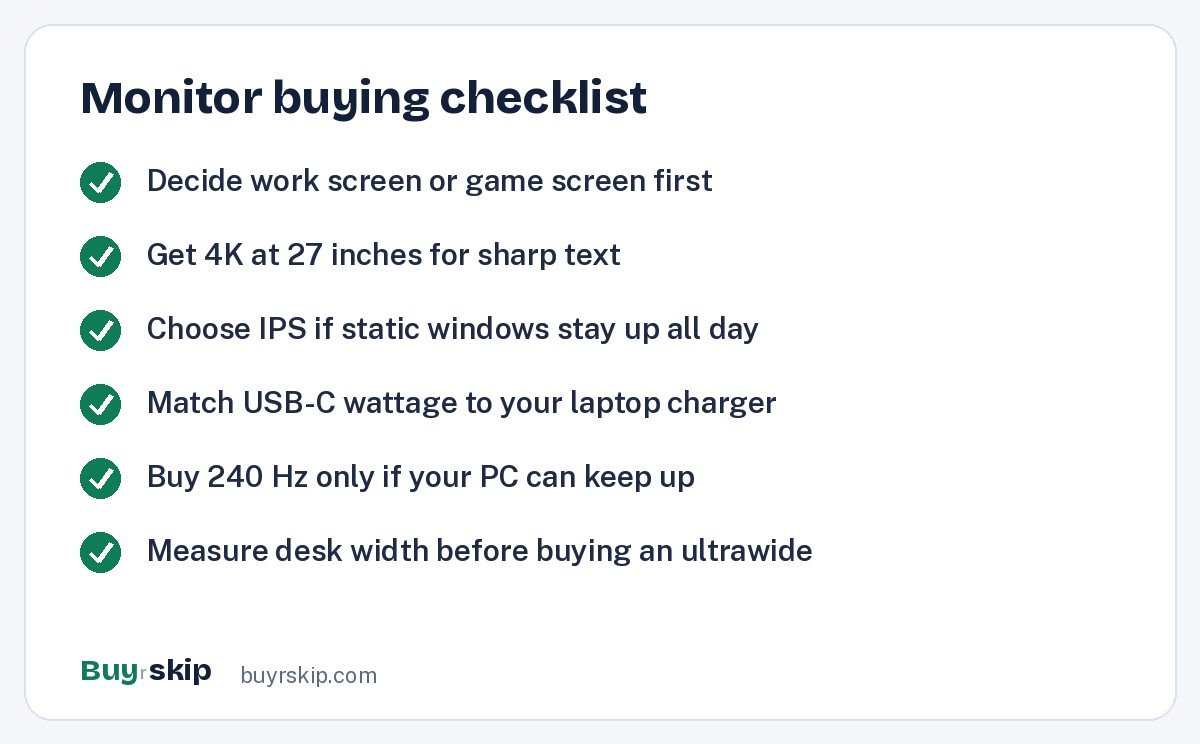
This one decision narrows the list fast. Work monitors prioritize sharp text, accurate color and laptop docking; refresh rate barely matters for email and spreadsheets. Gaming monitors prioritize refresh rate and pixel response. If you spend eight hours a day in documents, buy an IPS screen like the Dell U2723QE. If you spend your evenings in fast games, buy an OLED like the LG UltraGear 27GR95QE OLED or ASUS PG27AQDM.
Resolution and size: aim for sharp text
At 27 inches, 4K gives noticeably crisper text than 1440p, which is why the Dell office picks use it. The Apple Studio Display goes further with 5K, which suits macOS scaling especially well. Gaming OLEDs here use 1440p at 27 inches because it lets graphics cards hit high frame rates, at the cost of slightly softer text. Bigger screens need more pixels to stay sharp, which is why the 40-inch Dell uses 5K2K while the 45-inch LG looks softer up close.
OLED vs IPS
OLED gives perfect blacks, near-instant response and vivid HDR, which is wonderful for games and movies. Its weaknesses are burn-in risk with static content and text that can look slightly fringed. IPS panels are immune to burn-in and render text cleanly, and Dell’s IPS Black improves their contrast. A simple rule: if your screen shows the same taskbar and windows for hours every day, choose IPS. If it mainly shows moving pictures, OLED is worth it.
USB-C and Thunderbolt for laptops
For laptop users, a single cable that carries video, power and peripherals is the best upgrade you can buy. Check the wattage: the Dell S2722QC delivers 65W, the U2723QE 90W, and the U4025QW docks through Thunderbolt. Match it to your laptop’s charger, and use a USB-C cable rated for video and charging if you need a longer run than the one in the box. Our list of the best laptops can help if you are upgrading both.
Refresh rate
60Hz is fine for office work. 120 Hz, like on the Dell U4025QW, makes scrolling smoother. 240 Hz matters for competitive gaming, where the LG UltraGear 27GR95QE OLED, the ASUS PG27AQDM and the LG UltraGear 45GS96QB 45-Inch OLED all deliver. Your graphics card or console has to keep up for higher refresh rates to help, so a 240 Hz screen is wasted on a machine that runs games at 60 frames per second.
Ergonomics and desk space
A good stand matters as much as the panel. The UltraSharp models have fully adjustable stands; the Apple Studio Display’s base stand only tilts. Ultrawides like the Samsung G9 need a wide, deep desk. If your stand falls short, a VESA monitor arm fixes height and frees up desk space. Pair a new screen with a proper chair and desk; see our picks for the best office chairs and best standing desks. Before buying any ultrawide, measure your desk width and depth with a tape measure and leave room for speakers and a keyboard.
Macs need a little extra thought
Macs handle scaling best on high-density screens, which is why 27-inch 4K and 5K monitors look so much cleaner on macOS than 1440p panels do. The Apple Studio Display is the purest match with 5K resolution, but a 4K USB-C screen like the Dell U2723QE is a strong, cheaper alternative and adds Ethernet and USB ports that MacBooks lack. Gaming OLEDs at 1440p work fine with a Mac, but text will look softer. If you mostly read and write on a Mac, favor 4K or 5K over refresh rate.
Set a budget tier first
Monitor prices cluster into clear tiers, and naming yours early prevents overspending:
- Under about $350: the Dell S2722QC is the pick, with 4K and 65W USB-C.
- About $480 to $650: the Dell U2723QE for work, or the ASUS PG27AQDM when it is near its low end for gaming.
- About $650 to $900: the 27-inch gaming OLEDs from LG and ASUS.
- Over $1,000: the Samsung G9, the LG 45-inch OLED, the Apple Studio Display and the Dell U4025QW, each for a specific need.
Spending more past the first two tiers mostly buys speed, size or polish, not better everyday office use.
Consoles have different needs
If the monitor is mainly for a PlayStation or Xbox, check what the console actually outputs. Current consoles can run some games above 60 frames per second, so a high-refresh screen helps, but they do not take full advantage of 240 Hz. A 27-inch OLED still looks superb with a console, thanks to its contrast and response time. If you game from the couch, a TV usually makes more sense; see our best TVs list instead.
Frequently asked questions
What is the best monitor for working from home?
For most home offices, the Dell UltraSharp U2723QE is the best choice. Its 4K panel keeps text sharp, IPS Black improves contrast, and one USB-C cable charges your laptop at up to 90W while connecting Ethernet and USB accessories. If that is over budget, the Dell S2722QC gives you 4K and 65W charging for much less, with average contrast and a simpler stand.
Is OLED burn-in still a concern?
It is a risk, not a certainty. Burn-in happens when the same static image, such as a taskbar or spreadsheet grid, stays on screen for long periods over months. Gaming OLEDs like the ASUS PG27AQDM include features to manage wear, and mixed use lowers the risk. If your monitor will show static work apps most of the day, an IPS screen is the safer choice.
Is the Apple Studio Display worth it for a Mac?
It is worth it if you want the sharpest 27-inch Mac screen with great speakers and a built-in camera in one tidy package, and you do not mind 60Hz or paying extra for a height-adjustable stand. Many Mac owners are just as happy with a 4K USB-C monitor like the Dell U2723QE, which docks a MacBook with one cable for far less money.
Do I need 240Hz for gaming?
Only for fast, competitive games, and only if your PC or console can push high frame rates. At 240Hz, motion looks clearer and controls feel more responsive in shooters and racing games. For slower single-player games, a 120Hz or 144Hz screen is plenty. For office work, 60Hz is fine, which is why the Dell UltraSharp office models skip high refresh rates.
Ultrawide or two monitors?
An ultrawide like the Dell U4025QW or Samsung Odyssey OLED G9 gives you one seamless canvas with no bezel in the middle, which is great for timelines, sims and many windows. Two separate monitors are cheaper and easier to position, and you can mix a work screen with a gaming screen. If budget matters, two 27-inch screens usually cost less.
Can I use a USB-C monitor with a Windows laptop?
Yes, as long as your laptop’s USB-C port supports video output, often labeled DisplayPort Alt Mode or Thunderbolt. Many recent Windows laptops do. Check your laptop’s specs or look for a small DisplayPort or lightning bolt icon next to the port. Also compare the monitor’s charging wattage with your laptop charger so it can stay powered from the single cable.
The bottom line
For most people, the Dell UltraSharp U2723QE 27-inch 4K USB-C Hub Monitor is the best monitor: sharp, accurate and the easiest way to turn a laptop into a full desk setup with one cable. Gamers should pick the LG UltraGear 27GR95QE OLED or the ASUS PG27AQDM, whichever is cheaper, and budget shoppers should get the Dell S2722QC.
Whichever you choose, set the monitor up properly: raise the top edge to roughly eye level, sit about an arm’s length away, and set your computer to the monitor’s native resolution and refresh rate. Spend on an ultrawide or the Apple Studio Display only when you know you need the extra space or the Mac-specific polish.
Check price on Amazon: Dell UltraSharp U2723QE 27-inch 4K USB-C Hub Monitor
Paid link. Typical price about $479–$649; check the current price on Amazon.