We research products independently from specs, manufacturer documentation, warranty terms and owner feedback. When you buy through links on this page, we may earn a commission at no extra cost to you. As an Amazon Associate we earn from qualifying purchases.
Quick answer
The best noise cancelling headphones setup takes about 20 minutes: charge to full, install the brand’s app, update the firmware before you pair a second device, then run the fit or calibration routine. After that, choose an ANC level you can wear for hours, turn on multipoint, pick the right codec for your phone, tune the EQ lightly and set a volume limit. Most “weak ANC” complaints trace back to a poor seal or skipped firmware, not a bad product.
These noise cancelling headphones setup tips are written for the first day with a new pair, whether that is a flagship like the Sony WH-1000XM6 or a budget pair like the Soundcore by Anker Space One. Our guidance is based on manufacturer documentation, published specs, independent review consensus and owner-feedback patterns. The steps below follow the order that avoids the most common headaches, so it is worth doing them in sequence rather than jumping to the EQ.
If you have not bought yet, start with our noise cancelling headphones buying guide to pick a pair, then come back here.
Before you start: what you need
Gather four things first:
- Your main phone or laptop, with its software up to date.
- The brand’s companion app. Sony uses Sound Connect, Bose uses the Bose app, Sennheiser uses Smart Control, Sonos uses the Sonos app, and Anker uses the Soundcore app. AirPods Max settings live inside your iPhone’s Bluetooth and Settings menus.
- A USB-C cable and wall charger. Firmware updates often refuse to start below a certain battery level.
- A quiet 20 minutes. Calibration routines work best when you are sitting still in a normal room.
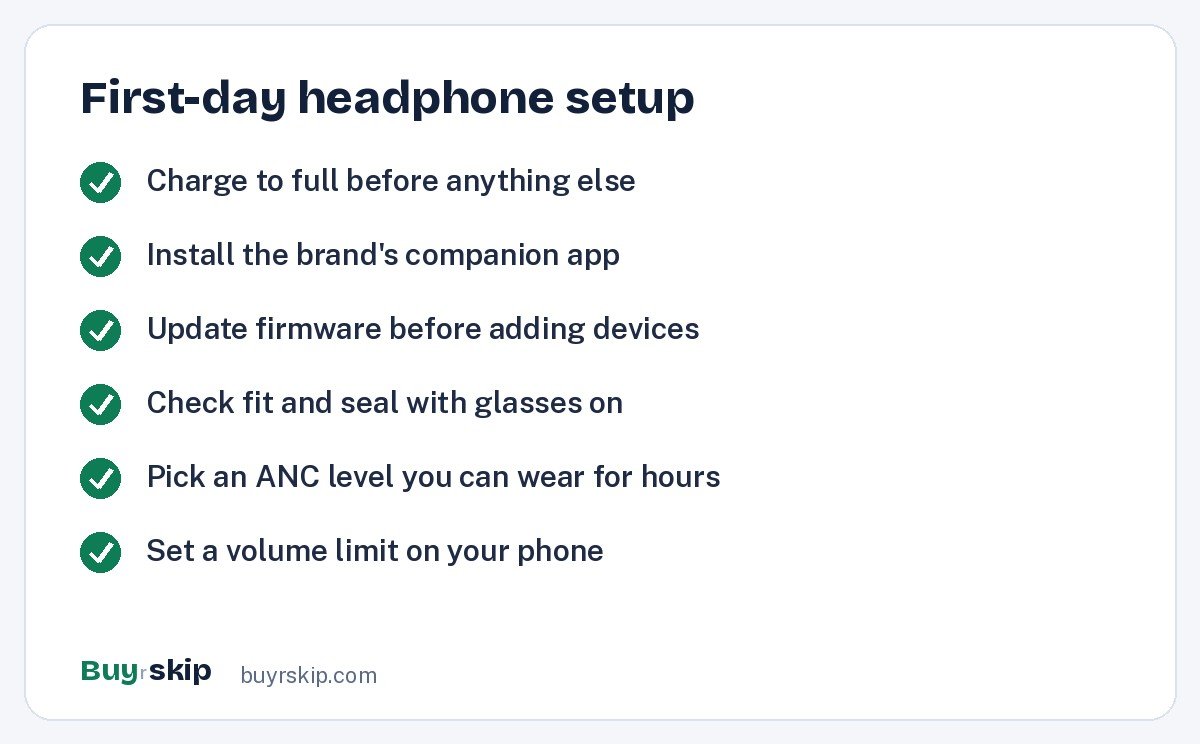
Noise cancelling headphones setup tips: the 15 steps
1. Charge to full
Plug the headphones in and let them reach 100 percent before you pair, so the firmware update in step 3 will not stall halfway. Any decent USB-C charger is fine.
2. Install the app and create the account
Download the official app, not a third-party “headphone booster” app. Registering the serial number is usually optional but can speed up a warranty claim later. Allow the Bluetooth and nearby-device permissions, since the app cannot find the headphones without them.
3. Update the firmware before anything else
This is the most skipped step. Headphones often ship with old firmware, and updates regularly fix connection bugs, improve calls and sometimes add features. Keep the headphones close to the phone, keep the app open and do not power them off during the update. If an update fails, charge to full, restart both devices and try again.
4. Pair with one device first
Pair your main phone through the app’s setup flow, not just the phone’s Bluetooth menu. The app flow usually registers the device correctly for multipoint, voice assistant and wear detection. Only after this first pairing works cleanly should you add a laptop or tablet.
5. Turn on multipoint and add your second device
Multipoint lets the headphones stay connected to two devices at once, so a call on your phone can interrupt a video on your laptop. On most current models it is a toggle in the app. Turn it on, then put the headphones in pairing mode again and connect the second device. Two common snags:
- Some models limit codec choice when multipoint is on. The app will usually tell you which one it is using.
- Apple’s AirPods Max do not use standard multipoint. They switch between Apple devices signed into the same Apple Account instead, which works well inside the Apple world and not at all with a Windows laptop.
6. Pick the right codec for your phone
The codec decides how audio is compressed over Bluetooth. iPhones use AAC, which is fine for every pair on this page. Many Android phones can use higher-bitrate codecs: LDAC on Sony headphones, and aptX or aptX Adaptive on models that support them, such as the Sennheiser Momentum 4 Wireless and the Bose QuietComfort Ultra Headphones (2nd Gen). On Sony, the app has a connection quality setting where you choose between sound quality and a stable connection. If you hear dropouts in busy places like train stations, switch to the stable option.
7. Get the fit and seal right
Noise cancelling depends on a seal around your ears. A loose fit leaks low-frequency sound, and that is exactly the kind of noise ANC is best at blocking. Adjust the headband so the cushions sit fully around your ears, not on them. Then check these:
- Glasses: thick temple arms break the seal. Thin wire frames help, and some people loosen the headband slightly so the cushions wrap around the arms.
- Hair and earrings: tuck long hair behind the ear pad and remove large earrings.
- Cushion orientation: most pads are thicker at the back. Check for left and right markings.
8. Run the fit or calibration routine
Many premium models measure your ear shape or the seal and tune the noise cancelling to match. Bose and Sony both include automatic optimization features, and the exact names vary by model. Run it while seated in a normal room, and run it again if you change glasses or hairstyle. If the app offers a hearing or sound personalization test, do it in a quiet room with the volume where the app tells you.
9. Choose an ANC level you can wear for hours
Maximum noise cancelling is not always the right choice. Some people feel a pressure sensation, a bit like being on a plane, when ANC is at full strength. If that is you, try a lower level or an adaptive mode, which adjusts to your surroundings. A good routine:
- Full ANC for flights, trains and loud open offices.
- A medium level or adaptive mode for home and quiet offices.
- Transparency or ambient mode for walking near traffic.
Remember what ANC does well: it reduces steady low-frequency sound like engines, HVAC hum and road rumble. It is less effective on voices, and sudden sounds like a dropped plate will still get through. That is normal, not a fault.
10. Set up transparency or ambient mode for safety
Transparency mode uses the outside microphones to let sound in. Set it up now so you know how to reach it with one press or a gesture. Many apps let you choose whether voices are boosted. Some Sony models also have a feature that pauses music when you start talking. It is handy for coffee orders, but it can trigger when you cough or sing along, so turn it off if it annoys you.
11. Tune the EQ lightly
Live with the default sound for a few days first. Then make small changes: a little bass cut if things sound boomy, or a small treble lift if voices sound dull. Big boosts tend to add distortion. Save a separate preset for podcasts if your app supports presets.
12. Configure wear detection, auto-off and controls
Wear detection pauses audio when you lift an ear cup and resumes when you put it back. Auto power-off saves the battery when you forget to switch off. Then customize controls:
- Decide what the custom button or long-press does: cycle ANC modes, call the voice assistant, or trigger a feature like Spotify Tap.
- On touch-panel models, practice swipes for volume and skipping tracks. If you trigger them by accident while adjusting the headband, see whether the app lets you lock or disable touch.
13. Decide on spatial audio
Bose calls its version Immersive Audio, Apple calls it Spatial Audio, and Sony offers its own spatial features on recent models. It can make movies feel wider, and head tracking keeps sound anchored to your screen. If it sounds hollow on music, leave it off for music and on for video.
14. Set up a wired backup
A wired connection is your backup when the battery runs flat on a long flight, and the only way to use some in-flight entertainment systems. Check which kind of wired audio your pair supports:
- 3.5 mm analog cable: common on Sony, Bose and Sennheiser. On many models it works even with the battery dead, though without ANC.
- USB-C audio: supported on models like the Apple AirPods Max (USB-C) and the Sonos Ace, and on some others. It needs the headphones to be powered.
Keep the cable in the case so it is there when you need it. If you fly often, add a two-prong airplane adapter for older seat jacks.
15. Set a volume limit
ANC lets you listen quieter because you are not fighting background noise, so take advantage of it. On iPhone, turn on Reduce Loud Audio in the headphone safety settings. Many Android phones, including Samsung models, have a media volume limiter. A common rule of thumb is to keep volume around 60 percent or less and take breaks during long sessions. If you need to raise volume to hear over noise, the seal or ANC level is usually the real problem.
Setup at a glance for popular models
Settings and features vary by model and firmware, so treat this as a starting point and confirm in your app.
| Model | App | Best codec on Android | Multipoint | Wired option |
|---|---|---|---|---|
| Sony WH-1000XM6 | Sony Sound Connect | LDAC | Yes | 3.5 mm cable |
| Bose QuietComfort Ultra Headphones (2nd Gen) | Bose app | aptX Adaptive (supported phones) | Yes | 3.5 mm cable, USB-C audio |
| Sennheiser Momentum 4 Wireless | Smart Control | aptX Adaptive | Yes | 3.5 mm cable |
| Sonos Ace | Sonos app | aptX Adaptive | Yes | USB-C audio |
| Apple AirPods Max (USB-C) | Built into iOS | AAC only | Apple device switching | USB-C audio |
| Soundcore by Anker Space One | Soundcore app | LDAC | Yes | 3.5 mm cable |
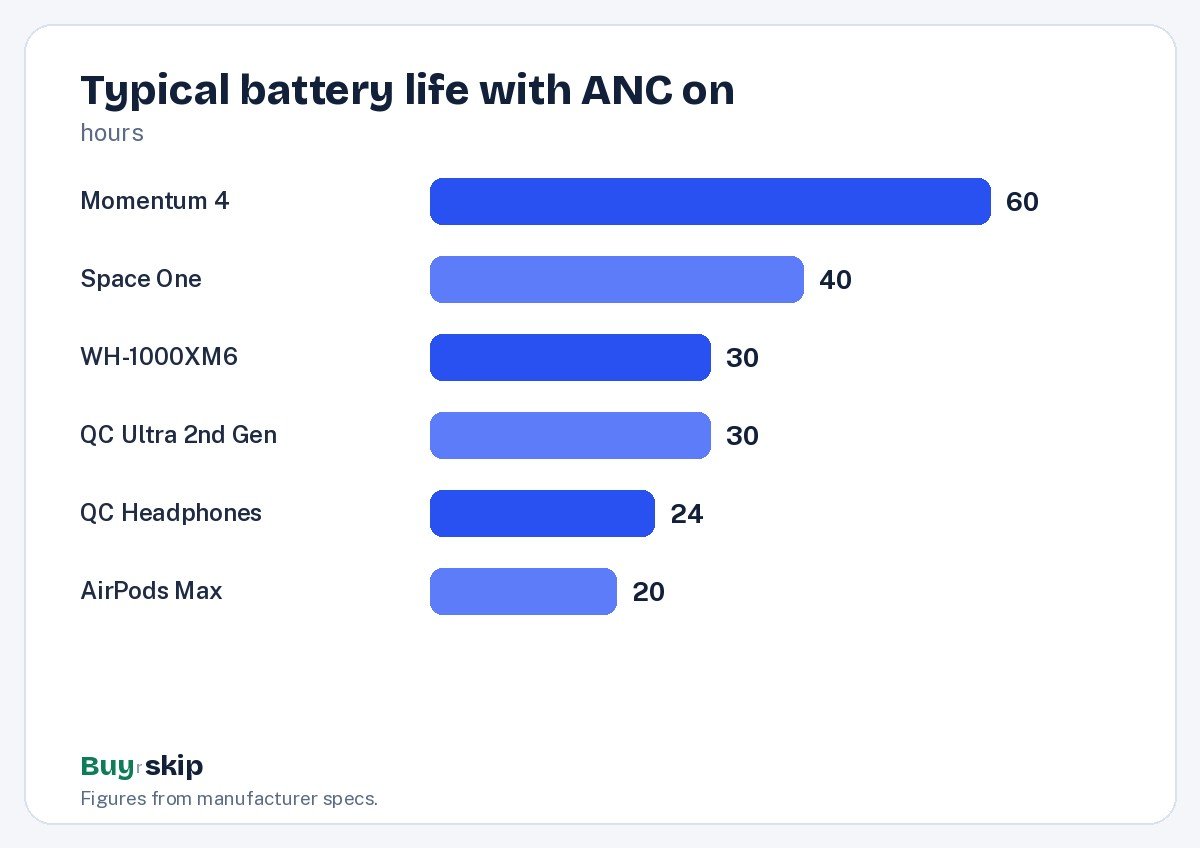
Battery life also shapes how you set things up. A pair with a long battery can stay on adaptive ANC all day, while a shorter-lived pair benefits from auto-off and lower ANC at home. Manufacturer figures, with ANC on, vary widely:
Picks that make setup easy
If you are still choosing, these are the models where the app, controls and features make the routine above straightforward.
Best overall Our verdict: Buy
Sony WH-1000XM6
Typical price: $399–$459
Anyone who wants class-leading noise cancelling and a deep app without fuss
- Pros
- ✓ Excellent ANC and call quality
- ✓ Folding design for travel
- ✓ LDAC for Android users
- Cons
- ✕ App has many menus to learn
- ✕ Speak-to-chat can trigger by accident
Check price on Amazon Paid link
Most comfortable Our verdict: Buy
Bose QuietComfort Ultra Headphones (2nd Gen)
Typical price: $379–$449
Frequent flyers who wear headphones for many hours at a time
- Pros
- ✓ Top-tier ANC with simple mode switching
- ✓ Very comfortable clamp
- ✓ USB-C and analog wired options
- Cons
- ✕ Premium price
- ✕ Immersive Audio is not for everyone
Check price on Amazon Paid link
Best battery life Our verdict: Buy
Sennheiser Momentum 4 Wireless
Typical price: $249–$379
People who hate charging and want rich sound with a detailed EQ
- Pros
- ✓ Around 60 hours of battery
- ✓ aptX Adaptive support
- ✓ Rich default tuning
- Cons
- ✕ Does not fold inward
- ✕ Touch controls take practice
Check price on Amazon Paid link
Best budget Our verdict: Buy
Soundcore by Anker Space One
Typical price: $69–$99
First-time buyers who want real ANC under $100
- Pros
- ✓ Strong ANC for the price
- ✓ LDAC support
- ✓ Long battery
- Cons
- ✕ Build feels less premium
- ✕ Calls are average
Check price on Amazon Paid link
For iPhone owners already deep in Apple’s world, the Apple AirPods Max (USB-C) has the simplest setup of all: hold it near an unlocked iPhone and tap Connect. It is heavy and expensive, though, so weigh comfort first. If you own a Sonos soundbar, the Sonos Ace can take over TV audio from the soundbar, which is a setup step no other pair offers.
Setup tips for headphones vs alternatives like earbuds
Earbuds need a different setup routine, and it is worth knowing the differences if you are comparing headphones against alternatives:
- Fit is about ear tips, not headbands. Try every included tip size and run the ear tip fit check if your app offers one. Most poor earbud ANC comes from tips that are too small.
- Battery is shorter per charge, so the charging case matters. Keep it topped up.
- Controls are tiny. Remap them early so you are not pausing music every time you adjust a bud.
The Apple AirPods Pro 3 are the easy choice for iPhone owners, and the Bose QuietComfort Ultra Earbuds (2nd Gen) are known for the strongest ANC among earbuds. For a fuller look at when buds make more sense than over-ears, read our guide to noise cancelling headphones pros, cons and alternatives.
Troubleshooting: is the problem the setup or the headphones?
Before you decide your new pair is not worth keeping, run through the usual suspects. Getting these setup tips right is often what makes noise cancelling headphones worth buying in the first place.
| Problem | Likely cause | Fix |
|---|---|---|
| ANC feels weak | Poor seal or old firmware | Reseat cushions, remove glasses, update firmware, rerun calibration |
| Audio drops in crowds | High-bitrate codec in a busy radio area | Switch to the stable connection setting or AAC |
| Wrong device plays audio | Multipoint priority | Pause on one device, or disconnect the unused one in the app |
| Pressure or mild headache | ANC strength | Lower the ANC level or use adaptive mode |
| Music pauses randomly | Wear detection or talk-to-pause | Adjust or disable those features in the app |
| Hiss in quiet rooms | Normal ANC noise floor on some models | Use a lower ANC level at home |
| Calls sound muffled to others | Mic blocked or wind | Turn on wind reduction, check the mic openings are clear |
If problems continue after a reset, contact the manufacturer while you are still inside the retailer’s return window, which is often much shorter than the warranty.
Care habits that keep the setup working
Good setup is wasted if the headphones wear out early. Store them in the case, wipe the cushions with a slightly damp cloth now and then, avoid hot cars, and do not leave the battery dead for months.
When cushions flatten, replacing them restores both comfort and seal. You can find replacement ear pads for most popular models, though official parts fit best. For more on which models hold up, see our guide to the most durable noise cancelling headphones. A hard shell headphone case is also worth it if yours came with a soft pouch.
New to all this? Our beginner's guide to noise cancelling headphones covers the basics in plain terms.
Frequently asked questions
Do I really need to install the headphone app?
You can use most headphones without the app, but you will miss firmware updates, ANC level control, multipoint settings and EQ. Firmware updates alone justify it, because they often fix connection bugs and improve calls. Once you are set up, you only need to open the app occasionally to check for updates or change a setting. AirPods Max are the exception, since their settings live inside iOS.
Why does my noise cancelling sound weaker than I expected?
The usual cause is a poor seal from glasses, hair or a headband set too loose, followed by outdated firmware. Also remember that ANC targets steady low-frequency noise like engines and air conditioning. Voices, keyboards and sudden sounds are harder to cancel on every model. Reseat the cushions, update the firmware, rerun any calibration, and then judge the result on a bus or plane rather than in a quiet office.
Should I use LDAC or aptX on Android?
Use the best codec your phone and headphones share if your connection is stable. LDAC and aptX Adaptive can carry more detail than AAC or SBC, though many listeners struggle to hear the difference outdoors. In crowded places, high-bitrate modes can drop out, so switch to the stable connection setting when that happens. On iPhone, AAC is used automatically and you do not need to change anything.
Is it safe to sleep in noise cancelling headphones?
Many people nap in them on flights, and ANC at a low or adaptive level helps with engine noise. Over-ears are bulky for side sleepers, and you may not hear alarms, so keep one alarm on a speaker. Keep the volume low or play nothing, and let auto-off save the battery if you drift off. Earbuds built for sleep are a better fit for nightly use.
How do I connect noise cancelling headphones to an airplane seat?
Use the 3.5 mm cable that came with your headphones, plus a two-prong airplane adapter if the seat has an older double jack. Many analog-cable models work with the battery dead, but ANC turns off. If your pair only supports USB-C audio, you will need a small USB-C to 3.5 mm adapter that supports audio and powered headphones. Pack both before you leave home.
How often should I update the firmware?
Check for updates once a month or whenever you notice a new bug. Most apps notify you, but only when you open them. Update while the headphones are charged and close to your phone, and do not interrupt the process. If an update introduces a problem, contact support before trying a factory reset, since some features need setup again afterward.
The bottom line
These noise cancelling headphones setup tips decide how good your pair sounds and how well it blocks noise. Charge, update the firmware, pair one device at a time, get the seal right and choose an ANC level you can live with. Most of the disappointment people report goes away after those steps.
If you are still shopping, the Sony WH-1000XM6 is the easiest all-round recommendation, with strong ANC, a folding design and an app that covers every step above. Check the current price before you buy, since it moves often.
Check price on Amazon: Sony WH-1000XM6
Paid link. Typical price $399–$459; check the current price on Amazon.