We research products independently from specs, manufacturer documentation, warranty terms and owner feedback. When you buy through links on this page, we may earn a commission at no extra cost to you. As an Amazon Associate we earn from qualifying purchases.
Quick answer
The Logitech MX Master 3S Wireless Performance Mouse is the best mouse for most people who work at a computer all day. It has a sculpted shape, a fast MagSpeed scroll wheel, quiet clicks and pairing with three devices. Gamers should get the ultralight Logitech G PRO X SUPERLIGHT 2 Lightspeed Wireless Gaming Mouse. If you just need a cheap spare for a laptop bag, the Logitech M185 Wireless Mouse costs less than lunch.
The best computer mice are the ones that fit your hand and your day. A mouse you use for eight hours of spreadsheets needs comfort and a great scroll wheel; a mouse for competitive shooters needs low weight and a fast sensor; a mouse for a laptop bag needs to be cheap and simple. This list covers all of those, plus a vertical option for sore wrists. Our picks are based on specs, manufacturer documentation, warranty terms, independent review consensus and owner-feedback patterns.
Quick picks
| Product | Best for | Our verdict | Typical price |
|---|---|---|---|
| Logitech MX Master 3S Wireless Performance Mouse | Productivity | Buy | about $89–$109 |
| Logitech MX Master 3S | Office and creative work | Buy | about $90–$100 |
| Logitech G PRO X SUPERLIGHT 2 Lightspeed Wireless Gaming Mouse | Competitive gaming | Buy | about $139–$159 |
| Razer DeathAdder V3 Pro | Competitive gaming | Buy | about $130–$160 |
| Logitech Lift Vertical Ergonomic Mouse | Wrist comfort | Buy | about $59–$79 |
| Logitech M185 Wireless Mouse | Spare or travel mouse | Consider | about $12–$19 |
| Apple Magic Mouse (USB-C) | Mac owners who love gestures | Skip | about $79–$99 |
Mouse prices change often, so check the current price before you buy.
The best computer mice in 2026
Best overall Our verdict: Buy
Logitech MX Master 3S Wireless Performance Mouse
Typical price: about $89–$109
Productivity. Buy it if you work long hours and want a comfortable, feature-packed mouse with a fast scroll wheel and side scrolling.
- Pros
- ✓ Sculpted, comfortable shape
- ✓ MagSpeed wheel flies through long documents
- ✓ Quiet clicks
- ✓ Pairs with three devices
- Cons
- ✕ Heavy for gaming
- ✕ Right-handed only
Check price on Amazon Paid link
If you spend your workday in documents, spreadsheets, design apps or a browser full of tabs, the MX Master 3S is the mouse to beat. The sculpted, right-handed shape supports your whole hand, with a thumb rest that keeps your grip relaxed. The MagSpeed scroll wheel is the standout feature: it can click line by line for precision, then spin freely to fly through a long document or spreadsheet. A separate thumb wheel handles side scrolling, which is a real time-saver on wide timelines and big sheets.
The clicks are quiet, which coworkers and family members will appreciate. It pairs with up to three devices and connects over Bluetooth or a Logi Bolt receiver, so you can switch between a work laptop, a home desktop and a tablet. Logitech rates the battery for up to 70 days on a charge, and the 8,000 DPI sensor tracks well on most surfaces, including glass.
The trade-offs: it is heavy for gaming and it is right-handed only. People with small hands sometimes find it too large. If that is you, consider the Logitech Lift Vertical Ergonomic Mouse, and if you play competitive shooters, buy a dedicated gaming mouse instead.
Also great Our verdict: Buy
Logitech MX Master 3S
Typical price: about $90–$100
Office and creative work. Buy it if you work long hours and want a comfortable, feature-rich mouse.
- Pros
- ✓ Very comfortable shape
- ✓ Fast MagSpeed scroll wheel
- ✓ Quiet clicks
- ✓ Switches between 3 devices
- Cons
- ✕ Right-handed only
- ✕ Heavy for gaming
Check price on Amazon Paid link
This is the same Logitech MX Master 3S, sold under a shorter product listing. It has the same comfortable shape, fast MagSpeed scroll wheel, quiet clicks and three-device switching as our top pick, and owners report the same strengths and weaknesses. We list it separately because retailers often show the two listings at slightly different prices.
The practical advice is simple: compare both listings and buy whichever is cheaper on the day you shop, making sure it is the 3S and the color you want. It suits the same people: anyone who works long hours, juggles multiple computers or does creative work where precise scrolling helps.
The same caveats apply. It is right-handed only, so left-handed users should look at the left-handed version of the Logitech Lift Vertical Ergonomic Mouse. It is also heavy for fast gaming. Gamers will be much happier with the Logitech G PRO X SUPERLIGHT 2 Lightspeed Wireless Gaming Mouse or the Razer DeathAdder V3 Pro.
Best for gaming Our verdict: Buy
Logitech G PRO X SUPERLIGHT 2 Lightspeed Wireless Gaming Mouse
Typical price: about $139–$159
Competitive gaming. Buy it if you play competitive shooters and want a very light, very responsive wireless mouse.
- Pros
- ✓ About 2.1 oz
- ✓ Lag-free Lightspeed wireless
- ✓ Long battery life
- ✓ USB-C charging
- Cons
- ✕ Few buttons
- ✕ Pricey
Check price on Amazon Paid link
The PRO X SUPERLIGHT 2 is built for competitive shooters, where every gram and millisecond matters. At about 60 g (2.1 oz), it is far lighter than a productivity mouse, so fast flicks and quick corrections take less effort. Logitech’s Lightspeed wireless is designed to feel as responsive as a cable, and the HERO 2 sensor goes up to 44,000 DPI, far more than most players will ever use. Logitech rates the battery for up to 95 hours, and it charges over USB-C.
The simple, symmetrical shape works for a wide range of grip styles, which is one reason it is popular with players who switch between palm and claw grips. The trade-off is buttons. You get the essentials and two side buttons, not the extra controls MMO players or productivity users want. It is also pricey for a mouse with so few features.
If you play competitive FPS games on PC, this is an easy recommendation. If you want lots of programmable buttons, look elsewhere. If you want a shape that fills a right hand more fully, compare it with the Razer DeathAdder V3 Pro.
Also great Our verdict: Buy
Razer DeathAdder V3 Pro
Typical price: about $130–$160
Competitive gaming. Buy it if you play competitive shooters and want a light, precise mouse.
- Pros
- ✓ Very light
- ✓ Excellent sensor
- ✓ Long battery life
- Cons
- ✕ Few extra buttons
- ✕ Right-handed shape
Check price on Amazon Paid link
The DeathAdder V3 Pro is the other top choice for competitive gaming. It is very light, it has an excellent sensor, and it delivers long battery life, which puts it in the same class as the Logitech. The main difference is shape. The DeathAdder line is known for an ergonomic, right-handed body that fills the palm more than a symmetrical mouse does, and many players with medium to large hands find it more comfortable for long sessions.
Like the Logitech, it keeps buttons to a minimum. You get what a shooter needs and little else, so it is not the right mouse for MMOs or productivity shortcuts. Prices for the two gaming picks usually overlap, so choose by shape. If you prefer a symmetrical mouse for a claw or fingertip grip, get the Logitech G PRO X SUPERLIGHT 2 Lightspeed Wireless Gaming Mouse. If you want a mouse that hugs a right hand, the DeathAdder is a great pick.
Best for wrist comfort Our verdict: Buy
Logitech Lift Vertical Ergonomic Mouse
Typical price: about $59–$79
Wrist comfort. Buy it if you feel wrist or forearm strain with a regular mouse and have small to medium hands.
- Pros
- ✓ Handshake grip reduces forearm twist
- ✓ Quiet clicks
- ✓ Left-handed version available
- ✓ Long AA battery life
- Cons
- ✕ Takes a few days to adjust
- ✕ Too small for large hands
Check price on Amazon Paid link
The Lift holds your hand at a 57-degree angle, closer to a handshake than a palm-down grip. That reduces the forearm twist that a regular mouse requires, which is why many people with wrist or forearm discomfort find it easier to use through a workday. It has quiet clicks, connects over Bluetooth or a Logi Bolt receiver, and runs for a long time on a single AA battery. A left-handed version is available, which is rare in this category.
Expect an adjustment period. A vertical mouse uses different muscles, and most people need a few days before it feels natural for precise work. The Lift is also sized for small to medium hands. If you have large hands, it can feel cramped, and the Logitech MX Master 3S Wireless Performance Mouse may be the more comfortable choice.
A mouse is not a medical treatment. If you have persistent pain, see a doctor, and look at your whole setup: desk height, chair and keyboard position all matter. Our guide to the best standing desks is a good place to start.
Best budget Our verdict: Consider
Logitech M185 Wireless Mouse
Typical price: about $12–$19
Spare or travel mouse. Buy it if you need an inexpensive, no-fuss mouse for a laptop bag, a kid's computer or a spare desk.
- Pros
- ✓ Very cheap
- ✓ Plug-and-play USB receiver
- ✓ Battery lasts about a year
- Cons
- ✕ Small and basic
- ✕ Needs a USB-A port or adapter
- ✕ No Bluetooth
Check price on Amazon Paid link
The M185 is the mouse you buy for a laptop bag, a kid’s computer, a spare desk or a guest room. It is very cheap, it works the moment you plug in the tiny USB receiver, and Logitech rates the battery for up to 12 months. There is no software to install and nothing to configure.
It is small and basic, though. There is no Bluetooth, so you need a free USB-A port or an adapter, which many newer laptops lack. The compact shape is fine for short sessions but not designed for all-day comfort.
That is why it gets a Consider verdict. As a spare or travel mouse, it is excellent value. If you use a mouse for hours every day, spend more on a better-shaped model like the Logitech Lift Vertical Ergonomic Mouse or the Logitech MX Master 3S. Your hand will notice the difference.
Skip it Our verdict: Skip
Apple Magic Mouse (USB-C)
Typical price: about $79–$99
Mac owners who love gestures. Buy it if you use Mac swipe gestures constantly and only use the mouse for short sessions.
- Pros
- ✓ Smooth multi-touch gestures on Mac
- ✓ Slim, minimal design
- ✓ Long battery life
- Cons
- ✕ Uncomfortable flat shape for long use
- ✕ Charging port on the underside means it is unusable while charging
- ✕ Expensive next to better-shaped mice
Check price on Amazon Paid link
The Magic Mouse has one real strength: its multi-touch surface makes Mac swipe gestures smooth and natural. It is slim, minimal and has long battery life, and it looks great on a clean desk.
For most people, it is still a skip. The flat, low shape gives your hand little support, which makes long sessions uncomfortable. The USB-C version keeps the charging port on the underside, so you cannot use it while it charges. And it costs about as much as far better-shaped mice.
Mac users have good alternatives. The Logitech MX Master 3S Wireless Performance Mouse works with macOS, adds a superb scroll wheel and side scrolling, and is much more comfortable. If your wrist is the concern, the Logitech Lift Vertical Ergonomic Mouse costs less than the Magic Mouse. Buy the Magic Mouse only if you live on gestures and use a mouse for short bursts.
How to choose computer mice
Start with your main use
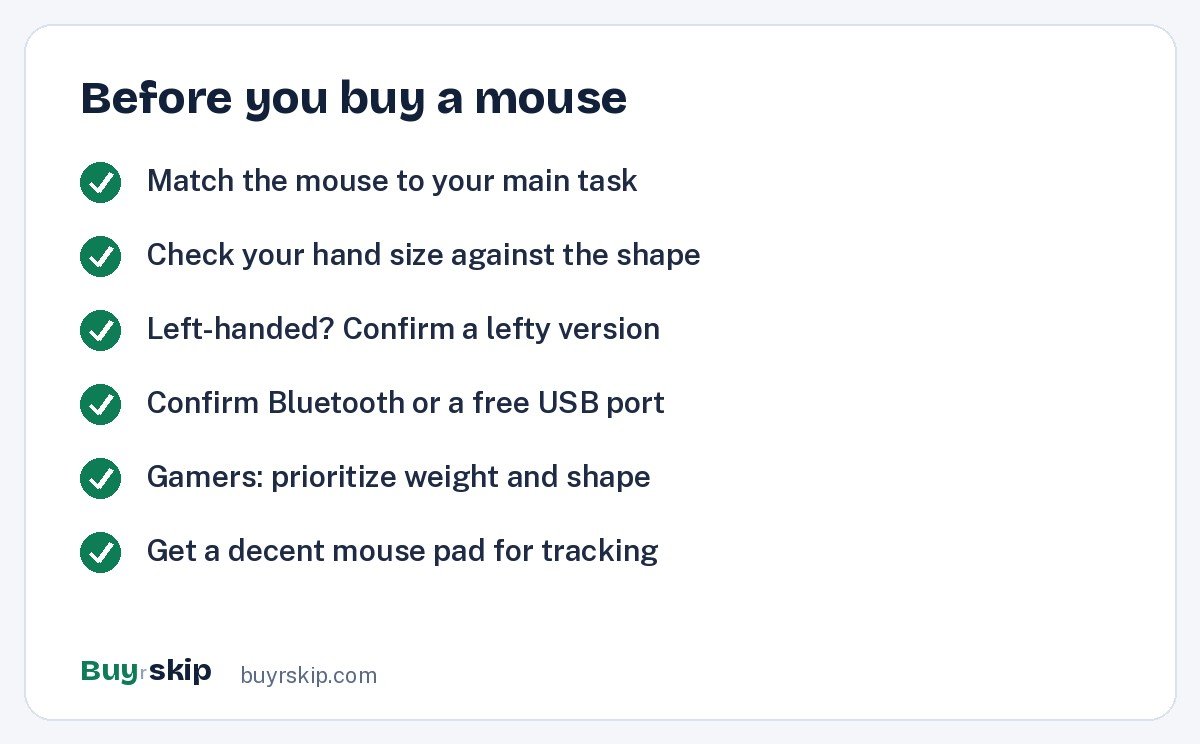
Most mice are tuned for one job. Decide which job matters most before comparing features.
- If you work long hours in documents and spreadsheets, buy the Logitech MX Master 3S Wireless Performance Mouse.
- If you play competitive shooters, buy the Logitech G PRO X SUPERLIGHT 2 Lightspeed Wireless Gaming Mouse or the Razer DeathAdder V3 Pro.
- If your wrist or forearm aches, try the Logitech Lift Vertical Ergonomic Mouse.
- If you just need a cheap backup, get the Logitech M185 Wireless Mouse.
Fit your hand size and grip
Shape matters more than any spec. Large, sculpted mice like the MX Master 3S suit medium and large hands with a palm grip. The Lift is sized for small and medium hands. Gaming mice vary: symmetrical shapes suit claw and fingertip grips, while ergonomic right-handed shapes like the DeathAdder suit palm grips. Left-handed users have fewer options; the Lift’s left-handed version is the standout here.
Weight and sensor
For gaming, weight is the spec that matters most after shape. A lighter mouse, like the 60 g SUPERLIGHT 2, takes less effort to start and stop. Sensor DPI numbers are mostly marketing beyond a point: every mouse here tracks accurately for normal use, and gamers rarely use the maximum DPI. For work, a heavier, more stable mouse is fine and can even feel more controlled.
Connection: Bluetooth, receiver or both
Bluetooth frees up ports and works with tablets, but a USB receiver is often more reliable and is required for the lowest gaming latency. The MX Master 3S and Lift support both Bluetooth and Logi Bolt. The M185 uses a USB-A receiver only. If your laptop has only USB-C ports, budget for a USB-C to USB-A adapter or choose a Bluetooth mouse.
Battery: rechargeable or AA
Rechargeable mice like the MX Master 3S and gaming picks charge over USB-C and go weeks or days between charges. The Lift and M185 run on AA batteries that last months. Neither approach is wrong; pick the one that fits how you work. Just avoid designs that cannot be used while charging. If you go with AA power, a set of rechargeable AA batteries keeps running costs and waste down.
Budget
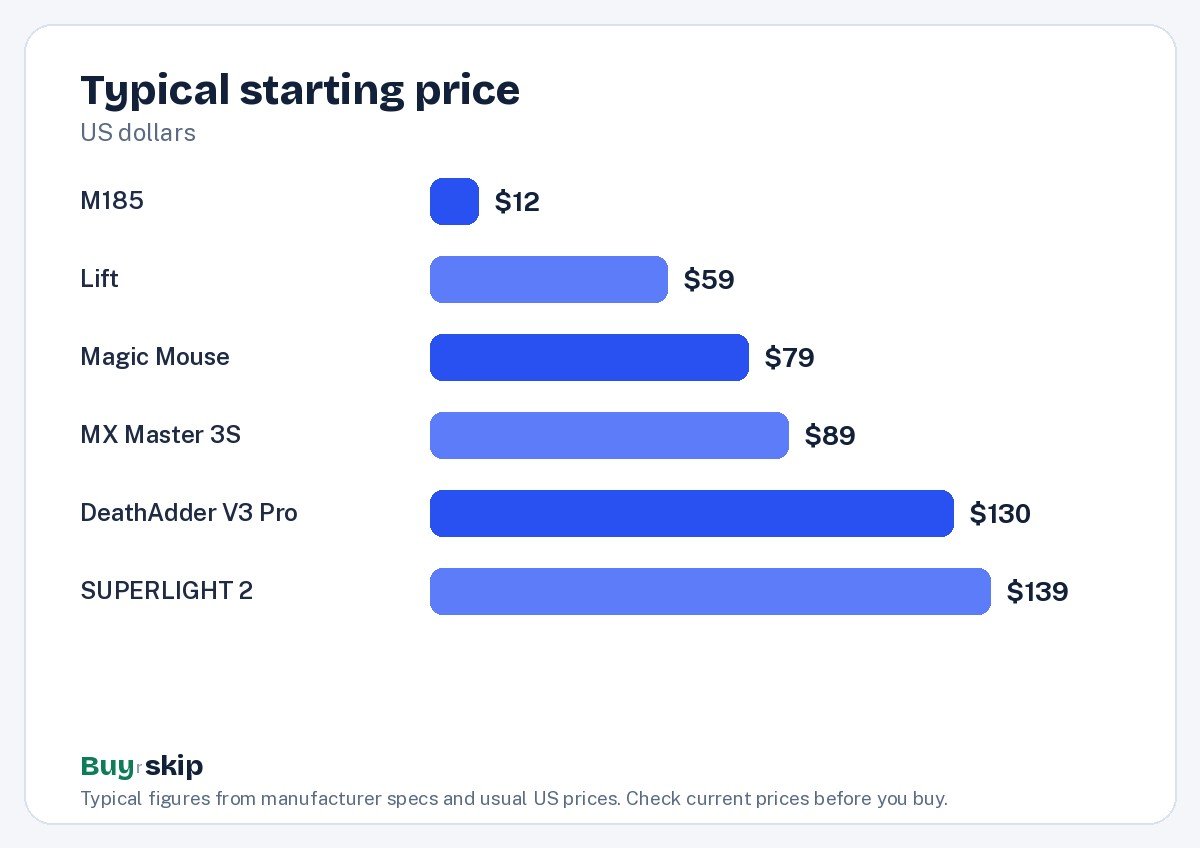
Mouse prices range from about $12 to about $160 on this list. The chart shows each pick’s typical starting price.
The jump from a basic mouse to a well-shaped one pays off quickly if you use a computer every day. A good large desk mat is a cheap upgrade that helps any mouse track smoothly and protects your desk. If you are rebuilding your whole desk setup, see our picks for the best keyboards and the best monitors.
Frequently asked questions
Are the MX Master 3S Wireless Performance Mouse and MX Master 3S different?
No. Based on the specs and features, both listings describe the same Logitech MX Master 3S, with the same shape, MagSpeed scroll wheel, quiet clicks and three-device pairing. Retailers sometimes list it under different names and prices. Compare both, confirm it is the 3S model in the color you want, and buy whichever is cheaper when you shop.
Is a vertical mouse better for wrist pain?
Many people with wrist or forearm strain find a vertical mouse like the Logitech Lift Vertical Ergonomic Mouse more comfortable, because the handshake grip reduces forearm twist. It is not guaranteed to help everyone, and it takes a few days to get used to. If pain persists, talk to a doctor and review your desk and chair setup too, since posture plays a large part.
Do I need a gaming mouse for casual games?
Not usually. Any accurate modern mouse works for casual and single-player games. A gaming mouse like the Razer DeathAdder V3 Pro earns its price in fast competitive shooters, where low weight and low latency help you aim. If you play mostly strategy, adventure or casual titles, the MX Master 3S or even a basic mouse will do.
Can I use the MX Master 3S with a Mac?
Yes. The MX Master 3S connects to Macs over Bluetooth or a Logi Bolt receiver, and Logitech’s software lets you customize its buttons and gestures. Many Mac owners prefer it to the Apple Magic Mouse (USB-C) because it is much more comfortable for long sessions and can be used while charging.
How long do wireless mouse batteries last?
It varies widely by design. Logitech rates the MX Master 3S for up to 70 days per charge, the PRO X SUPERLIGHT 2 for up to 95 hours, and the M185 for up to 12 months on its battery. Real-world life depends on how much you use the mouse and its settings, so treat these figures as upper limits.
Is a wired mouse still better than wireless?
For most people, no. Modern wireless gaming mice like the PRO X SUPERLIGHT 2 and the DeathAdder V3 Pro use dedicated receivers designed to feel as responsive as a cable, and many competitive players now use wireless. Wireless also means no cable drag and a cleaner desk. A wired mouse still makes sense if you never want to think about charging, or if you need the cheapest possible option for a fixed desktop.
The bottom line
For most people at a desk, the Logitech MX Master 3S Wireless Performance Mouse is the best mouse you can buy: comfortable, quiet, fast to scroll and happy to switch between computers. Gamers should pick between the Logitech G PRO X SUPERLIGHT 2 Lightspeed Wireless Gaming Mouse and the Razer DeathAdder V3 Pro based on shape, and anyone with wrist strain should try the Logitech Lift Vertical Ergonomic Mouse.
Keep the Logitech M185 Wireless Mouse in mind as a spare, and skip the Apple Magic Mouse (USB-C) unless gestures matter more to you than comfort.
Check price on Amazon: Logitech MX Master 3S Wireless Performance Mouse
Paid link. Typical price about $89–$109; check the current price on Amazon.